caichholzer
Participating Frequently
September 3, 2018
Answered

Automatic numbering in book not working

  • September 3, 2018
  • 4 replies
  • 3333 views

Hello everyone,

I have a created a book with many different documents inside. For the moment is still missing the document 3 and 4 not writing yet..
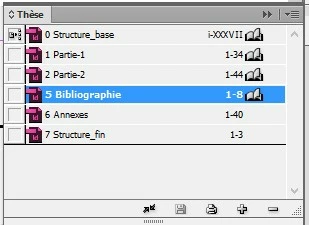
The first one (0 Structure) is in Roman numbers and all the others docs are in Arabic numbering (from 1 Partie to 7 Structure).
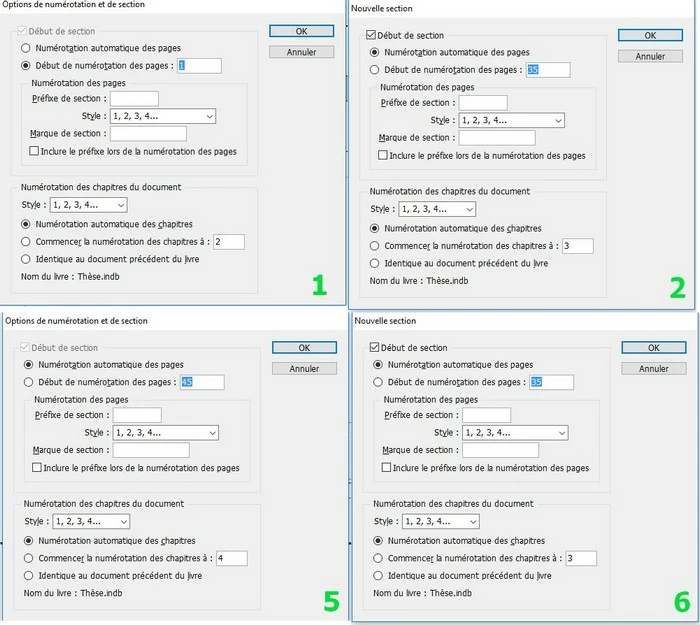

In the Arabic numbering documents, the first one is manually defined to start at 1. Then I wanted that all the others pages of the different following documents be automatic (because I may add new pages in the documents, and I’ll also add the missing documents soon). The automatic numbering is working for the document 2 which starts at 35 as supposed, but for the two next documents it should start at 79 (not 45) and 87 (not 9) and I don’t understand why ?

Thank you in advance for your help,

This topic has been closed for replies.
Correct answer vinny38

This is a very interesting puzzle...

I did quite a bit of head-scratching and I think I might have found the answer...

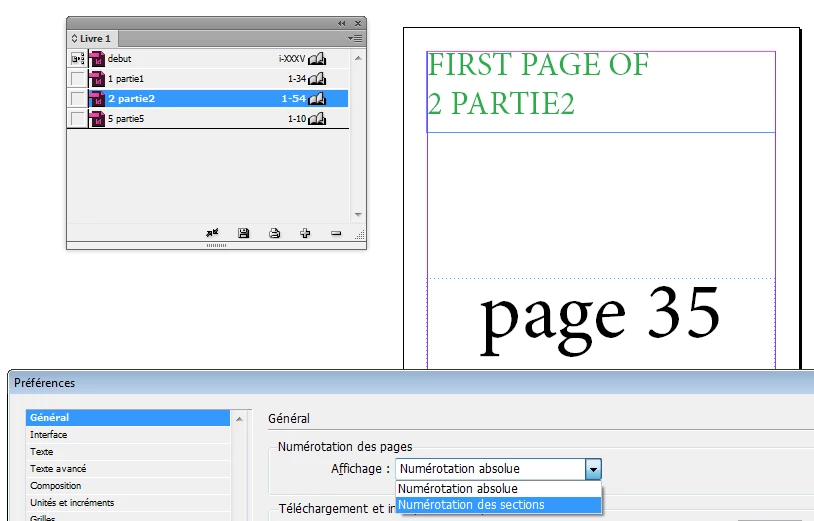
Open Preferences panel > General.

I bet that "Absolute numbering" is selected.

Change to "Sections numbering" and update all numbers in the Book panel.

ps: Not sure why this preference interferes with the Book panel numbers display though...

4 replies

vinny38
vinny38Correct answer
Brainiac
September 4, 2018

This is a very interesting puzzle...

I did quite a bit of head-scratching and I think I might have found the answer...

Open Preferences panel > General.

I bet that "Absolute numbering" is selected.

Change to "Sections numbering" and update all numbers in the Book panel.

ps: Not sure why this preference interferes with the Book panel numbers display though...

Brainiac
September 4, 2018

Hi Vinny,

brilliant idea!

Indeed. That makes the difference.

Absolute Numbering vs Section Numbering!

Where Section Numbering is needed to get the automatic numbering right with the book file.

Just tested this.

Best.
Uwe

Geоrge
Brainiac
September 3, 2018

Can you try to delete from book your three last indd. Save book, close InDesign, and try to add yours last indd again into the book with enabled autu-numbering in the settings of your book?

Remember, never say you can't do something in InDesign, it's always just a question of finding the right workaround to get the job done. © David Blatner
caichholzer
Participating Frequently
September 3, 2018

I tried that and it's not working, when I added the indd again it was still with the same number of pages (the wrong one). Is it possible that the document in itself 'set some data' ?
When I tried to create a new book, with the indd (copied in another folder) and setting the book with automatic numbering before adding the indd again, it gave me the same result as before ..

Brainiac
September 3, 2018

Hi,

be cautious what the active page is when you open the panel "Nouvelle  section" from the Page panel.

If you can see "Début de section" not grayed out you are on the wrong page. Always do that when you are on page 1 of the document.

What are your numbering options with the book file?

From my German InDesign where I have no issues with document numbering in a book:

You see that the option for automate page and section numbering is enabled.

Regards,
Uwe

caichholzer
Participating Frequently
September 3, 2018

The difference I see with you is that in your book the numbers are written : 1-34 and 35-78 but for me it's always 1-34 ; 1-44; 1-8. Which is weird because the 1-44 shows the right page numbering in the document (start at 35), and the others documents don't.

Brainiac
September 4, 2018

With the indb close, I opened all the indd and set the numbering at 1 for each. I closed again all the indd and created a new book. In this book I added all the indd and changed the numbering option with the automatic setting and it doesn't work. Because the last document with the automatic setting started at 45 and 9 as before. And I was on the first page when I choose the automatic numbering, and I verified that in each indd there was only one section.. So I really don't get what's wrong with the last indd. In the worst case I'll create new document and copy what was inside..


caichholzer  wrote

With the indb close, I opened all the indd and set the numbering at 1 for each.…

And you selected "Numérotation automatique des pages" after resetting the numbering?

Then I'm out of suggestions for now. ( Sigh.)

Regards,
Uwe

Adobe Expert
September 3, 2018

You need to set the book's page-numbering mode to 'Continue from the previous document'. Open the book's fly-out menu (click the four small horizontal rules at the top right of the panel and select 'Book page numbering options'.

caichholzer
Participating Frequently
September 3, 2018

In that section, I already have set 'Continue from the previous document' and 'Automatically update page and section numbers'. And it's not working though for the last documents..