
Automatic sub header styling script help
Hello
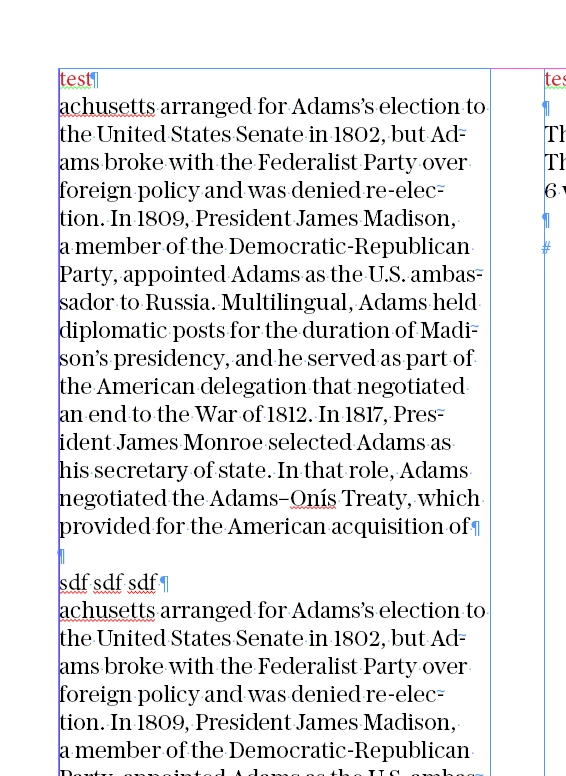
I have a script which is suppose to find subheads and change them applying text settings a user has predefined. For example a user writes at the very top of the text box 'test' applies all styles they want, then selects the text box, and when the script is run it will go through the text and apply the same text settings as the word 'test' to all subheaders.
The below I outline a working script which looks for the first instance of the word 'test', reads text settings, and applies it to other instances of text.
When I then experimented to change it so that it looks for the first instance of the word 'text. reads text settings, and applies those settings to subheaders I ran into issues.
In particutlar subheaders can be idenified as -
- has at least two hard enter returns or more (one for the termination of the paragraph above, one for a line space)
- then a string comprising of under 6 words (normally they are short so let's say 6 for now)
- this string must not have a full stop '.'
When I try to run the script which should be able to apply text stylings for subheaders it says it cannot find any... but there are
Okay here is the 1st working part which the scripts reads the word and applies those text settings to the same word
// Adobe InDesign ExtendScript

// Function to find "test" as a standalone word in selected text frame and apply its text settings to other paragraphs
function findAndApplyTextSettings() {
var doc = app.activeDocument;
var textFrame = app.selection[0]; // Get selected text frame

if (textFrame instanceof TextFrame) {
var paragraphs = textFrame.paragraphs;
var foundTest = false;
var testTextSettings;

// Define RegExp to match "test" as a standalone word
var testRegex = /\btest\b/i;

// First, find the paragraph containing standalone "test" and get its text settings
for (var i = 0; i < paragraphs.length; i++) {
var paragraph = paragraphs[i];

// Check if the paragraph contains standalone "test"
if (testRegex.test(paragraph.contents)) {
// Found standalone "test" in this paragraph, get text settings
var testWord = paragraph.words.itemByRange(0, paragraph.words.length-1).getElements()[0]; // Get first word "test"
testTextSettings = {
appliedFont: testWord.appliedFont,
pointSize: testWord.pointSize,
fillColor: testWord.fillColor,
justification: paragraph.justification // Get text alignment (justification)
// Add more text attributes as needed
};
foundTest = true;
break; // Exit loop once found
}
}

if (foundTest) {
// Apply "test" text settings to all text in the text frame within an undoable action
app.doScript(function() {
for (var j = 0; j < paragraphs.length; j++) {
var para = paragraphs[j];

// Apply text settings only if it's not the "test" paragraph itself
if (!testRegex.test(para.contents)) {
var words = para.words.everyItem().getElements();
for (var k = 0; k < words.length; k++) {
words[k].appliedFont = testTextSettings.appliedFont;
words[k].pointSize = testTextSettings.pointSize;
words[k].fillColor = testTextSettings.fillColor;
para.justification = testTextSettings.justification;
// Add more text attributes as needed
}
}
}
}, ScriptLanguage.JAVASCRIPT, [], UndoModes.ENTIRE_SCRIPT, "Apply 'test' Text Settings");

alert("Applied text settings (including alignment) from 'test' word to all other text in the selected text frame.");
} else {
alert("No standalone 'test' word found in the selected text frame.");
}
} else {
alert("Please select a text frame.");
}
}

// Run the function
findAndApplyTextSettings();
And here is the script which tries to find subheaders but doesnt work - it runs minus error but says there are no subheaders
// Adobe InDesign ExtendScript

// Function to find subheaders and apply text settings based on the first instance
function findAndApplySubheaderSettings() {
var doc = app.activeDocument;
var textFrame = app.selection[0]; // Get selected text frame

if (textFrame instanceof TextFrame) {
var paragraphs = textFrame.paragraphs;
var foundSubheader = false;
var subheaderTextSettings;

// Define criteria for identifying subheaders
var subheaderRegex = /^([^\r\n]+[\r\n]){2,}([^\r\n]{1,}\s){1,5}[^\.\r\n]+$/;

// First, find the paragraph containing a subheader and get its text settings
for (var i = 0; i < paragraphs.length; i++) {
var paragraph = paragraphs[i];

// Check if the paragraph matches the subheader criteria
if (subheaderRegex.test(paragraph.contents)) {
// Found subheader matching criteria, get text settings
subheaderTextSettings = {
appliedFont: paragraph.words[0].appliedFont,
pointSize: paragraph.words[0].pointSize,
fillColor: paragraph.words[0].fillColor,
justification: paragraph.justification
// Add more text attributes as needed
};
foundSubheader = true;
break; // Exit loop once found
}
}

if (foundSubheader) {
// Apply subheader text settings to all subheaders in the text frame within an undoable action
app.doScript(function() {
for (var j = 0; j < paragraphs.length; j++) {
var para = paragraphs[j];

// Apply text settings only if it matches the subheader criteria
if (subheaderRegex.test(para.contents)) {
var words = para.words.everyItem().getElements();
for (var k = 0; k < words.length; k++) {
words[k].appliedFont = subheaderTextSettings.appliedFont;
words[k].pointSize = subheaderTextSettings.pointSize;
words[k].fillColor = subheaderTextSettings.fillColor;
para.justification = subheaderTextSettings.justification;
// Add more text attributes as needed
}
}
}
}, ScriptLanguage.JAVASCRIPT, [], UndoModes.ENTIRE_SCRIPT, "Apply Subheader Text Settings");

alert("Applied text settings (including alignment) from the first subheader to all other subheaders in the selected text frame.");
} else {
alert("No subheader found in the selected text frame matching the criteria.");
}
} else {
alert("Please select a text frame.");
}
}

// Run the function
findAndApplySubheaderSettings();
Any ideas would be amazing.
Many regards,
Smyth
 AdChoices