
Automating a Product Style Catalog
I am creating a very simple table orientated product style catalog for work. Starting off with 250 products and growing up to 6K. I use photoshop mostly, and not very fluid with InDesign. I figured this would be dead simple to automate, but keep hitting barrier after barrier. I'll explain the problems I am having to see is there are any soltutions. I am using a parent page with header, footer and page count.
First off, data merge doesn't work with tables. Not sure why Adobe hasn't updated this. I found a script that I thought was going to bridge that gap, but I cannot get it to work. Found the script here:
https://www.youtube.com/watch?v=AD2NwzTAN7w&t=1s
Seemed to be cake and this is exactly what I am tryign to do, but maybe the newest update broke it. In fact, I get the same error referenced in this article:
After abandoning that, I thought of maybe doing two different merges, one table data and the other with thier respective images. Placing the table with the data worked just fine, even though the saved formating I used really didn't take. But, trying to place multiple images is giving mixed results. Reference:
https://www.youtube.com/watch?v=ylw6_6keG30&t=186s
Using data merge and create merge document, sometimes the "multiple records" is greyed out. When going through the process, it creates multiple pages, placing one image per page and also duplicating the data table. Very annoying and not sure where the problem is coming from.
In the meantime, I am going to manually create this catalog. But find it very disappointing that InDesign doesn't have built in automation to pull data and images from a table to create a simple formatted layout. On Win 11 Pro with newest version of InDesign 2024.
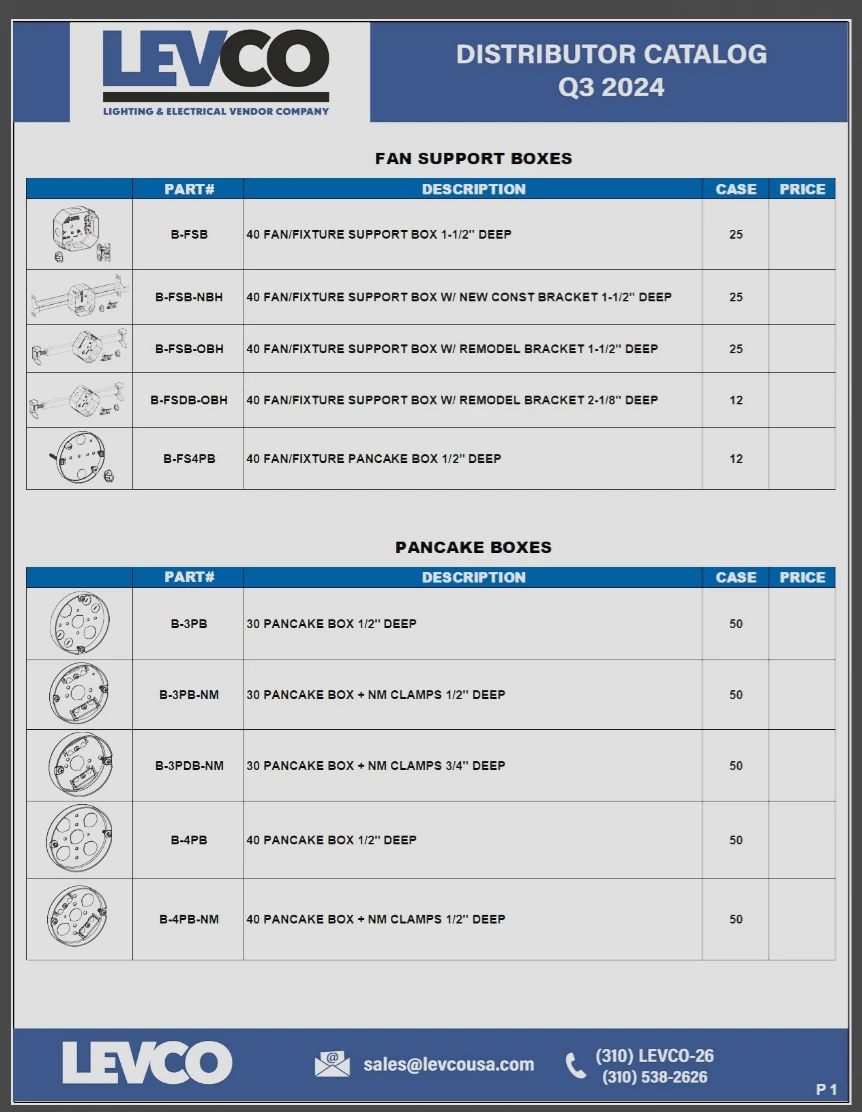
Any help is greatly appreciated. Here is an example image of what I am tryign to accomplish.
 AdChoices