
Participant
May 18, 2010
Answered

Background missing when exporting from indesign to pdf

  • May 18, 2010
  • 14 replies
  • 53747 views

Sometimes when I export a file  from indesign to pdf, my background doesn't show up. The background is  just a block of solid colour, or gradient. The background block of  colour is usually the full size of the page. I've tried to play around  to see what is causing this to happen and sometimes if I reduce the size  of the block to say, 1/3 of the page then the block of colour shows up,  but then when I make it the full size of the page as I actually need it  to be, the colour block doesn't show up when I export it to pdf (i've  tried all the different pdf presets and it doesn't make a difference)???  Does anyone know why and how to fix it?

thanks!
    This topic has been closed for replies.
    Correct answer BCNisly86

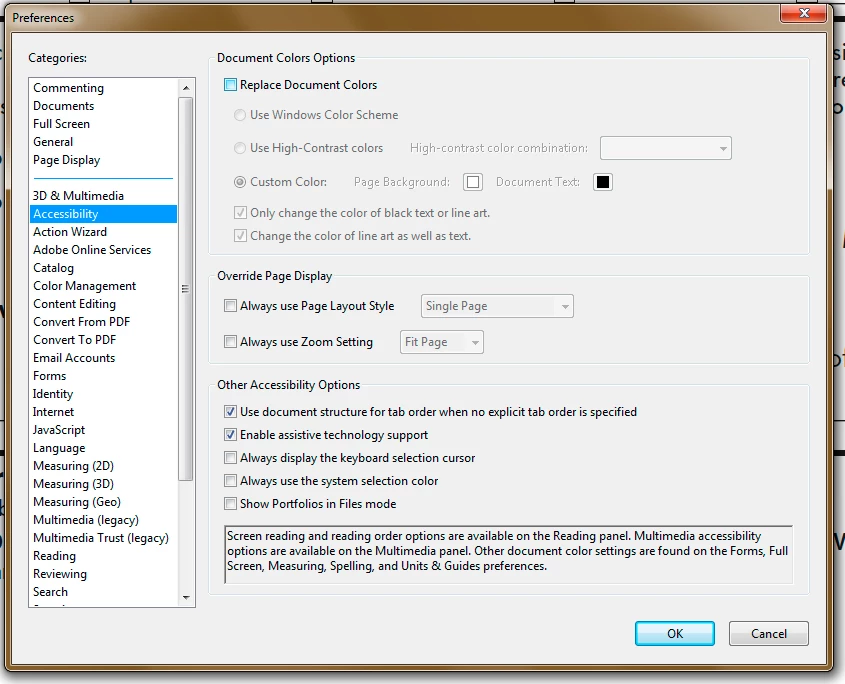
    Check your Acrobat preferences: Edit>Preferences, then click Accessibility and make sure "Replace Document Colors" is NOT checked.

    14 replies

    February 15, 2011

    I have been pulling my hair out on this problem as well.  I am using CS4 ID and Acrobat Pro 9.  I originally thought it was an ID EXPORT problem.  But now I think it is some DISPLAY problem in Acrobat. 

    I work for a magazine and we are constantly making ID files into PDFs and sending them to press.  This problem has shown up for me in the last few months.  I believe related to an update or some settings of Acrobat.  I have a coworker who is using the same software as me and DOES NOT have these issues when looking at the same files. 

    EXAMPLE:

    here is a tester ID file I made with a CMYK gray background and some text on top:

    http://ccie-media.s3.amazonaws.com/downloads/acrobat_problem/background_test.indd

    Here is the PDF  EXPORT SETTINGS:

    http://ccie-media.s3.amazonaws.com/downloads/acrobat_problem/export_summary.txt

    Here is the PDF that I made (that likely looks correct on your machine.  It looks correct on my coworker's macbook)

    http://ccie-media.s3.amazonaws.com/downloads/acrobat_problem/background_test.pdf

    Here is a JPEG of what I see on my screen (macbook pro circa 2008 running 10.6.3)

    http://ccie-media.s3.amazonaws.com/downloads/acrobat_problem/background_test.jpg

    Here is the OUTPUT dialog JPEG-  my Acrobat does not recognize any background color in any plates... even when I run the crosshairs over the background to get percentages of color... all 0%)

    http://ccie-media.s3.amazonaws.com/downloads/acrobat_problem/background_output.jpg

    When I print this PDF out on a printer-  the background is there.  When I send to other people the background is there.  I believe the PDF file is fine... but it is an ACROBAT display issue that I am missing...  like FAST WEB VIEWING or some weird thing like that.  Let me know if you have any insights

    Thanks

    Larry G. Schneider
    Community Expert
    Community Expert
    February 15, 2011

    In this checked in your Acrobat preferences. It is a user setting so you can't force it on anyone.

    Community Manager
    May 27, 2010

    If possible, can you provide us with the sample indd file where you are encountering this problem?

    jacq_vyrAuthor
    Participant
    May 27, 2010

    sure. i've run across this making a pdf from an illustrator file (using distiller) as well so I'm thinking maybe it's not an ID problem but an acrobat problem (i had originally posted this question on the acrobat forum)? as i said before, the background seems to be there when you print, but it just doesn't show up when you open the file on screen.

    p_taz
    Inspiring
    May 19, 2010

    I have seen this plenty of times in the past, I think up to CS4, definitely CS3.  When I had a very basic page with an overall coloured background made with a rectangle bleeding off all four sides, sometimes it would not appear at all in PDF.  I found that the program is not clear about which page the object belongs to and would assign it to a neighbouring page where it was actually out of sight to that page.

    As more items were added to the page, it was as though the item would interact somehow with those items and suddenly start appearing, so I would put hidden items behind the missing object and that seemed to help.

    I have a strong feeling that this stopped happening part way through CS4, so maybe there was an update that improved the behaviour, you could try updating or putting more things on the page.  Or start drawing the rectangle on the desired page and then drag edges to make the bleed to ensure that it is still attached to the appropriate page.

    jacq_vyrAuthor
    Participant
    May 19, 2010

    Hi,

    I've just noticed this.  When i open the pdf it seems like the background is missing. I tried splitting up the background in 2 rectangles of the same colour that overlap a bit and then it seems to work (sometimes - but it's inconsistent. ) so maybe p taz's suggestion that adding more items to the page somehow makes things appear.

    BUT I only now tried this! ... It seems that when i send it to print, the background is actually there. So I guess that's a relief. It just doesn't show up on screen in the pdf. The problem is  that if I send it to a client to review, he's going to open the file and see nothing.

    BTW, I don't get any error warnings, I've tried making the pdf with all the standard presets (e.g.high quality, pdf/x1a, press quality), I'm still using CS3, it doesn't show in overprint or preview mode.

    Peter Spier
    Community Expert
    Community Expert
    May 19, 2010

    jacq_vyr wrote:

    ... it doesn't show in overprint or preview mode.

    Are you saying that in ID it disappears in overprint or Preview mode, or that it still doesn't appear on screen in the PDF?

    If you don't see it in ID in those modes it means it's set not to print.

    Peter Spier
    Community Expert
    Community Expert
    May 19, 2010

    I see nobody has had any ideas yet. Maybe I can get the ball rolling.

    Do you get any error or warning messages during the export? What settings are you using? Have you tried any of the other presets?

    Is the background visible when you go to Preview mode or use Overprint Preview in ID?

    What version of ID are you using? Is it fully patched? What is your OS?