
Participating Frequently
March 7, 2019
Answered

Background printing dark gray, images on top printing black

  • March 7, 2019
  • 7 replies
  • 10230 views

I am fairly new to InDesign and I am creating a brochure for work.  I set the artboard to be 11 x 8.5, drew a rectangle to cover the board, and filled it with black.  I've since Placed multiple jpg images with a black background on the artboard.  Looks great on the screen, but when I print from InDesign or from the exported PDF the background of the images is darker than the background of the artboard. 

It looks like the top part of this image:
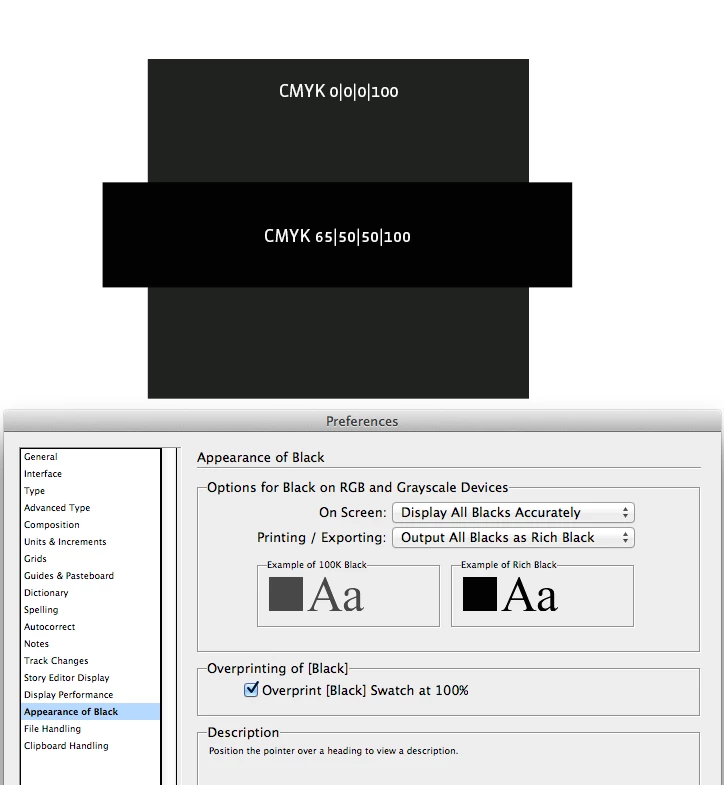
I want the blacks to be the same, the darker of the two.  I've tried multiple solutions such as in this link https://forums.adobe.com/message/6352416#6352416, but no luck.  It has something to do with the dpi of the background vs. the dpi of the placed images.  I don't want to change the image sizes, I want to change the background to be darker.

The sad thing is that this problem presented itself previously and we figured out the solution, but neither of us remembers.  Thank you for your time...
    This topic has been closed for replies.
    Correct answer rob day

    I’m getting all 0|0|0 RGB on the background and the image edges, so all I can think of is your print driver is handling vector and image pixels differently. There's no variance in the file color, so it has to be the driver and not the file itself.

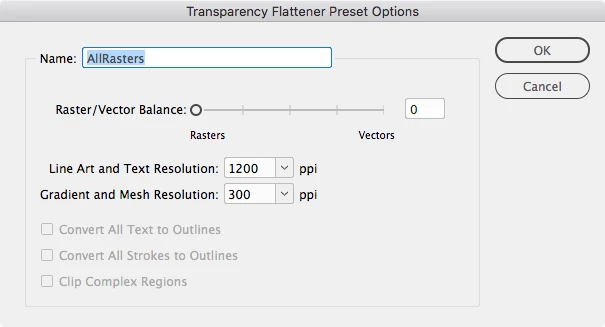
    You could test that by making a Flattener Preset that forces everything to rasters and use that in the Advanced tab. Something like this:

    7 replies

    Participating Frequently
    March 8, 2019

    Thank you rob day !  I can't tell you how much I appreciate your efforts.  Glad to finally have this resolved...

    rob day
    Community Expert
    Community Expert
    March 8, 2019

    If you have time try setting the background frame to 1|1|1 RGB and export with live transparency.

    I’m wondering if the driver interprets the 0|0|0 vector frame as absolute black and switches over to black only toner, which would have a different appearance. It may be doing that to prevent black text objects from printing with all 4 colors, which would give the text a bold appearance.

    Participating Frequently
    March 8, 2019

    I had time and it did not work.

    Participating Frequently
    March 8, 2019

    That's because I changed it back while trying other settings.  I know where those settings are and I changed them to match and still had the same results.  I can change it back and send it to you.

    rob day
    Community Expert
    rob dayCommunity ExpertCorrect answer
    Community Expert
    March 8, 2019

    I’m getting all 0|0|0 RGB on the background and the image edges, so all I can think of is your print driver is handling vector and image pixels differently. There's no variance in the file color, so it has to be the driver and not the file itself.

    You could test that by making a Flattener Preset that forces everything to rasters and use that in the Advanced tab. Something like this:

    Participating Frequently
    March 8, 2019

    What you sent worked, so am I to assume this was the solution?  And, since the images are raster, I'm guessing that the background is a vector graphic.  Is that right?

    Participating Frequently
    March 7, 2019

    I've discovered that exporting to a jpeg works fine.  No separation of colors...  For what it's worth.

    To recap:

    Printing directly from InDesign = dark gray and black

    Printing from a PDF = dark gray and black

    Printing from a jpg = black and black

    Viewing all from my screen = black and black

    Viewing from some other screens = dark gray and black

    Quite frustrating.

    rob day
    Community Expert
    Community Expert
    March 7, 2019

    I've discovered that exporting to a jpeg works fine.  No separation of colors...  For what it's worth.

    This is a composite printer and there is transparency on the page right? Sounds like the print driver isn't handling the transparency flattening correctly.

    If a flattened JPEG is working you could try the same with a PDF export. Set your Export Output tab to this. Acrobat 4 forces flattening on export, include the profile:

    Participating Frequently
    March 8, 2019

    Those are the settings I am already using except that my compatibility is with Acrobat 5 (PDF 1.4) and the Adobe PDF preset is High Quality Print modified.

    Participating Frequently
    March 7, 2019

    Headed to a presentation, but will check back in about an hour and a half.

    Dave Creamer of IDEAS
    Community Expert
    Community Expert
    March 7, 2019

    What are your PDF export settings?

    David Creamer: Community Expert (ACI and ACE 1995-2023)
    Participating Frequently
    March 7, 2019

    Which ones?  Also, since it prints the same way from InDesign, is that going to be the issue?

    Participating Frequently
    March 7, 2019

    Here's a really bad photo showing the difference in the background of the photo and the background color of the artboard.  The color picker shows both to be R 0 G 0 B0.  You can see that the text background is also darker.

    Dave Creamer of IDEAS
    Community Expert
    Community Expert
    March 7, 2019

    Are the JPEGs CMYK or RGB?

    David Creamer: Community Expert (ACI and ACE 1995-2023)
    Participating Frequently
    March 7, 2019

    RGB

    skiddydoodah
    Participating Frequently
    March 7, 2019

    Is the black in the jpegs the same as the InDesign swatch?

    If the jpegs all have the same background CMYK values as in your example, make an InDesign swatch of the same values - note this will be a CMYK print job not black and white / greyscale, if this job is only to print black then convert your jpegs to greyscale, measure the black background values and create an InDesign swatch to match.

    Another longer process, you could also put a path on the jpegs to isolate them from their backgrounds if they are easy enough to do and save as PSD's, reimport to InDesign and just use your InDesign black as background

    Participating Frequently
    March 7, 2019

    Same exact color, only using the illustration to show how the printing turns out.  The values just came along for the ride...

    Dave Creamer of IDEAS
    Community Expert
    Community Expert
    March 7, 2019

    Why not fill the rectangle in the background with the same color as the rich black?

    David Creamer: Community Expert (ACI and ACE 1995-2023)
    Participating Frequently
    March 7, 2019

    It is.  Both the same exact color.