


Baseline Shift Issues? Maybe?

Copy link to clipboard
Copied
I was having some issues with a font that has text showing outside of the text box. I did a search and found that someone else was having the same issues (Text outside of text box? ) and it was fixed by changing the baseline shift in the character palette back to zero. Delighted to see this I checked out my values in the character palette and it was already at zero. I can change the size of the text box but that also moves the position of the text. If I resize the text box and change the baseline shift value to -7.5 that seems to fix it, but that just doesn't seem right.... The issue is also fixed if I change the font (obviously I haven't checked all the fonts I own). Below is a screen of what I am talking about. all the text boxes are that size and I have highlighted some text to show the character settings. Thanks for any help!



 19
Replies
19
19
Replies
19


Copy link to clipboard
Copied
Show your Text Frame Options dialog box.
Copy link to clipboard
Copied


Copy link to clipboard
Copied
craigp10806000 wrote

You are showing the Text Frame Options, but you no longer have the frame selected—the text is selected, not the frame.
Something like this could create the overflow:

Copy link to clipboard
Copied
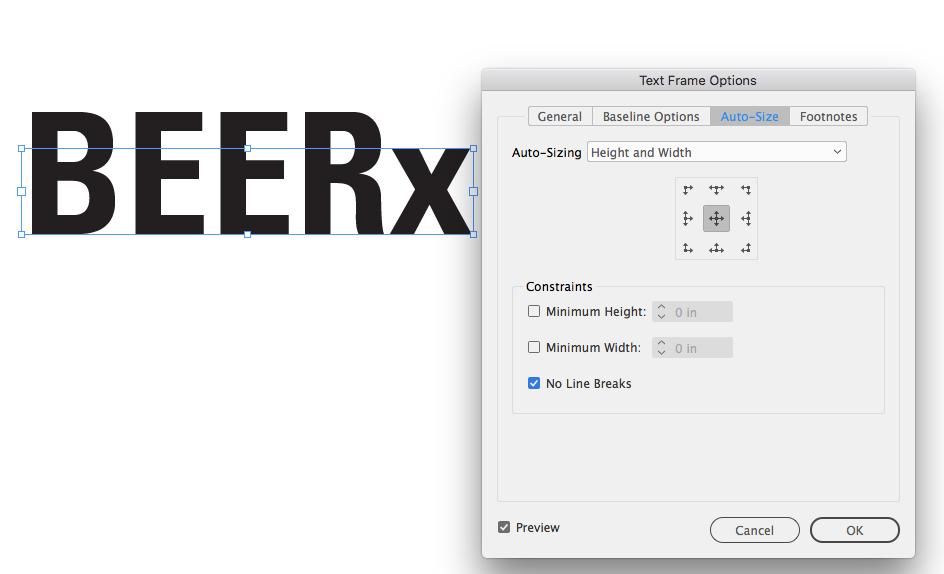
Sorry about that, I was rushing to respond and totally missed that...opps! Here are the text frame options with the text box selected.

Copy link to clipboard
Copied
Can you share the page?
Copy link to clipboard
Copied
I don't think I can, I don't have creative cloud.
Copy link to clipboard
Copied
You can put it in Dropbox or another file sharing service. It doesn't have to be the whole page, just one or two frames.
I suspected the First Baseline offset, but it's not that. And it's not leading. It still prints fine, right?
Copy link to clipboard
Copied
I believe it prints fine. I will sign up for a dropbox and throw it in there ASAP, I will post link in a few.
Copy link to clipboard
Copied
I think we need the entire page. It wouldn't be impossible for the frame you are showing in your capture to be empty and on top of the text.
Copy link to clipboard
Copied
I should probably mention that I am not the original author of this file. I am in the process of redesigning it using the original as a base to safe some time. I have never come across this problem before though. Here is the link to a cut down version of the file: Beer Dessert Menu Drop.indd Thanks so much to all of you for the help!
Copy link to clipboard
Copied
There does seem to be some kind of corruption. The text frame's are acting like the First Baseline offset is set to X-height even though it is showing as Ascent. If I switch to X-height and then back to Ascent the text oversets, which is what I would expect with the undersized text frame.
Also if I save an IDML and open that all of the frames show as overset.
Copy link to clipboard
Copied
I was fooling around and I noticed the same thing. Seems that setting First Baseline - Offset to any of the other options produces the desired outcome: Cap Height, Leading (if you change the leading value), x Height, even Fixed (when changing the Min value), all produce the desired outcome, but as you said once it is changed back to Ascent the text goes back outside the frame. Could this be an issue with the font? As I said previously I tried a few others and did not have the same issue.
Copy link to clipboard
Copied
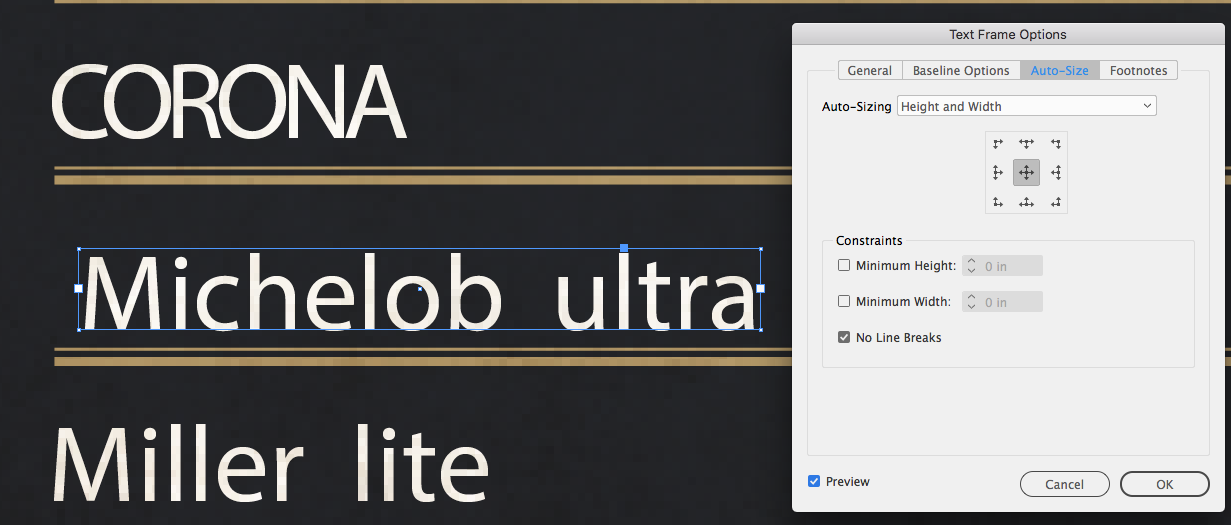
You can set Auto-Size to Height and Width with No Line Breaks and get what you are expecting. If you reopen and turn Auto-Sizing Off the frame will remain expanded.
Copy link to clipboard
Copied
This fix didn't do anything/ work for me. But I noticed the font you were showing is lower case, the Bebas I have only is uppercase, not sure if typekit (which I don't have) has a Bebas font that includes lower case as well. I can add the Bebas font file to my dropbox if you think that will help.
Copy link to clipboard
Copied
You mentioned that you don't have CC (#7), does that mean you are working with a back saved document? The DropBox doc has the creator as CC2018
Copy link to clipboard
Copied
I am not using a back saved doc. I believe you are correct that it was created in 2018. Because of lack of backwards compatibility I was on a colleague's computer
Copy link to clipboard
Copied
Have you tried exporting an IDML? If you export an IDML and open that are you getting text oversets? And if so what happens if you select a frame and use Auto Fit or Object>Fitting>Fit Frame to Content?
Copy link to clipboard
Copied
No overset text, but same issues as before. Below is what I see and when I 'Fit frame to Content' nothing happens.

Sorry to be taking up so much of your time and Thank You so much!

Copy link to clipboard
Copied
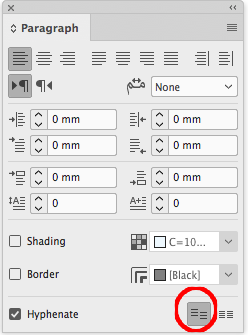
you may try to Do not alight to baseline grid button


Get ready! An upgraded Adobe Community experience is coming in January.
Learn more
 AdChoices