
Known Participant
July 21, 2025
Answered

Best Practice for New Chapters?

  • July 21, 2025
  • 2 replies
  • 415 views

Hey folks,


Novice to InDesign (using it on Mac), used it a few times but just for fun. Working on a long(ish) book, about 120 pages and wanted to ask what is the best way for me to set up new chapters? Should I be using page breaks? I think it is bad practice to use a load of returns to get to a new page right? Or am I supposed to be setting it up in Paragraph Styles for the last para of each chapter or something? Not sure what to do and am starting out in the book so just want to get things right in the early setup. I've set up para and charatcer styles for the main text so it seems ok there, just wondering about how to deal with new chapters. Should I be using the Book Panel? I understand that that would make each chapter a separate file or something?


Appeciate any help.


Thank you.
Correct answer Scott Falkner

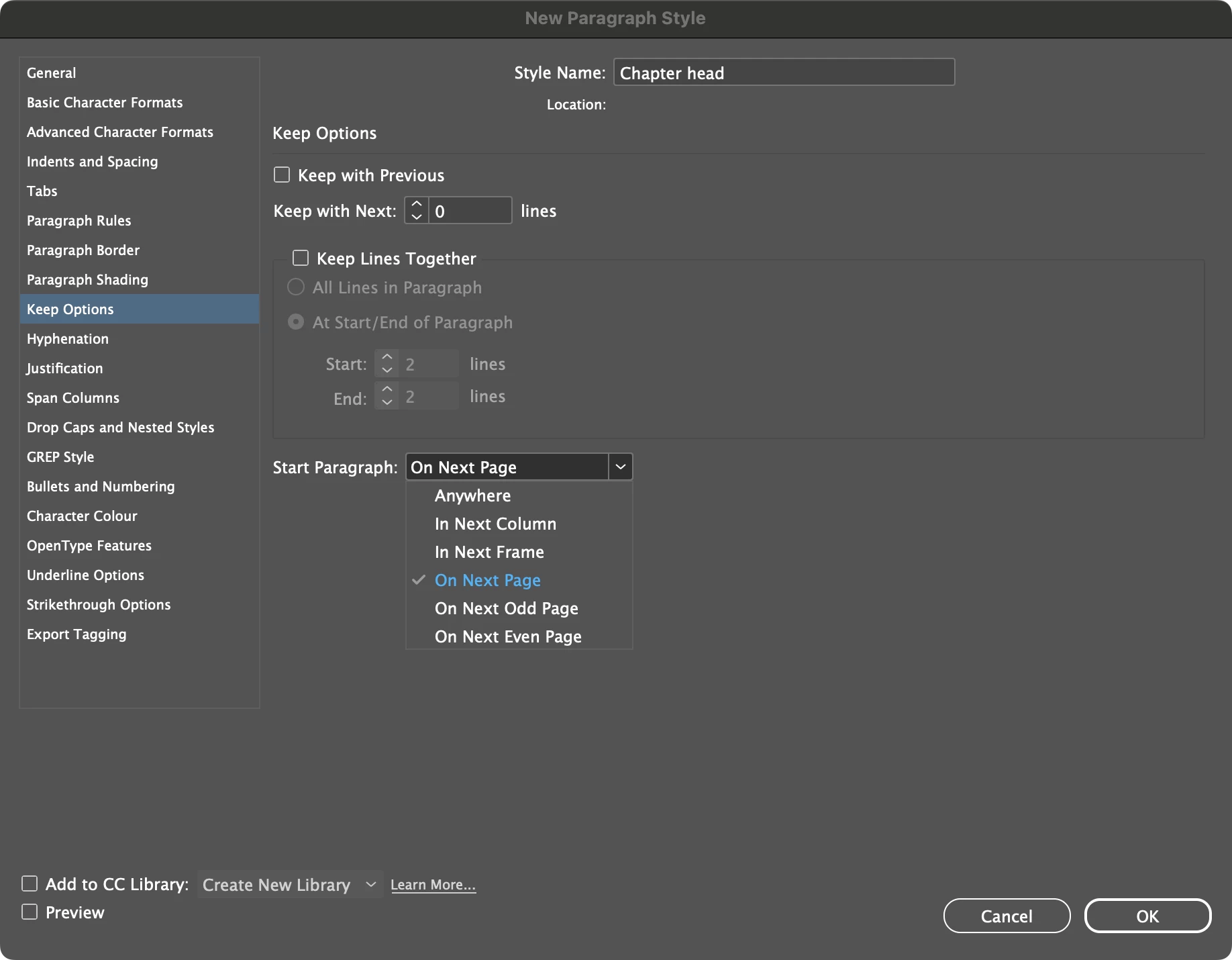
Use styles. Your chapter head can include a page break by forcing the paragraph to start on a new page, in a new text frame, or on the next odd or even page.


Use styles for everything, and create a base style to base all styles on. I usually have a “Body Copy” style that will be used for the bulk of my text. I base all other styles on that style so that changes to the base style will also affect the child styles. For example, the first paragraph in a new chapter might have no indent and use capitals for the first line. I’ll make a style called “1st ¶” based on Body Copy and only apply the formatting that changes. If I later change the font, size, or leading of Body Copy those changes will also appear in 1st ¶.


Oh, and DO NOT base any of the styles you create on [Basic Paragraph] and don’t use that style for anything.

2 replies

Scott Falkner
Community Expert
Scott FalknerCommunity ExpertCorrect answer
Community Expert
July 21, 2025

Use styles. Your chapter head can include a page break by forcing the paragraph to start on a new page, in a new text frame, or on the next odd or even page.


Use styles for everything, and create a base style to base all styles on. I usually have a “Body Copy” style that will be used for the bulk of my text. I base all other styles on that style so that changes to the base style will also affect the child styles. For example, the first paragraph in a new chapter might have no indent and use capitals for the first line. I’ll make a style called “1st ¶” based on Body Copy and only apply the formatting that changes. If I later change the font, size, or leading of Body Copy those changes will also appear in 1st ¶.


Oh, and DO NOT base any of the styles you create on [Basic Paragraph] and don’t use that style for anything.

Known Participant
July 21, 2025

Yeah so I did come across the fact that we should use styles so I setup a few based on [No Paragraph Style], hopefully that is ok? I can easily change it if that is not the right option, I'm just working through this slowly to get an understanding of how to get this all set up.


Thanks for showing me the option of how to start a new paragraph for the chapter head. 

Willi Adelberger
Community Expert
Community Expert
July 21, 2025

Make for each chapter a separate INDD document (which is technically a chapter in InDesign terminology) and bundle them together kn an InDesign INDB book file.

Create a template with an oprening page and follow up page (based on master/parent). Work with proimary text frames.

Known Participant
July 21, 2025

Thanks will look into book files.