
Participating Frequently
October 22, 2024
Answered

Blank pages not inserting in book

  • October 22, 2024
  • 1 reply
  • 414 views

I created a book (using the "book" function). In each chapter's Indesign file, I have the chapter title paragraph style's keep options set to start on the next odd page. When I export the book to PDF, it seems to be ignoring that setting and putting the first page of each chapter on the next page, even or odd, of the book. Is there a setting to have it insert a blank page to accommodate the keep options? 
Correct answer James Gifford—NitroPress

This isn't controlled by the paragraph settings  —those work only within each chapter.


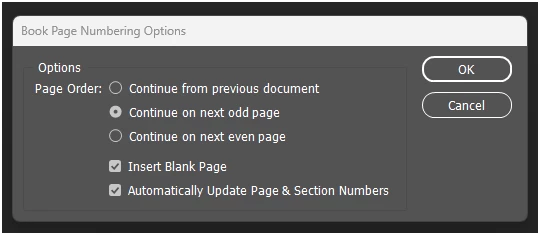
In the Book menu, accessed via the three-line/hamburger menu, Book Page Numbering Options, set things as shown —


That tells the book export process how to merge chapters that may have varying page lengths and settings.

1 reply

James Gifford—NitroPress
Legend
October 22, 2024

This isn't controlled by the paragraph settings  —those work only within each chapter.


In the Book menu, accessed via the three-line/hamburger menu, Book Page Numbering Options, set things as shown —


That tells the book export process how to merge chapters that may have varying page lengths and settings.

MikeP5403Author
Participating Frequently
October 22, 2024

Oh, awesome, that did the trick. Thank you!

James Gifford—NitroPress
Legend
October 22, 2024

Books are a useful feature, but they have so many added quirks and management layers it's best to avoid them unless a single file really, really won't do the job. Large chapter files, a need to edit and change chapters asyncrhonously, a few other fussy situations — Book. Everything else — use internal chapter breaks and the like and avoid a whole extra layer of project settings etc.