Deaf_Guy
Inspiring
June 1, 2023
Answered

Bold bulleted numbers when I don't want them to be

  • June 1, 2023
  • 2 replies
  • 7573 views

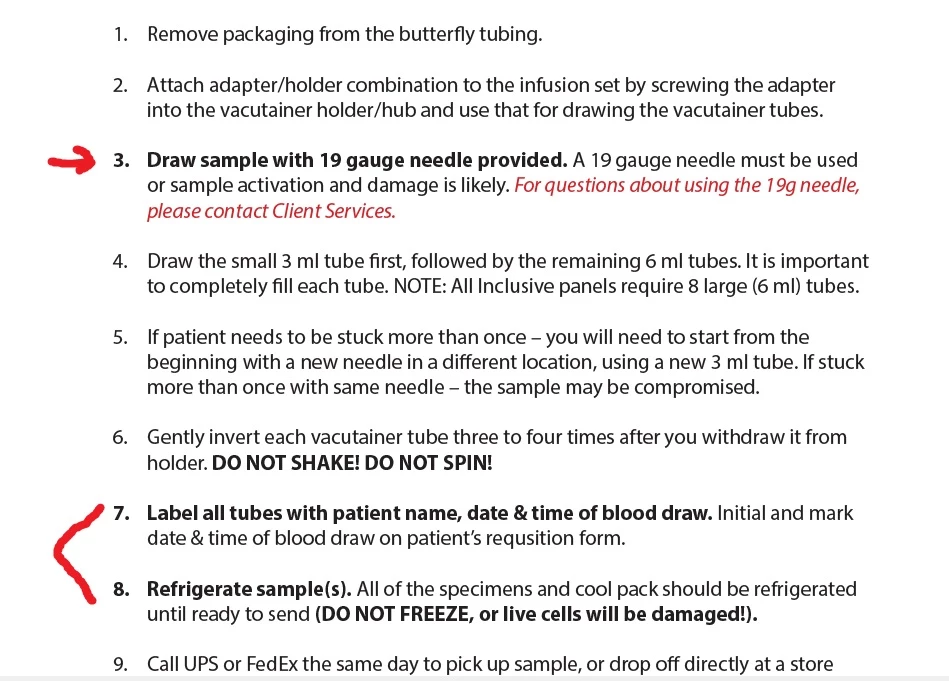
Can't figure this out. When I bold the sentence in a bulleted list, the numbers are also bold and I don't want them to be. Can't out how to stop this. Any ideas? Thanks.

 

Correct answer James Gifford—NitroPress

Define a specific character style for the numbers, and assign it in the Bullets and Numbering panel of the paragraph style. That should prevent the number from picking up the style on the text. 


Also, it's better to define a bold character style and use it, rather than the wonky override bolding like Word's. That alone might also solve the problem. 

2 replies

James Gifford—NitroPress
Legend
June 1, 2023

Define a specific character style for the numbers, and assign it in the Bullets and Numbering panel of the paragraph style. That should prevent the number from picking up the style on the text. 


Also, it's better to define a bold character style and use it, rather than the wonky override bolding like Word's. That alone might also solve the problem. 

Deaf_Guy
Deaf_GuyAuthor
Inspiring
June 1, 2023

OK thank you. Would you happen to know of a YT video that shows how to do this? I learn best by watching a video 🙂

James Gifford—NitroPress
Legend
June 1, 2023

Defining paragraph and character styles is very fundamental to using InDesign efficiently. Styles are not an optional gloss as in Word.


There are many tutorials for this basic level of knowledge,  including here on the Adobe site. You'd be best to take a comprehensive approach, rather than get help with each small problem. It will pay off. 

BobLevine
Community Expert
Community Expert
June 1, 2023

Use a paragraph style and in the bullets and numbers tab, set the paragraph to a numbered list and create a character style for the number.

Deaf_Guy
Deaf_GuyAuthor
Inspiring
June 1, 2023

OK thank you.