
rehana36276218
Known Participant
April 20, 2024
Question

bold Values

  • April 20, 2024
  • 4 replies
  • 812 views


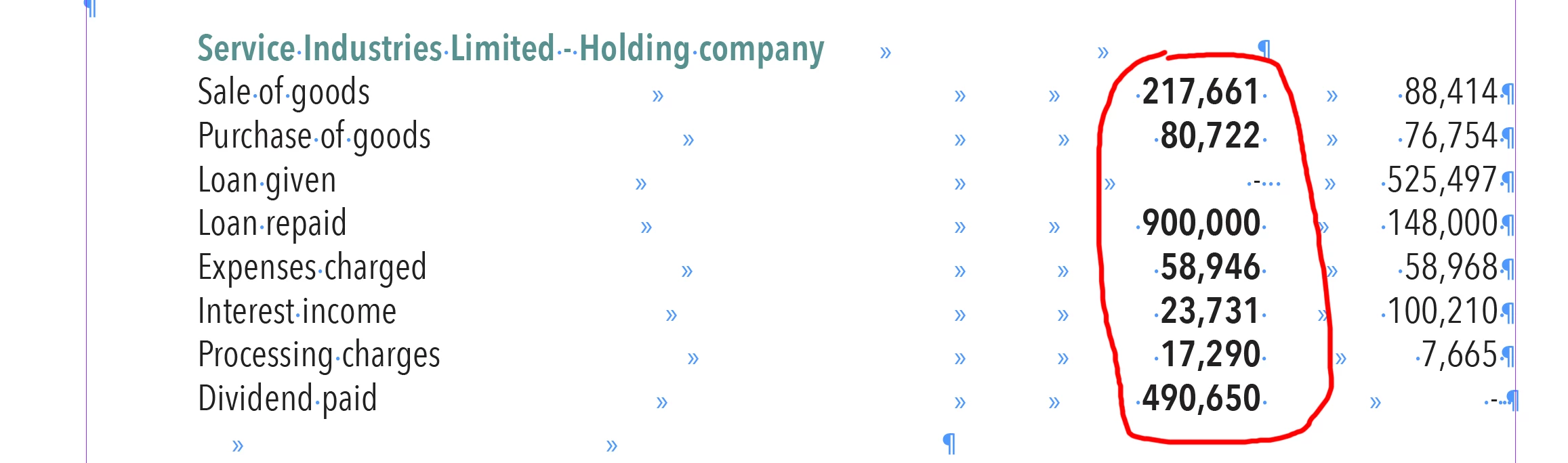
Hi all, i have a report more then 500 pages in indesign in tab format . i want values bold that is in red circle, i did it one by one, how i can do that smartly, i am selecting one by one and pressing CMD+SHIFT+B any other smartway to do that job quickly..? Thanks in Advance
This topic has been closed for replies.

4 replies

rob day
Community Expert
Community Expert
April 20, 2024

Hi @rehana36276218 , Here’s an illustration of the Align to Character tab @BobLevine is suggesting—the tabs and alignments can be saved in a Paragraph Style:


m1b
Community Expert
Community Expert
April 20, 2024

Hi @rehana36276218 along the lines of what the guys have said—I'm hoping you have a paragraph style set for the financial lines. If not, then I would consider doing so... but read on: I think you can get away with using a Grep Style here, on the basis that you are always bolding the second last column (by tab characters, not tables) and the last column always has a value (or a hyphen if no value). If these rules don't hold true, then some tweaks might be needed. Here's the grep style I was thinking about, which targets the 2nd last column:

And it gives this result:

I've attached my demo.indd if that helps, too. So you would just need to assign that paragraph style to the financial lines.

- Mark


Edit 2024-04-21: I didn't make this clear: you can do a find/change to set every paragraph that matches the grep I used in the "Financial Line" paragraph style, like this:

I would start with that and then, if some tables have more columns and need different tab stops or something, then make a "Financial Line 2 Col", "Financial Line 3 Col" etc, based on the "Financial Line" style.

BobLevine
Community Expert
Community Expert
April 20, 2024

I don't think it's that simple. The OP has multiple tabs that would need to be deleted before apply a new style and we're only seeing one example. 500 pages of this is going to need a lot of clean up.

m1b
Community Expert
Community Expert
April 20, 2024

Yep, no choice about that, really. But I can't think of an easier way.

BobLevine
Community Expert
Community Expert
April 20, 2024

I would be using tables for this but if you insist on using tabs, this should be done with a paragraph style containing the text, a single decimal alignment tab, followed by the bold style (as part of a nested style) for the numbers, and finally a right-aligned tab. for the second column of number.


The nested style would be nothing through the decimal tab, bold up to the right aligned tab.


I can't even begin to imagine going back and fixing this for a 500 page document, though.

Peter Spier
Community Expert
Community Expert
April 20, 2024

This is what styles are for.

Lookinig at your screen capture, I would create a character style that does nothing but Bold, the create a Paragraph Style for the table entries that uses the character style as a nested style (which requires a fairly rigid tab structure or that there be no digits in your entries before the ones you want in bold.

If you have a constant number of tabs, you could use nested styles of [none] THROUGH the number of tabs before the the number column, them Bold style UP TO 1 tab.

If the number of tabs is not consistent. you can use [none] UP TO 1 Digit, then Bold UP TO one tab. (Edit: Note that this latter method would be a problem for rows such as Loan Given tht have no numbver in the middle column)

All of that said, I think you would be far better off making a "real" table, with cells, instead of using tabs and spaces for your alignments. This would allow you to create Table Styles and Cell Styles to automatically format the various sections.

BobLevine
Community Expert
Community Expert
April 20, 2024

That's the thing...there is absolutely no reason for multiple tabs. A single properly set decimal aligned (or right aligned) tab would do it.