Hi there,
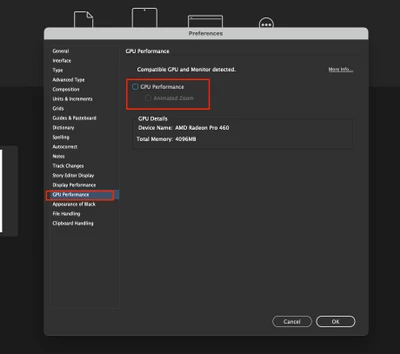
Sorry to hear about your experience. As @Laubender suggested, if you are on macOS, try to disable GPU from
InDesign Preferences (cmd+k) > GPU Performance > uncheck GPU Performance and see if that helps.
If it doesn't, I will request you to share a few more details like:
- OS & exact version of InDesign
- Share a screenshot or a small video demonstrating the issue. It would be really helpful.
- Does it happen while working on a specific document? If yes, could you please share the document with us? You can upload it to the Creative Cloud (https://helpx.adobe.com/in/creative-cloud/help/share.html) and share the download link.
- Where are you saving the files & links (Network Drive/ System HDD/ Shared Folder on System/ External HDD)?
- Are there any recent changes made to your system? For example, any antivirus, system updates, plugins, or web extensions installed recently.
- Does resetting InDesign Preferences (https://helpx.adobe.com/indesign/kb/indesign-preferences-support-file-locations.html) help to resolve the issue?
Disclaimer: Please note that resetting preferences will remove all the custom settings, and InDesign will launch with default settings. You can also take a backup of the folders in case you want to. Location is mentioned in the article.
We'll be looking forward to your response.
Thanks & Regards,
Anshul Saini


 AdChoices