Known Participant
June 30, 2017
Answered

Bullets and indents

  • June 30, 2017
  • 2 replies
  • 1256 views

Hi,

What does the cross symbol mean before the copy starts after the bullet in the attached screenshot. That a particular indent has been established? How do you change it?

Thanks!

    This topic has been closed for replies.
    Correct answer winterm

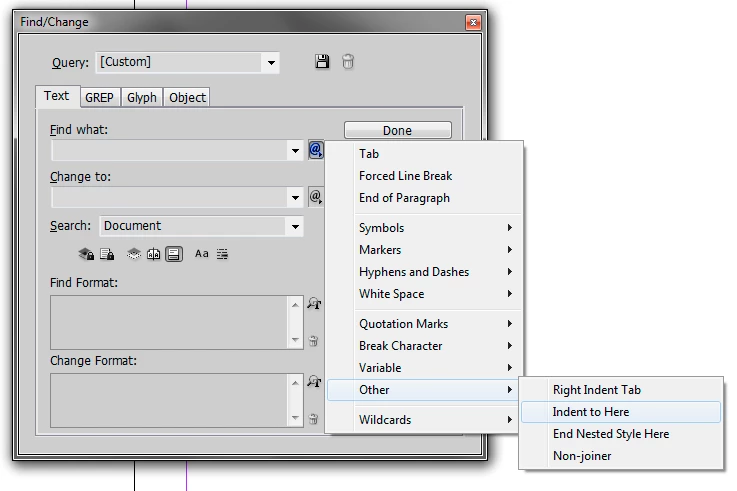
    It's a special character Indent to Here

    see for the complete list:

    https://indesignsecrets.com/free-guide-to-indesign-special-characters.php

    Special chars are searchable:
    2 replies

    Barb Binder
    Community Expert
    Community Expert
    July 5, 2017

    I've noticed that even though it appears to be aligned on the left when I print it doesn't look straight on the left side. Is there any way to tweak it to make sure it looks straight on the left side?

    I'm unclear why you are using it for a bullet list in the first place. It's a manual fix: someone had to add the bullet, press the space bar 5 times, and then add the Right Indent to Here character...on every paragraph. InDesign has a bullet feature which uses tabs as the separator and creates the hanging indent for you. It's quicker to apply, and quicker to edit.

    It's not too late to create a style called bullet and then find that string and replace it with the bullet style.

    As for the alignment: it's the font. I don't see an appreciable difference in the alignment when I use spaces and a Right Indent to Here character vs using a tab in the Bullets and Numbering dialog box. Do you?

    ~Barb at Rocky Mountain Training
    winterm
    wintermCorrect answer
    Legend
    June 30, 2017

    It's a special character Indent to Here

    see for the complete list:

    https://indesignsecrets.com/free-guide-to-indesign-special-characters.php

    Special chars are searchable:

    Known Participant
    July 5, 2017

    Thanks. I've noticed that even though it appears to be aligned on the left when I print it doesn't look straight on the left side. Is there any way to tweak it to make sure it looks straight on the left side?

    Thanks!

    Known Participant
    July 5, 2017

    Actually the attached the screenshot to reference
