
Participant
June 3, 2021
Question

Bullets and numbers Right to left

  • June 3, 2021
  • 5 replies
  • 2429 views

Hi all,


I'm typesetting in Hebrew, right to left and while doing a bullet list I wanted to align all lines as usually is the case. 

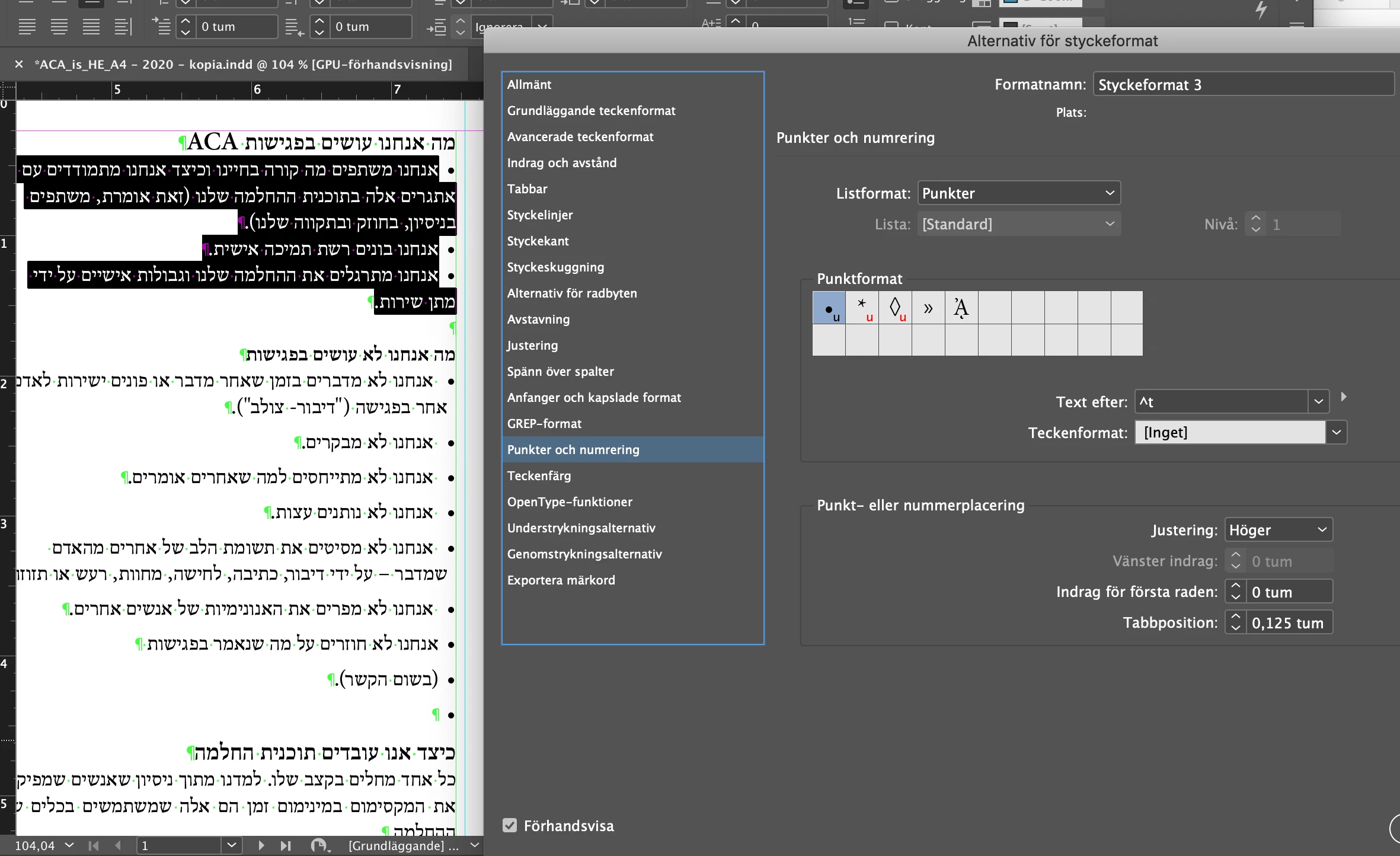
I've done a paragraph style right aligned but then in Bullets and numbers I can't add any value in the left indent regardless of whether or not I choose Left or Right Alignment I still cant enter any value in the left indent box.
Anyone knows how to fix this or any other way to get all lines of text with the same indent and not just the first line?

Thanks, Markus
 

This topic has been closed for replies.

5 replies

Community Expert
June 4, 2021

Hi Chad,

could you select some text and then show the Paragraph panel?


Thanks,
Uwe Laubender

( ACP )

hammer0909
Community Expert
Community Expert
June 4, 2021

Sure sorry about that.


hammer0909
Community Expert
Community Expert
June 4, 2021

The first line indent value still seems to work from the right side but you'll need to adjust the right indent value instead of the left indent value to move the bullets from the right edge of the frame. See screenshot below.


Community Expert
June 4, 2021

Also found this, but the screenshots come with English texts and do not describe your issue explicitly:

https://helpx.adobe.com/il_he/indesign/using/tabs-indents.html


Regards,
Uwe Laubender

( ACP )

Community Expert
June 4, 2021

Hm…

Can you show your Paragraph panel when your text is selected?

Also the full Control panel should be visible.


Tried to find something in InDesign's helpX pages, but the English version currently seems to be without contents.

Ah! Now there is contents again, but does not list the "Hanging Indent" explicitly :


Arabic and Hebrew features in InDesign

https://helpx.adobe.com/indesign/using/arabic-hebrew.html


The Hebrew version follows the English version as far as I can see, so there is no news with that:

https://helpx.adobe.com/il_he/indesign/using/arabic-hebrew.html


Well, and I could not find the Arabic version of this helpX pages…

EDIT: Here it is, but also nothing about "Hanging Indent":

https://helpx.adobe.com/mena_ar/indesign/using/arabic-hebrew.html


Regards,
Uwe Laubender

( ACP )

Community Expert
June 4, 2021

Are you using the ME version of InDesign?

https://helpx.adobe.com/indesign/kb/access-install-hebrew-arabic-indesign-illustrator-CC.html


You shouldn't have to setup a right alignment for this text. 

You can use the full InDesign version - just the ME version has tools for ME text.

PubstaffAuthor
Participant
June 4, 2021

Thanks, Im using the ME version now. I'm able to set language to Hebrew in Indesign and choose from ME from paragraph styles. 

World Ready Paragraph Composer turned on.

Still didnt cut to the chase. Second lines still don't align with the rest of the text...


Community Expert
June 4, 2021

I think you  might have to set both the numbers to 0 before it can activate.