Inspiring
July 14, 2022
Answered

Calculating the resolution to print a JPEG poster in InDesign?

  • July 14, 2022
  • 5 replies
  • 5114 views

Hi!  I recently took a test and I don't think I answered this question correctly.


I had to design a 22”x28” poster with an 1/8 bleed.  The directions said it will go to a web designer so save a low resolution JPEG with 1200px width.


So...I had no idea how to calculate what resolution I should export as, but online I found that if you want to print a 22”x28” and you want the resolution to be 300 PPI, then you multiply the inches by PPI amount (PPI is just the resolution, right?) and that gives you the pixel amount.  So, if the width of this poster is 22inches, then I'd take 1200 (the width of the final JPEG image) and divide by 22, right?  That gives me 55.  Should 55 be the resolution?  It seems awfully low!


I feel something is amiss.  Any help on this, or directing me to a tutorial or something on it, would be very much appreciated!!


Thank you so much!

Kathy
Correct answer rob day

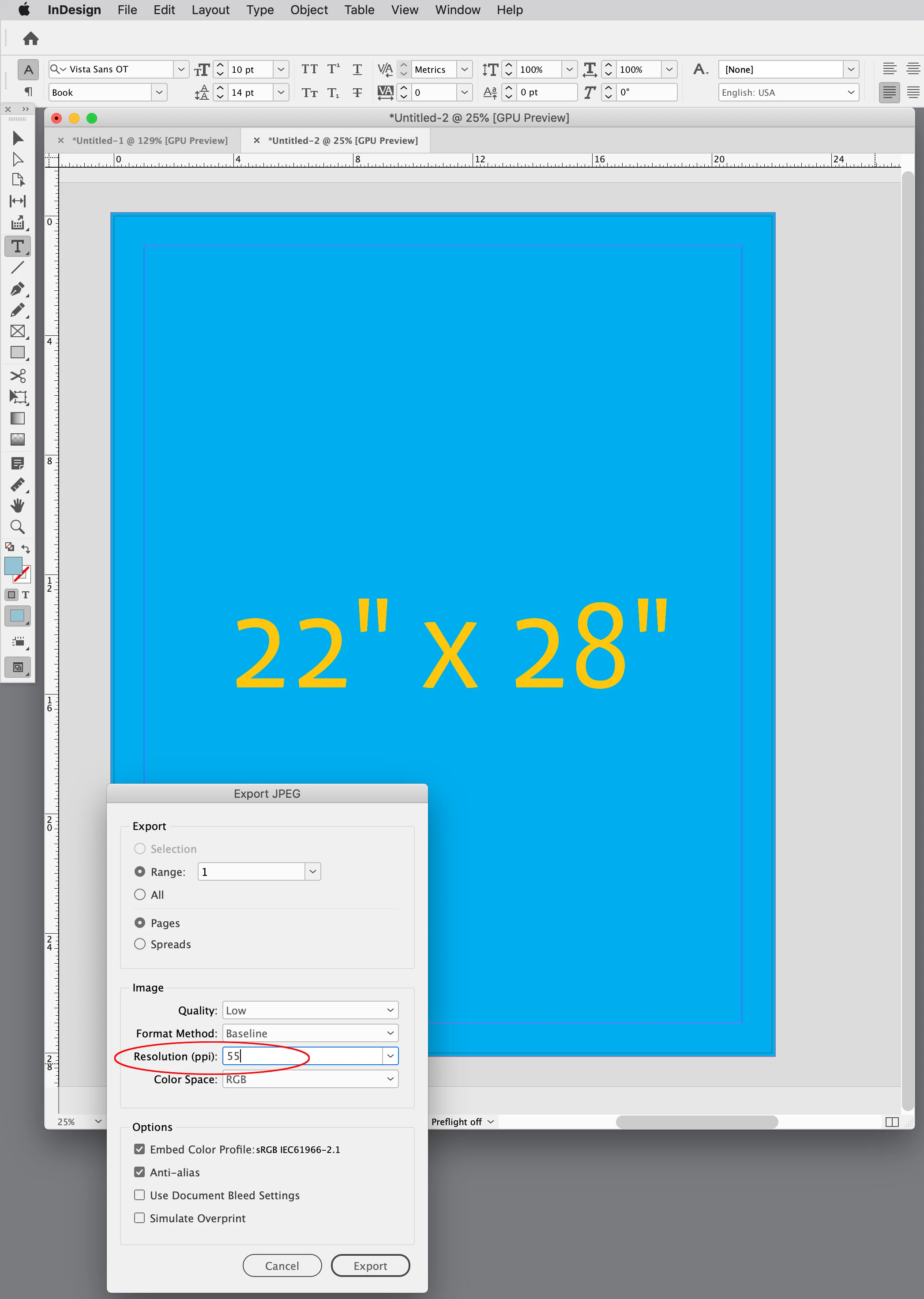
Oh wait!  ... when I went to export 55ppi, it wouldn't let me.  Please see attachment - the lowest option to select seems to be 72, and I don't know a way to customize it....  


Oh wait! ... when I went to export 55ppi, it wouldn't let me.


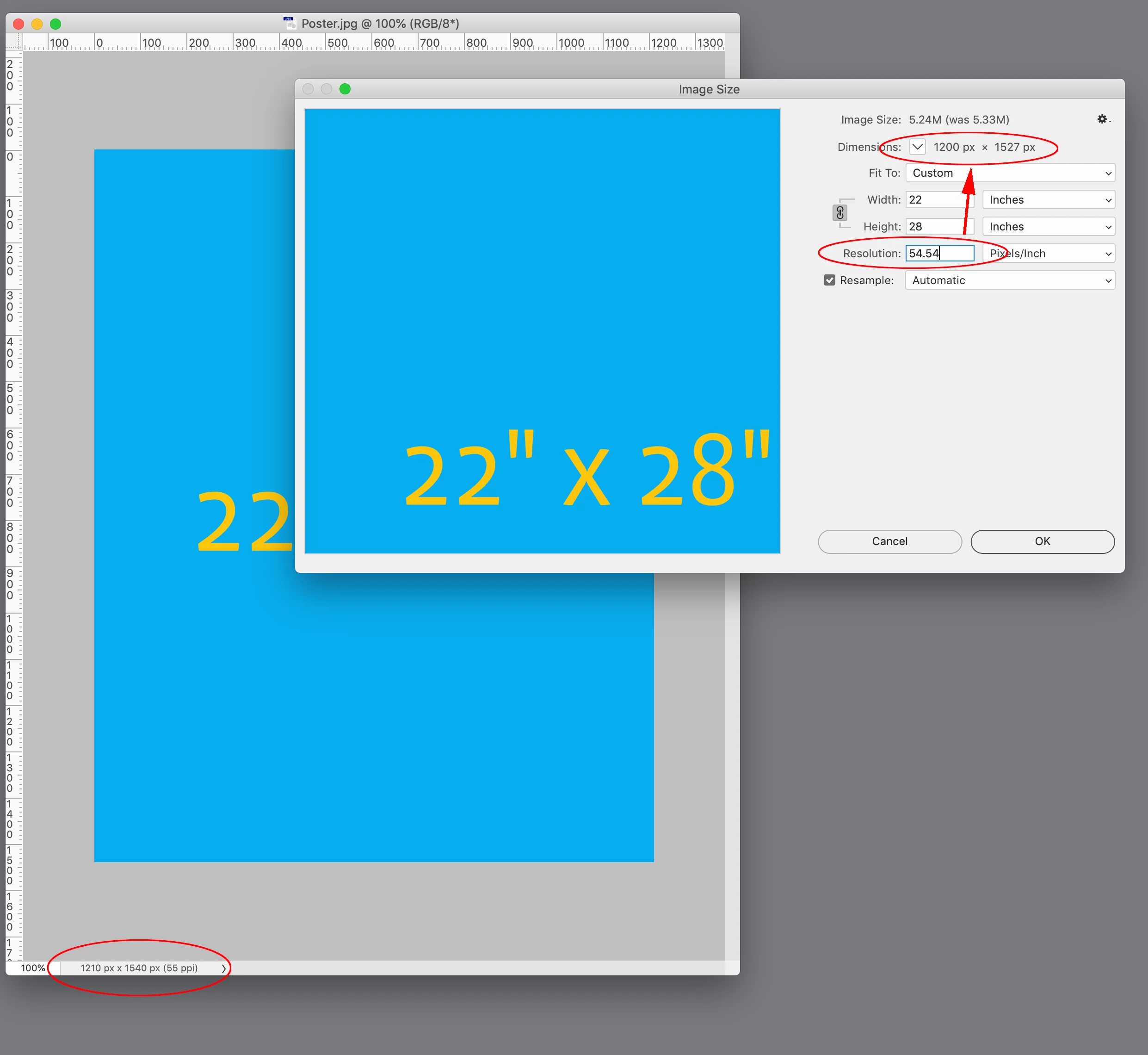
Hi @Katherine25238449muqx , the Resolution dropdown is a collection of presets, but you can also type in any integer (54.54 will get rounded up):


55ppi will export to a 1210 pixel width (55 x 22 = 1210). If you need an exact 1200 pixel width set the Image Size Resolution to 55.54 with Resample checked in Photoshop:


5 replies

Dave Creamer of IDEAS
Community Expert
Community Expert
July 15, 2022

I think I would have exported the poster to PNG without bleed and down-res in Photoshop to 1200 pixels. As mentioned, web graphics have no PPI resolution, just x-number of pixels by y-number of pixels. Of course, any type would be practically impossible to read. Also, web graphics are usually output double size to accommodate uHD devices. 


I'm curious about this test. The question sounds as if it was written by someone with partial knowledge about images. 

David Creamer: Community Expert (ACI and ACE 1995-2023)
James Gifford—NitroPress
Legend
July 15, 2022
quote

I'm curious about this test. The question sounds as if it was written by someone with partial knowledge about images.


I have lost track of how many "evaluations" I have been asked to do, usually online and as part of an application process, that were so ineptly designed it was clear the owner or recruiter had no idea how this field works.


I suspect there is an airplane book out there full of "secrets" about how to hire creative talent cheap and giving these canned "tests" and "evaluations."


/editorialmodeoff


Inspiring
July 16, 2022

Haha, no, I'm afraid the mistakes lie with me -- I probably unknowingly misstated the question because I misunderstood it.  The guy who gave me the test has been a graphics designer himself for 15 years and is now Marketing Director 🙂

Mike Witherell
Community Expert
Community Expert
July 15, 2022

Notwithstanding all your excellent comments, I have a feeling the question wanted a simple answer of "72 ppi".

Mike Witherell
Inspiring
July 15, 2022

Haha!  🙂

rob day
Community Expert
Community Expert
July 15, 2022

If exporting to an exact pixel width is important, you can try this JPEG export script, which includes a fixed pixel width field:


https://shared-assets.adobe.com/link/e62626e4-9f44-45a3-6da0-0a1b51e8ecbf


Here’s the dialog:


The Exported JPEG file:


Legend
July 14, 2022

There seems to be a problem right at the start. You say it's going to a web designer. Then you talk about printing. But web designers don't print things: they want images measured in pixels. (It's a very strange spec because bleed is only applicable to printing, and not relevant to web graphics either.)

Your calculation of 55ppi is correct, but your view of it as "awfully low" is not: that's thinking as if it will be printed. 
A key thing to know about "resolution" is that the word is used for two entirely different things. 1. The pixels per inch as printed (ppi) 2. The width and height of an image in pixels. You need to know which meaning applies. 

Inspiring
July 14, 2022

Oh, great!  I'm so glad I did my calculation correctly.  So I should always just divide the desired pixel width by the width of the JPEG.  Wow, 55 seemed low but I'm glad it's not low for web.


Thanks for the tip about "resolution"!  I'm coming back to this after some years and have forgetten the terminology. 

James Gifford—NitroPress
Legend
July 14, 2022

One point of confusion is that image files have no "resolution," even though a value for PPI can be assigned and noted in apps like Photoshop. It's a completely arbitrary value. If you open a file with an assigned PPI of 300 and change that value to 50, it's still the same image/file. (It will be interpreted differently by apps like ID if it's imported and placed without scaling, but the pixel-size-image still doesn't change.)


The only time PPI/DPI matters is when an image is printed or displayed, and then there will be a relationship between the actual pixel dimensions (say 900x1200) and the size at which a screen will display it (at a nominal 92/96/120/144 ppi) or it will print (at 300 dpi, it would be 3x4 inches).


If you are designing for print, the effective DPI is important; if the printer wants a "300DPI file" it must contain 300 pixels per intended print inch. If you are designing for web, it's a lot looser as images can easily be rescaled on the fly; working to a nominal 100PPI for approximate screen sizes (300 pixels wide if you want the image to be about three inches wide on a "standard" screen) is adequate.


But outside of very specific situations, such as magazines or catalogs that create and maintain images for their specific requirements, a "300 dpi image" is a meaningless designation, topped only by things like "a 2MB image." In all cases, it's the actual pixel dimensions that matter, interpreted as necessary by an output DPI/PPI/desired size.


Peter Spier
Community Expert
Community Expert
July 14, 2022

Your thinking is correct for calculating the size for the web poster, and you are equally correct that this resolution is too low for quality printing at full size (not to mention that a "low-resolution" jpeg is probably unsuitable for printed output at any size).

Requirements for screen and print are quite different.

Willi is also correct. Images have no inherent resolution, only the pixels. Resolution is a function of how large or small that image is physically output.

Inspiring
July 14, 2022

Thank you, this is helpful.  Images have no inherent resolution - didn't know that.  Thanks!  Yep, I know print requirements a bit better.  Bleed was only for print, obviously.  Sorry for confusion.  🙂

Willi Adelberger
Community Expert
Community Expert
July 14, 2022

Web Images have no Resolution, only pixel dimensions. The resulting resolution is depending on the size of the screen. 

Inspiring
July 14, 2022

Interesting. PPI is not resolution?  The size of the screen varies for each user.


So if it's a 22”x28” poster (I guess we only care about the ratio here?), do you know what I'd do in InDesign to save a low resolution JPEG with 1200px width?


thanks!

Willi Adelberger
Community Expert
Community Expert
July 14, 2022

I never said that ppi is not resolution. But as long as you do not know the size in metric, no resolution is known. I did say that resolution is not relevant on screen, pixels are relevant.

If an image should have 1200px width, make it 1200px width. Where is the problem?