

Chris  P.  Bacon
Inspiring
August 15, 2022
Question

Can all column rules' height be re-adjusted at once after changing the copy text font size?
  • August 15, 2022
  • 5 replies
  • 3424 views

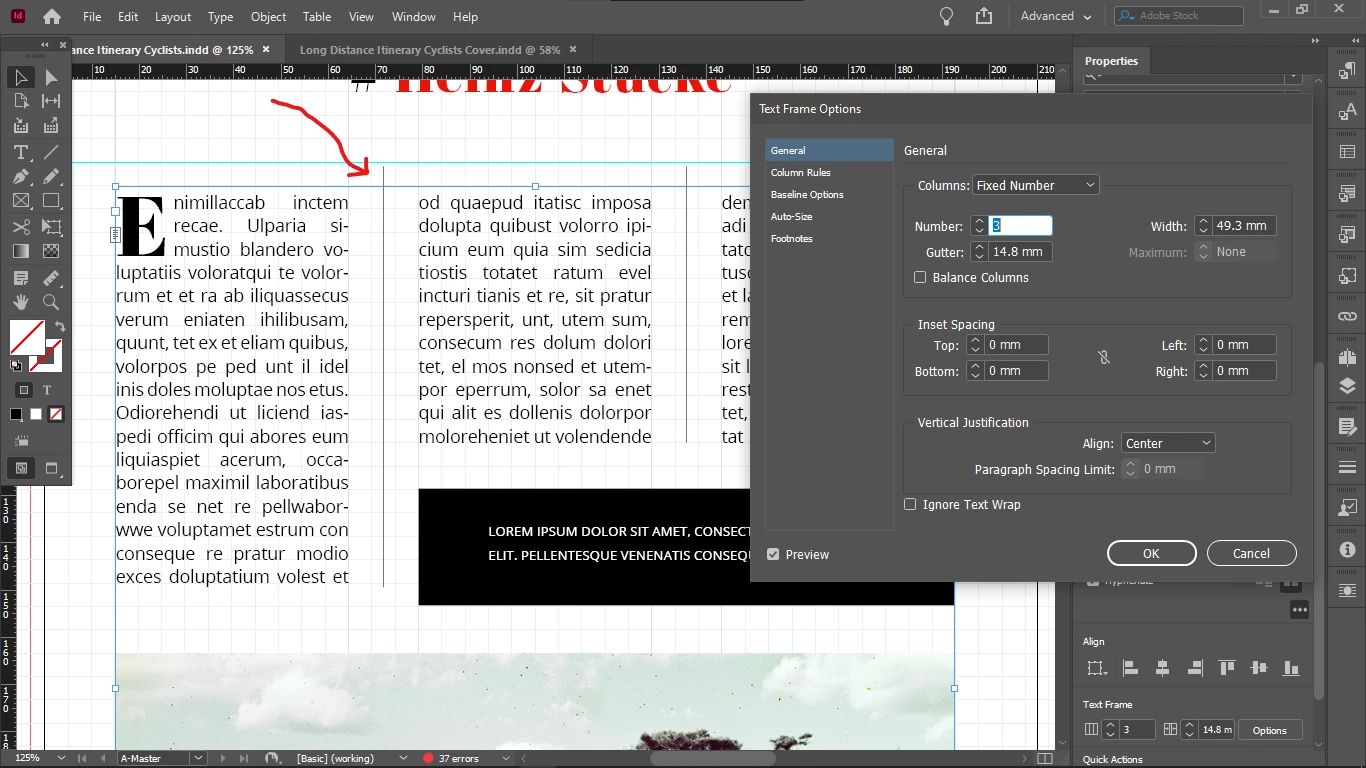
I decreased my copy text font size and now my column rules are exceeding their previous upper boundary.

So now do i have to delete them and re-apply all my column rules, is there any adjustment shortcut or function?


This topic has been closed for replies.

5 replies

Willi Adelberger
Community Expert
Community Expert
September 5, 2022

Work with object styles, change the setting there.

Chris  P.  Bacon
Inspiring
September 5, 2022

What are you thinking of more specifically which setting?

Community Expert
September 4, 2022

With your document "Long Distance Itinerary Cyclists copy.indd" open, my take on the technical side of InDesign is this:


[1] Do not use the Column Rules feature of the Text Frame Options. Use graphic lines instead.

[2] For call out text use two frames: One for the text and one for the text wrap. That's more flexible.

[3] Allow text in articles to end on a different line than the other columns.


[4] Do not (mis)use parent pages for your layout work. Currently all your layouts are done on Parent A named "A-Master" and Parent B named "B-Master".


[5] Text cannot flow from page to page. Text frames are not threaded.


[6] Document history shows that your document initially was created in InDesign CS6 in 2013. The exact version is 8.0.0.370, the initial version of InDesign CS6 not bug fixed at all. So I wonder if this causes some crashes on the document later in its life. Time to export the document to IDML, open the IDML file as document and save it with a new name to prevent future corruption of the file.


Regards,
Uwe Laubender
( Adobe Community Professional )


Chris  P.  Bacon
Inspiring
September 4, 2022

Thanks.

But when I give it the new name, I should re-save it as INDD, as that is the newer format?

Chris  P.  Bacon
Inspiring
September 4, 2022

Graphic lines - you mean to manually set the start and end point of each of my rulers by drawing lines?

Community Expert
August 16, 2022

Currently I see this workaround:

Have an extra text frame for the first character threaded to the other one with the column rules. With text wrap applied. From my German InDesign 2022 on Windows 10:


Regards,
Uwe Laubender
( Adobe Community Professional )

Chris  P.  Bacon
Inspiring
August 16, 2022

Thanks.

Community Expert
August 16, 2022

Hi @Chris P. Bacon ,

the start position of the column rules is a side-effect of the first character in your text frame.

The bigger the character the more does the zero start position of the rule move out of the frame.


Regards,
Uwe Laubender
( Adobe Community Professional )

James Gifford—NitroPress
Legend
August 15, 2022

You can try turning column rules off and back on (try it for just that frame, use Ctrl-B to open the menu). But I think what you're seeing is default behavior, running the rules continuously along the text flow, even though it's interrupted by the inset box. (ETA: remember, it's a column setting, not a paragraph/text setting.)


Also, try adding text wrap padding to the left side of that inset box, to force the text flow to fully bypass it.


Chris  P.  Bacon
Inspiring
August 15, 2022

What do you mean by inset box? Can you point it out?

Chris  P.  Bacon
Inspiring
August 16, 2022

One last thought on this: delete that text frame, then click on the previous-frame button of the facing one and draw a completely new one. That is, completely replace that problematic frame and see if the problem goes away.


I couldn't find the previous-frame button, I found a shortcut for it for my Windows: 

Select first/last frame

Shift+Alt+Ctrl+Page Up/ Shift+Alt+Ctrl+Page Down

Shift+Option+ Command+Page Up/ Shift+Option+ Command+Page Down

but it didn't do anything, not before or after deleting the frame.

I tried to draw a new frame, but I couldn't get any text into it (something might be wrong with my setup).

"Fill with paceholder text" was grayed out, and later only pasted one row in the box, and never more.

Something might be wrong with my setup.

So I packaged my Parent page for you (before I started tweaking, with the rule overlap still on):

https://bit.ly/3pnCOOw

in case you want to take a look.

Thanks.

Finally I solved the issue by:

cutting the frame

paste it back in place

delete all text

fill it again with "Fill with placeholder text"

Now my column rules end nicely at the top of the box.