Inspiring
October 16, 2023
Answered

Can InDesign output a PDF that shows tracked changes?

  • October 16, 2023
  • 5 replies
  • 2572 views

Hi all


I've had a request from a client that I don't think is possible and just wanted to check I'm right (both for now and for future reference).


I format a lot of paperback interiors using InDesign.


My normal workflow with manuscripts is…

  1. Import and format the manuscript in InDesign and output a PDF for review by the client.
  2. The client supplies me a PDF back with text amends and comments marked-up (normally using Acrobat Reader)
  3. I load the PDF comments into InDesign ('Import PDF comments'), execute the comments / amends / changes and output a new PDF for review.


Here's the rub. A new client has just said that they don't want to (or would prefer not to) review a new PDF that contains changes, without seeing the tracked change list in the PDF (for fast reference of what has been changed since the last PDF).


Am I right in thinking that it isn't possible to output a PDF from InDesign that somehow contains comments that track changes?


Hope that makes sense.


Any info/feedback appreciated.


VBW

TP
Correct answer Barb Binder

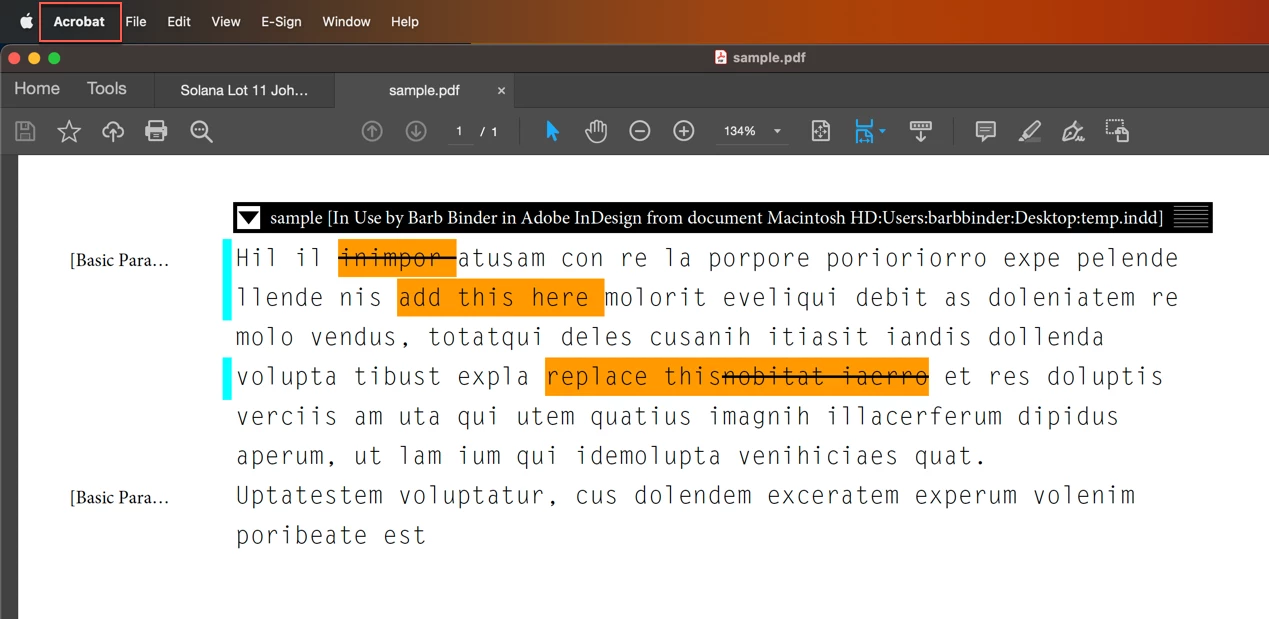
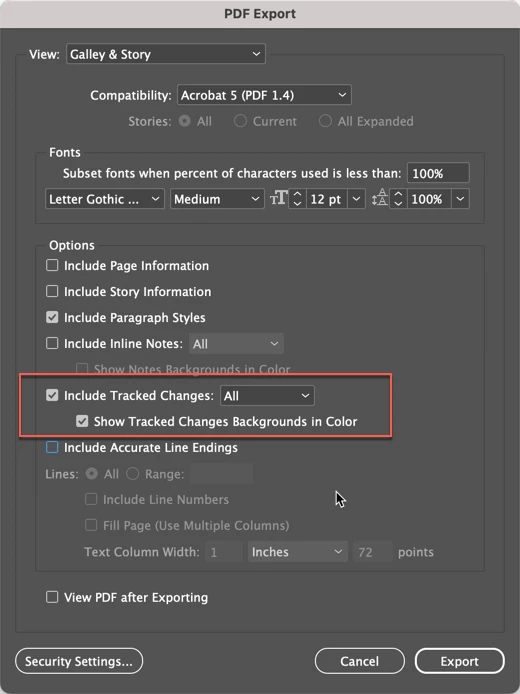
Actually, you can! You will need to download a copy of InCopy from the CC desktop app. It's included with your InDesign subscription. This workflow is also helpful for those who want to print a document with the suggested changes highlighted.


InDesign

  • Mark up the text as usual
  • Create an InCopy Assignment Edit > InCopy > Export > All Stories to create an .icml file(s)


InCopy

  • Open InCopy
  • File > Open to open the .icml file(s) in Story or Galley View
  • File > Export > Adobe PDF and change the following three settings:
    Include Tracked Changes All and Show Tracked Changes Backgrounds in Color and View PDF after Exporting
  • Click Export


Acrobat

Here is how the file will open in Acrobat, including the tracked changes:


~Barb

5 replies

Legend
October 18, 2023

Hello,


There are commercial PlugIns that do this.


https://ctrlsoftware.com/


and my thing.


https://www.kerntiff.co.uk/products-4-indesign/editmarks


There is another.


http://blacklining.com/


InCopy comes with your InDesign subs.


P.

BobLevine
Community Expert
Community Expert
October 16, 2023

This sounded like something I had done a deeper dive on and sure enough...I did...in 2017!


InQuestion January 2017 | CreativePro Network


You need to be a member to read it.

Inspiring
October 16, 2023

Hi Bob

My thanks for your response, with this and your other replies.

I've zero experince with InCopy, so I'll need to familiarise myself with that. As I sit here now, I've no idea how to utilise that for use with my paperback author clients. 

VBW
Mark

BobLevine
Community Expert
Community Expert
October 16, 2023

You can do this with InCopy. Export the content. Open in InCopy and export the PDF using the available options.


Barb Binder
Community Expert
Barb BinderCommunity ExpertCorrect answer
Community Expert
October 16, 2023

Actually, you can! You will need to download a copy of InCopy from the CC desktop app. It's included with your InDesign subscription. This workflow is also helpful for those who want to print a document with the suggested changes highlighted.


InDesign

  • Mark up the text as usual
  • Create an InCopy Assignment Edit > InCopy > Export > All Stories to create an .icml file(s)


InCopy

  • Open InCopy
  • File > Open to open the .icml file(s) in Story or Galley View
  • File > Export > Adobe PDF and change the following three settings:
    Include Tracked Changes All and Show Tracked Changes Backgrounds in Color and View PDF after Exporting
  • Click Export


Acrobat

Here is how the file will open in Acrobat, including the tracked changes:


~Barb

~Barb at Rocky Mountain Training
BobLevine
Community Expert
Community Expert
October 16, 2023

You were typing fast than me, Barb, but I don't see any need for an assignment here. Just export all stories into a folder, save the InDesign file and then open it in InCopy. Also, (and this is more for the OP since you already know it) there's no need to use the story editor. The changes are still tracked if you edit in the layout view.


Finally, something neither of us noted: Track changes is off by default and needs to be enabled. Any changes before that, will not be recorded.

Barb Binder
Community Expert
Community Expert
October 16, 2023

Hi Bob:


I had to figure out how to print the edits for a client recently—so I was typing quickly because I was so excited I knew the answer! 😂


And you are right of course about just exporting, but since InDesign has two export commands, it's worth noting to @The Patina that it's Edit > InCopy > Export and not File > Export.


~Barb

~Barb at Rocky Mountain Training
Steve Werner
Community Expert
Community Expert
October 16, 2023

I have never heard of that feature being built into InDesign.


As usual, it's possible that there is a plug-in that does it (don't know) or someone may have created a script (don't know).

Inspiring
October 16, 2023

Thanks for the feedback, Steve.