

dublove
Legend
July 9, 2024
Question

Can multiple pictures( or Frame) be suitable for the type area, Automatic equivalence?

  • July 9, 2024
  • 4 replies
  • 659 views


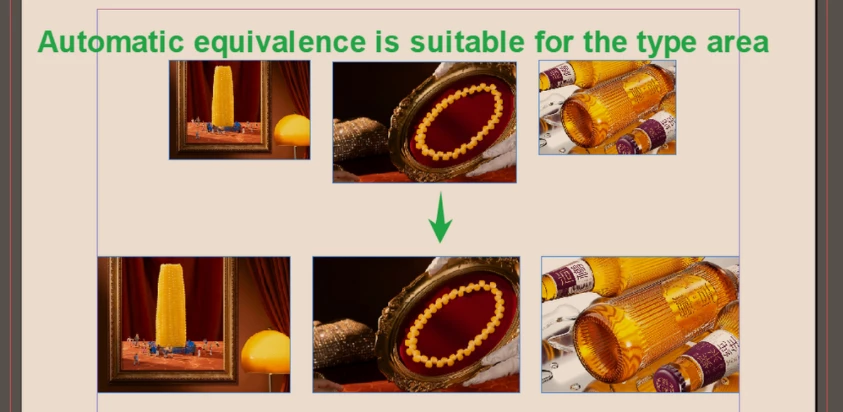
Can multiple pictures be suitable for the type area, Automatic equivalence? Like like below.

It is to choose the picture above, and automatically arrange the three columns of the same size and the same distance.

I think this feature should be merged here.
One is a distance distribution picture. The other is the separation distribution frame (but the original script uses the split method).
 

https://community.adobe.com/t5/indesign-discussions/is-there-any-script-that-can-quickly-generate-three-or-four-text-frameworks-in-the-type-area/m-p/14727627#M580230 


This topic has been closed for replies.

4 replies

Community Expert
July 11, 2024

If I needed to to this - I'd anchor them in a text frame and add an invisible rectangle between the 3 objects to space them.


Alternatively, you could place the images in a table and space out the images this way.

*edit* I see @Doc Maik also suggested a table workflow.

Good idea 


Robert at ID-Tasker
Legend
July 9, 2024

@dublove 


Easy to automate - but you can quite quickly do it manually:

1) select frame that defines finall size,

2) create new Object Style,

3) edit this new object style - by "activating" ADJUST HEIGHT & WIDTH:

4) set fitting options,

5) apply this ObjectStyle to frames you want to resize,

6) align objects vertically - top,

7) move left and right objects accordingly,

😎 select all three objects and use DISTRIBUTE SPACING:

RED - unchecked,


Unless you have 100s of those to align...


dublove
dubloveAuthor
Legend
July 9, 2024

 Your method is unscientific and unswerving.
You will take a lot of time.

Robert at ID-Tasker
Legend
July 9, 2024

@dublove


Yes, manually is only viable for a few instances. 


brian_p_dts
Community Expert
Community Expert
July 9, 2024

InDesign has a built in grid feature. Or you can use Content Collector with a predefined Object Style. 

Legend
July 9, 2024

I had a hard time understanding, but I think he/she means to "equalize the object size and apply vertical alignment and horizontal distribution by a script".

@dublove : in a text box, there are no columns unless you set them. If the images are supposed to be in flow text, the position is not defined. One solution could be to use an invisbile table. Another to put them floating above the text. However, a script that does the aligment and size change you must find or create yourself.