Copy link to clipboard
Copied
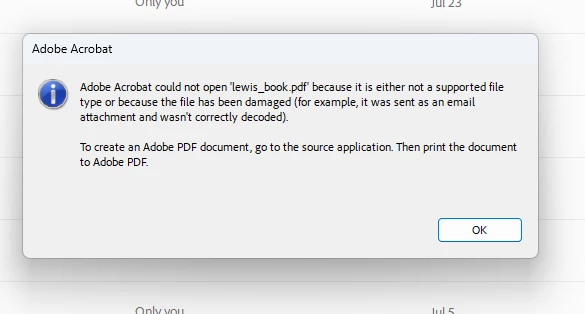
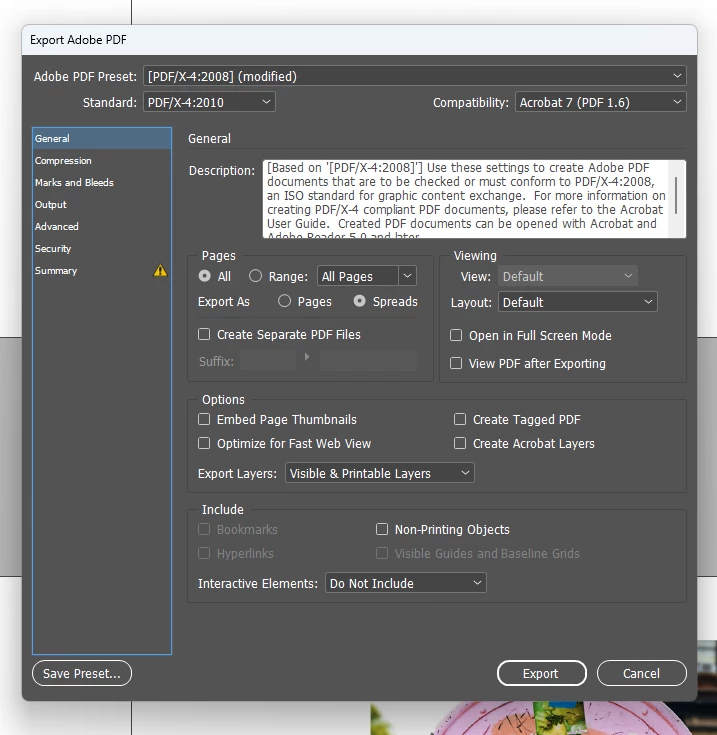
I can't open a PDF I exported from InDesign and need to get it to an editor. I'm using the options below. Then get the error shown in the screen shot below that. Why is this happening?
Is InDesign showing an error? What size is the PDF? Are you sure the file is finished writing? Look in Window > Utilities > Background Tasks. Perhaps InDesign has not finished writing the file.
Copy link to clipboard
Copied
Is InDesign showing an error? What size is the PDF? Are you sure the file is finished writing? Look in Window > Utilities > Background Tasks. Perhaps InDesign has not finished writing the file.
Copy link to clipboard
Copied
Thanks. I noticed it was inconsistent as to whether it would open or not. It's working fine now. I think you're right and the file had not finished writing when it wouldn't work. There is no status bar as to the progress in InDesign after you export and I was waiting a few seconds and then trying to open in Adobe. But at 120 pp. I think maybe the file hadn't finished writing.
Copy link to clipboard
Copied
Error message says Acrobat is unable to open the file, not InDesign...
There are basically two possibilities here, as the error message says, either the file is damaged, and you should export it again, or perhaps this is a not really the PDF, but rather a sync file in cloud storage or a file that has had its extencion changed to .pdf, but that's less likely.
Copy link to clipboard
Copied
You're right about the error message. I just wondered if InDesign had faultily exported the file. But I think (per above) it's because it hadn't finished writing when I was trying to open it. Thanks.
Copy link to clipboard
Copied
If you needed that quickly you should have enabled "View PDF After Exporting."
Copy link to clipboard
Copied
Good to know thanks!
Get ready! An upgraded Adobe Community experience is coming in January.
Learn more