
Richard Groff
Inspiring
August 17, 2020
Answered

Can't See Objects on Pasteboard Mac ID2020

  • August 17, 2020
  • 3 replies
  • 10811 views

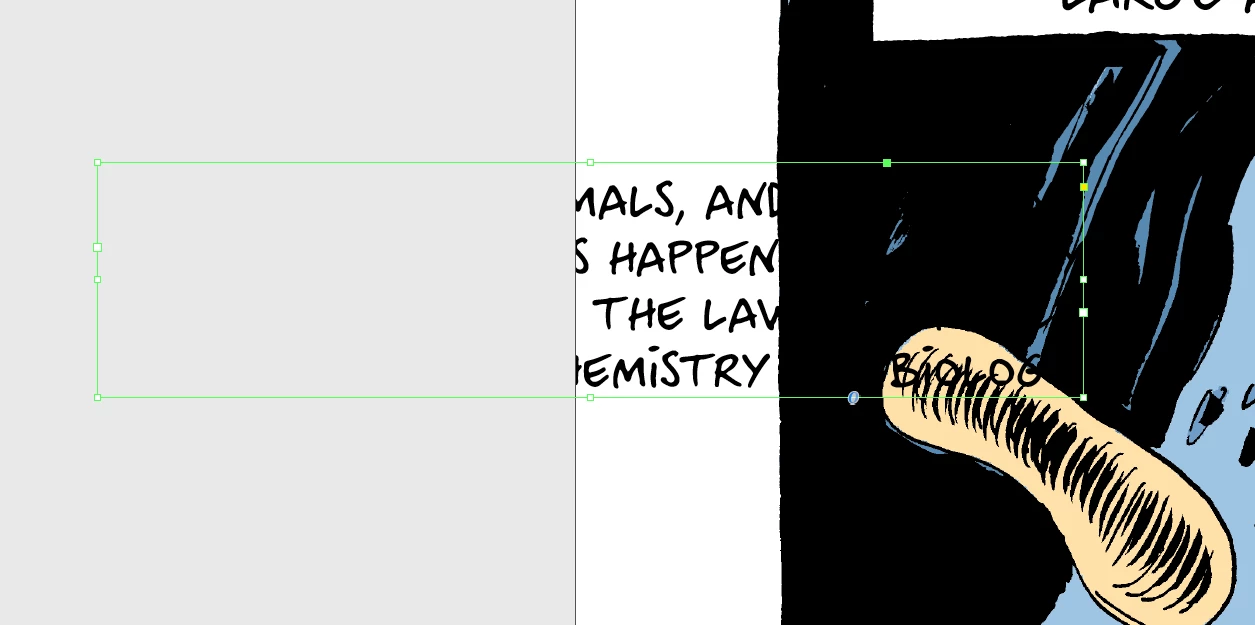
My pasteboard isn't showing text in frames. The frame itself is visible but not the text. Objects also aren't visible unless actually selected. I have the same Preference settings that I've always had.
 

This topic has been closed for replies.
Correct answer BobLevine

You appear to be in preview mode.

3 replies

Participant
April 30, 2024

Hi guys, 


I'm having a similar issue where can't see things that I place onto my pasteboard. I can see the bounding box while hovering over it but not the actual subject.

I use the pasteboard a lot to hold elements that I will later use as a part of my design. I have tried checking if I'm in preview mode, and disabeling the overprint preview mode, as well as matching my pasteboard to the colour theme. I have aslo tried changing my pasteboard margins to 0 but nothing has worked so far.

I would really appreciate any guidance on how to resolve this.


Thank you

leo.r
Community Expert
Community Expert
April 30, 2024
quote

I have aslo tried changing my pasteboard margins to 0 but nothing has worked so far.


By @Topia Water


so what your pasteboard margins are now? because if they're zero then you indeed won't see anything on the pasteboard.

BobLevine
Community Expert
BobLevineCommunity ExpertCorrect answer
Community Expert
August 17, 2020

You appear to be in preview mode.

Babington. Co
Inspiring
March 24, 2022

Hi Bob, I'm hoping you can help me solve the same problem: nothing on my pasteboard is visible. In my case, I'm in the Normal screenmode. (I dont knonw if I should have started a new post. Sorry if I should have. I hope you see this.) Thanks.

BobLevine
Community Expert
Community Expert
March 24, 2022

Are you sure you're not in preview mode? Because it sure sounds like you are.

Richard Groff
Inspiring
August 17, 2020

Problem solved! Sorry!