
Inspiring
December 30, 2023
Question

Can't start TOC on Left side of spread

  • December 30, 2023
  • 3 replies
  • 675 views

My TOC is using a  "Heading 1" style. Heading 1 always starts on "next odd page."
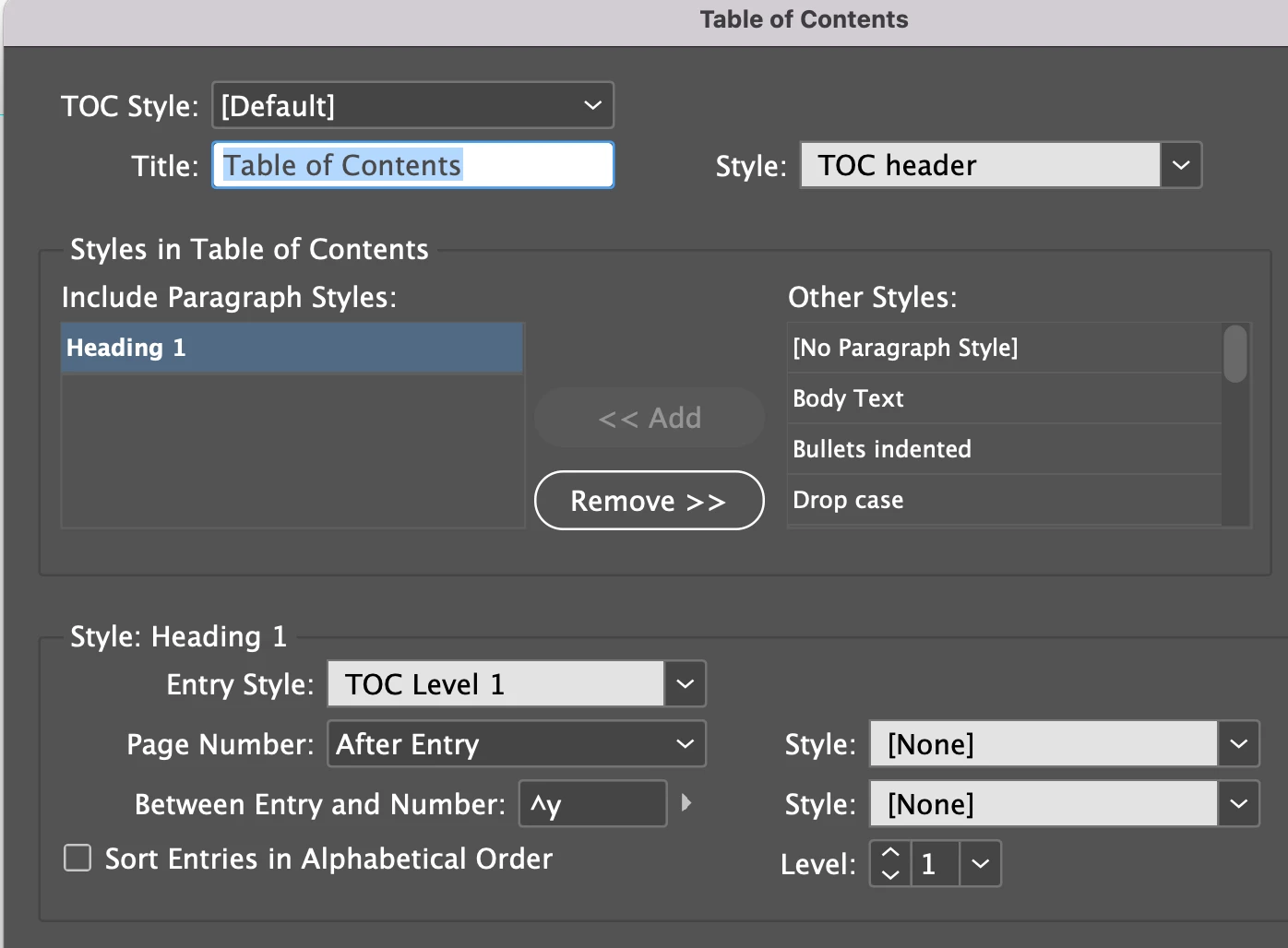
I want my TOC to start on an even page. I can't get it to work. 


Is it because "Heading 1" is set to start on "next odd page" or is there something I am missing? How do I get my TOC to start on an even page?


Thanks

This topic has been closed for replies.

3 replies

Barb Binder
Community Expert
Community Expert
December 31, 2023

Hi @Andrew Mikelsons:


I know this is frustrating but you are close to getting this to work. Here is my recommendation:


  1. Delete any existing TOCs, empty or otherwise.
  2. Navigate to the page where you want the TOC to appear. Be sure there is room to add the TOC—which will always be in its own frame, unthreaded from the rest of the content. 
  3. Your last screen shot has the title mispelled: Contents or Table of Contents, and you are assigning the paragraph style called TOC Header. Be sure to remove the Keep Options on TOC Header so that it doesn't try to jump to the facing page. 
  4. You have InDesign ready to collect all of the Heading 1s and assign them a paragraph style called TOC Level 1. Be sure to remove the Keep Options on TOC Level 1 so that it doesn't try to jump to the facing page.
  5. Before you click OK (and after each edit to this dialog box, click on Save Style and update the TOC style (which remembers all of these decisions).


This should type up the TOC, with the title assigned TOC header, and the Heading1s text followed by a right-indent tab and the page number, and assigned TOC Level 1. If things don't look perfect, edit the TOC Header and TOC Level 1 paragraph styles and update the TOC. 


~Barb

~Barb at Rocky Mountain Training
Robert at ID-Tasker
Legend
December 30, 2023

As @Eugene Tyson pointed out  - most likely your "TOC Level 1" ParaStyle - you are using to format your TOC - have "start on odd page" applied - directly or indirectly.


Your "Heading 1" ParaStyle - used in the text - have nothing to do with the TOC generation - is just a "source" - unless one of them is BasedOn on the other - and "parent" is set to "start on odd page"?


Inspiring
December 30, 2023
where would my parent be set to "start on odd page"?

How do I see where and how my parent is set?
Andrew MikelsonsAndy Fairchild Publishing Inc.
Robert at ID-Tasker
Legend
December 30, 2023

For where ParaStyle starts:

For BasedOn:


In your case - you need to make sure that your "TOC Level 1" - even if it is BasedOn on "Heading 1" - Keep Option -> Start Paragraph is set to "Anywhere".


Community Expert
December 30, 2023

Have different styles for your toc that don't start on new pages. 

Inspiring
December 30, 2023

How do I set up a new style for a TOC that already exists?

Also, where is the current style for my TOC listed?


Does the current TOC style appear in the Paragraph Style panel?

Andrew MikelsonsAndy Fairchild Publishing Inc.
Community Expert
December 30, 2023

Create a new paragraph style call it TOC header 1 or something

Then when you generate the TOC you can assign the paragraph style 

https://helpx.adobe.com/ie/indesign/using/creating-table-contents.html#:~:text=Options%20for%20formatting%20a%20table%20of%20contents


See the screenshot in the help page


Include styles >. Headings

Style: Heading
Entry Style
And you can select your own style for the TOC.

Most find it useful to create a separate set of styles for the TOC and most seemingly use TOC Body, TOC Heading, etc.