
Inspiring
June 9, 2025
Answered

Can you force lower-case with a style?

  • June 9, 2025
  • 5 replies
  • 1926 views

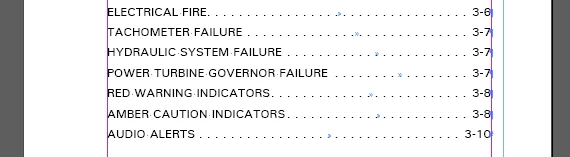
Our TOCs pull headings from the document that are in all caps, but we don't want the TOC entries to be in all caps. I've seen examples of grep styles that can apply a character style to make letters capitalized, but I don't think I've seen the opposite. Is it possible?
 

Correct answer Mike Witherell

Although there is an attribute style called lowercase, in a sense, there is no such thing as the opposite as a style or attribute because InDesign cannot read and know when a word should be capitalized. But you can Find/Change Heading text to be typed (a new addition called Change Case) in Sentence Case, or Title Case, or lowercase. Next, the Heading style could be edited to apply the appearance of all caps. This basically gets you back to where you were before, except that it is now built correctly and typed correctly. Lastly, the ToC could be refreshed and it would pull in properly typed upper/n/lowercase characters.

5 replies

Mike Witherell
Community Expert
Community Expert
June 10, 2025

So it would appear that since July 2024 with the 19.5 version of InDesign, we all now have the ability to Find/Change: Change Case: lowercase.

But also sneaked in: the Character panel gives the option to apply lowercase as an appearance style (but not a hard textual change as in Type > Change Case). It is also possible to make a Character Style with this new attribute as an appearance style. However, the Properties panel and especially the Control panel do not yet show this new appearance attribute button.


Have I gotten the introduction date correct?


Mike Witherell
Inspiring
June 10, 2025

Your solution in my case was still better, Mike. I'd rather have a title's raw bytes capitalized exactly as desired, and then style its references elsewhere.

Known Participant
June 10, 2025

Had lost track of changes in InDesign for a while, but it seems InDesign has learned Lowercase for character, dont aks since when.


As you see image1, my sample text has no uppercase switched on, its just hard UPPERCASE.
Now look into your character setting, either in the pallette, or thru an character-style. Theres a new option "lowercase" (german "Kleinbuchstaben") now.

This would be your best option i guess.


BobLevine
Community Expert
Community Expert
June 10, 2025

As pointed out multiple times in this discussion.

Known Participant
June 10, 2025

Since this question is not marked as answerd...

As for the new direction (title-capitalizing), from where should a script know, if my text is really uppercased? Just have a acronym or so between somewhere. This could be a job for a LLMA.


The initial error was to ditch upper/lower-infos by converting the text to upper.

Mike Witherell
Community Expert
Community Expert
June 9, 2025

You cannot upvote your own post; only others.

Mike Witherell
Inspiring
June 9, 2025

I wasn't trying to upvote my own. I tried to upvote Peter's and couldn't. I'd say more than half the time you can't upvote other people's posts.


And on another side note, why does this forum E-mail you a notice of every one of your own posts? So dumb.

Mike Witherell
Community Expert
Mike WitherellCommunity ExpertCorrect answer
Community Expert
June 9, 2025

Although there is an attribute style called lowercase, in a sense, there is no such thing as the opposite as a style or attribute because InDesign cannot read and know when a word should be capitalized. But you can Find/Change Heading text to be typed (a new addition called Change Case) in Sentence Case, or Title Case, or lowercase. Next, the Heading style could be edited to apply the appearance of all caps. This basically gets you back to where you were before, except that it is now built correctly and typed correctly. Lastly, the ToC could be refreshed and it would pull in properly typed upper/n/lowercase characters.

Mike Witherell
Inspiring
June 9, 2025

Thanks Mike. But, in this case, it turns out that there is the opposite of all-caps: "Lowercase." It's just missing from the Character properties section of the Properties tab, which does show all-caps.


BobLevine
Community Expert
Community Expert
June 9, 2025

Which is what I said in my comment above! <LOL> Perhaps I should have said "intelligently" lower-cased in order to be better understood. My basic rule is: don't type in all caps, but rather apply the appearance attribute of all caps. That way, when you get in a situation like yours, it produces upper and lowercase intelligently, especially when you generate a ToC.


Way back in the day, Dave Saunders wrote a smart title case script. Maybe someone has it filed away somewhere.

BobLevine
Community Expert
Community Expert
June 9, 2025

Create a lower case character style and then use that as a nested style.

None through one character, lower case through a space. Repeat that as many times as you need to cover the full heading.


Edit: Characters and letters will both work here.