Participant
November 6, 2024
Question

Cannot Find InDesign Recovery Folder on Mac

  • November 6, 2024
  • 1 reply
  • 189 views

Hello, 

I am looking for the recovery folder in on my Mac and i cannot find it. 

Under:  /Library/Caches/Adobe InDesign/Version[20.0]/InDesign Recovery does not exist 
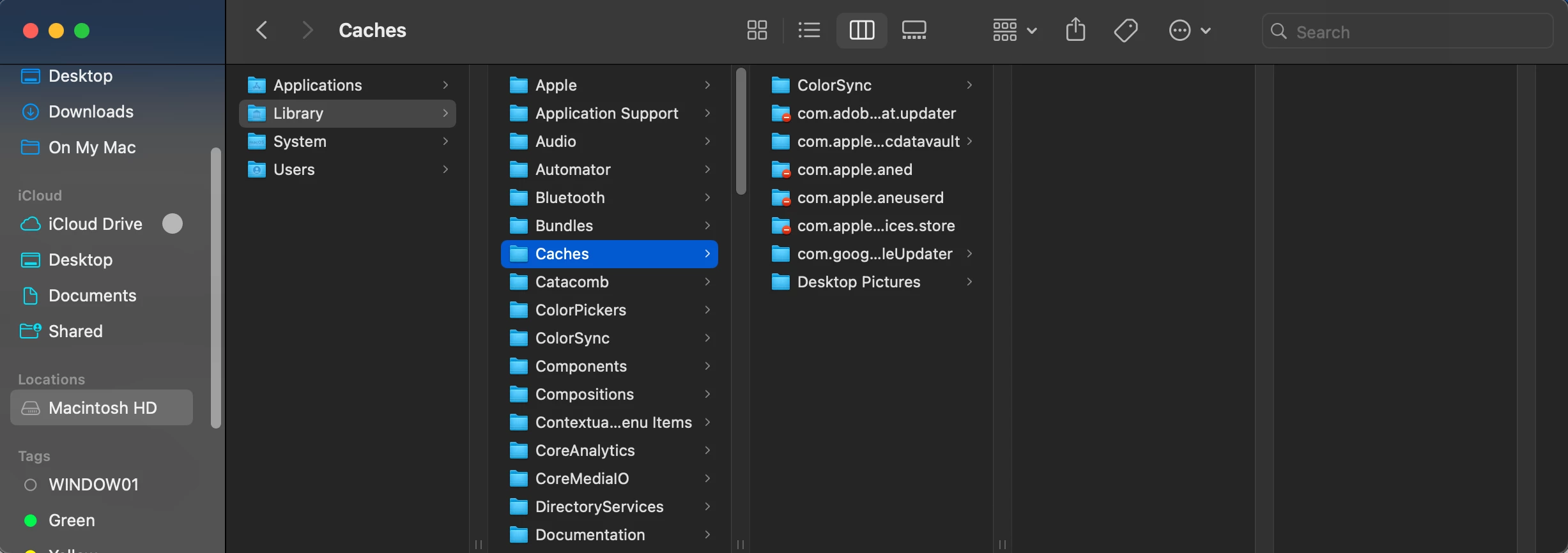


<Title renamed by MOD>

This topic has been closed for replies.

1 reply

Abhishek Rao
Community Manager
Community Manager
November 6, 2024

Hi @Celeste229368610eyj,


Thanks for reaching out. Could you please confirm the version of InDesign you're using as well as your macOS version? This information will help in providing more accurate guidance.

If you are unable to find the recovery folder in the path /Library/Caches/Adobe InDesign/Version[20.0]/InDesign Recovery, here are some steps you can try:

  1. Make sure that hidden files and folders are visible. You can press Command + Shift + . (dot) in Finder to toggle hidden files on or off.

  2. If the recovery folder is not in the specified location, try looking in your ~/Library folder (your user Library folder), as sometimes macOS permissions or setup can cause slight variations in path locations. The path would be:

    javascript
     
    ~/Library/Caches/Adobe InDesign/Version[20.0]/InDesign Recovery
  3. We have an official guide on InDesign document recovery that might provide additional insights into locating and using the recovery folder. Here’s the link for your reference: InDesign Document Recovery

Let me know if these steps help or if you need further assistance!


Best,

Abhishek Rao