
Participant
August 12, 2020
Answered

Cannot Load Printer Presets in InDesign

  • August 12, 2020
  • 1 reply
  • 2937 views

Hey Everyone,

           I just downloaded Indesign, Photoshop, Acrobat DC & Illustrator.. my boss had sent me two printer presets that I need to load (she uses them in the same version that i have so they should work...), so I went in:


File > Print Presets > Define > Load

I choose the file/preset and it comes up with: "Cannot import presets from this file"


the file shows up in my system as "adobe pdf settings" (.joboptions) so i'm not sure why it's not loading!  Is there something im missing, does it need to be a different file type? The preset also opens fine with Adobe Distiller... just not indesign...


This topic has been closed for replies.
Correct answer rob day

The only way to get a .joboptions file would be via File>AdobePDF Presets>Define>Save As


Are you and your boss outputting InDesign files to the same composite printer?


1 reply

Steve Werner
Community Expert
Community Expert
August 12, 2020

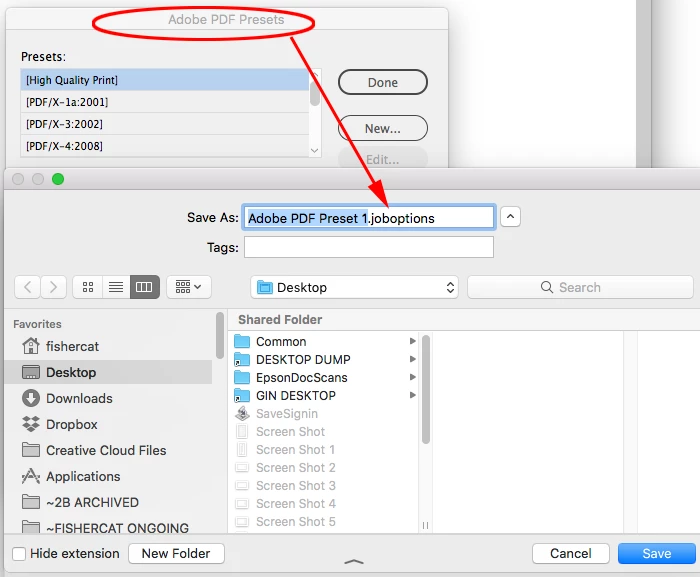
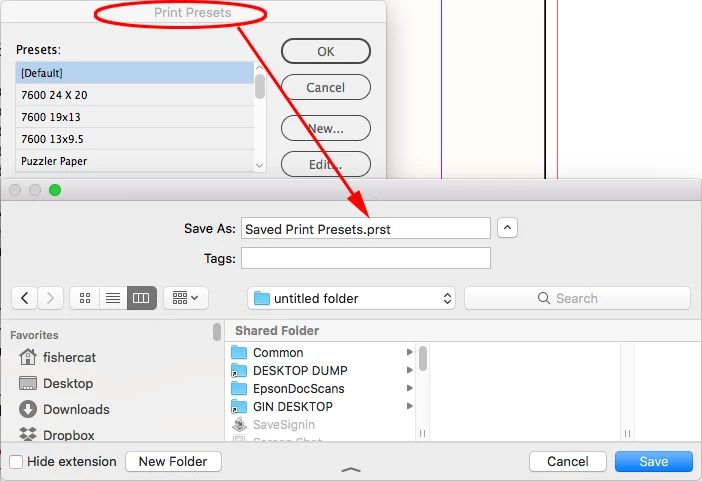
I think you're mixing up Print Presets and PDF Presets. Print presets are saved from File > Print Presets > Define as a file which has the extension ".prst"


Adobe PDF Presets are created by choosing File > Adobe PDF Presets > Define. When you create a PDF Preset, it has the .joboptions extension you describe:


hmils5
Participant
August 13, 2020

Hey Steve,

        I wonder how the file was sent to me that way (as the adobe pdf preset) and my boss uses it for her InDesign.. Thanks for the response, i'm considering just having her screen shot her presets and i'll just recreate it.  --Holly

rob day
Community Expert
rob dayCommunity ExpertCorrect answer
Community Expert
August 13, 2020

The only way to get a .joboptions file would be via File>AdobePDF Presets>Define>Save As


Are you and your boss outputting InDesign files to the same composite printer?