Exit
  • Global community
    • Language:
      • Deutsch
      • English
      • Español
      • Français
      • Português
  • 日本語コミュニティ
  • 한국 커뮤니티
0

Cannot manually drag row height in table

Explorer ,
Sep 26, 2022 Sep 26, 2022

Using CC 17.4, working on a table. Never had this issue: cannot manually drag the height of a row with the cursor. Can change column width, but now row height. It's like it's locked. Row height is set to no minimum with a max of 3.1. Any ideas?

TOPICS
Performance
689
Translate
Report
Community guidelines
Be kind and respectful, give credit to the original source of content, and search for duplicates before posting. Learn more
community guidelines

correct answers 1 Correct answer

Explorer , Sep 26, 2022 Sep 26, 2022

It is not a header row. I figured out what was wrong - the row height was set to "at least" instead of "exactly." Now the "fit frame to content" feature for the table won't work ...

Translate
Community Expert ,
Sep 26, 2022 Sep 26, 2022

Is it a header row on a second(ary) page? You can only modify the header row on the very first page of the table.


Translate
Report
Community guidelines
Be kind and respectful, give credit to the original source of content, and search for duplicates before posting. Learn more
community guidelines
Explorer ,
Sep 26, 2022 Sep 26, 2022

It is not a header row. I figured out what was wrong - the row height was set to "at least" instead of "exactly." Now the "fit frame to content" feature for the table won't work ...

Translate
Report
Community guidelines
Be kind and respectful, give credit to the original source of content, and search for duplicates before posting. Learn more
community guidelines
Community Expert ,
Sep 26, 2022 Sep 26, 2022

Hi @leannz30751615:


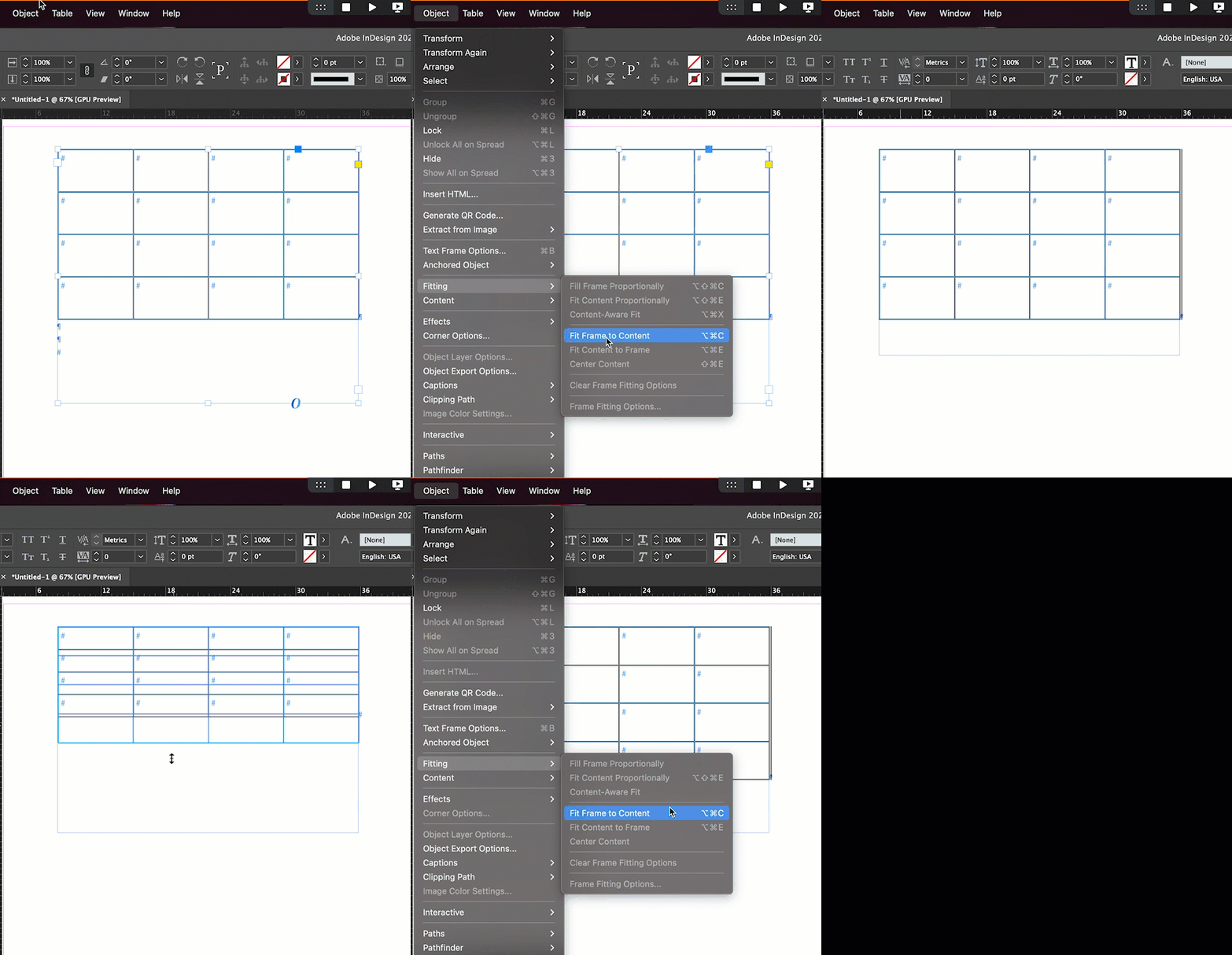
Is the table in its own frame? What happens when you choose Fit Frame to Content with the frame containing just the table selected? Are there extra ¶s at the bottom of the table that you can't see because Type > Show Hidden Characters is disabled? A screen shot would be good, a quick video even betters so that we can see what is happening.


~Barb

Translate
Report
Community guidelines
Be kind and respectful, give credit to the original source of content, and search for duplicates before posting. Learn more
community guidelines
Explorer ,
Sep 27, 2022 Sep 27, 2022
Nothing happens at all. There are no extra paragraphs. The frame just stays “unfit” although I can adjust it manually but it’s not exact.
Translate
Report
Community guidelines
Be kind and respectful, give credit to the original source of content, and search for duplicates before posting. Learn more
community guidelines
Community Expert ,
Sep 27, 2022 Sep 27, 2022
LATEST

Hi @leannz30751615:


We are happy to help with part II of your question, but it's hard for us to guess without seeing what you are working with. That's why I asked for a screen shot or quick video. For example:

2022-09-27_07-57-46 (1).gif


~Barb

Translate
Report
Community guidelines
Be kind and respectful, give credit to the original source of content, and search for duplicates before posting. Learn more
community guidelines