
Sarrach
Participant
April 6, 2022
Question

Cannot open file error

  • April 6, 2022
  • 2 replies
  • 544 views

My computer crashed and when I attempted to reopen the file I was working on I got the following message.


Please advise.
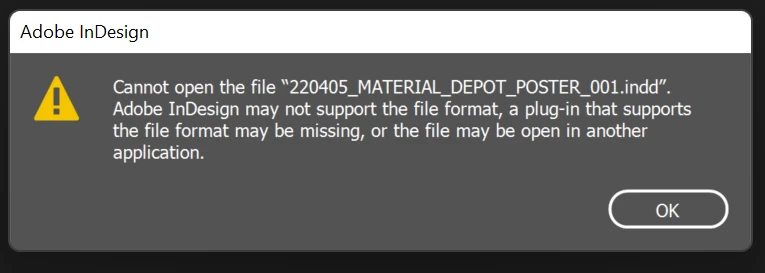


This topic has been closed for replies.

2 replies

Community Expert
April 7, 2022

The .idlk would be hidden, so you will have to activate showing hidden files to locate it and delete it.

WIN :- View hidden files and folders in Windows

MAC :- Use the shortcut cmd+shift+. on the finder window

-Manan

-Manan
Sarrach
SarrachAuthor
Participant
April 7, 2022

I deleted the .idlk file and it still creates the error.

Community Expert
April 8, 2022

Then we could be looking at file corruption. Check the file size, does it look fishy? Very small in size or something like that. Can you share the file? So that we can have a look at it

-Manan

-Manan
Peter Spier
Community Expert
Community Expert
April 6, 2022

Look in the directory where the file is located for a .idlk file and delete it.
