Answered
Cannot place .xlsx file in InDesign
Trying to place a simple .xlsx file into InDesign and get the attached error message. What the heck?
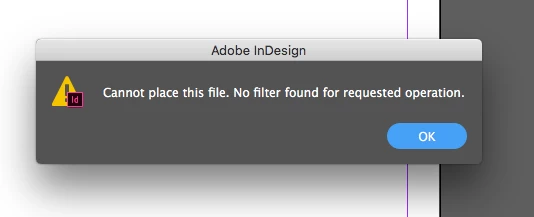

Trying to place a simple .xlsx file into InDesign and get the attached error message. What the heck?
3rdrockgraphics wrote
I can only open in Google docs myself. I don't have Excel. I'm on a Mac and don't have Office.
Hi
If you don’t have Excel, how did you open it and convert it to .csv?
When you converted it to .csv, did you keep it as a text only file? Or accidentally save again in another native format? A .csv is text only and can’t hold any formatting at all. That’s another thing to double-check.
I also have a Mac. Office 365 can be put on 5 devices and it’s okay to mix Windows and Mac.
Jane
I converted it to .csv using google docs just to see if maybe it was a problem with the .xlsx. It wouldn't even give me the option to place it. Weird thing that I'm using the same CC version on my Mac at work (well, I think it's the same version, anyway since we use CC) and it places .xlsx files created with Google docs just fine since I do it all the time at work. Not sure why the one at home doesn't work. Could it be the OS? Using High Sierra here at home and Mojave at work.
UPDATE: I just tried resaving and renaming the same file using 365 (a friend has it) and it places fine. The frequency I would need Office 365 just doesn't warrant the $ to spend on it, really (even tho it's cheap, I know). I'd say maybe 5x a year I need it.
I also just tried using zamzar online to convert the xlsx customer sent to xls and THAT worked too.
I guess I'm all set! Thanks to everyone for all their help!
Already have an account? Login
Enter your E-mail address. We'll send you an e-mail with instructions to reset your password.
 AdChoices