
Inspiring
January 11, 2019
Answered

Cannot print "PB" pages

  • January 11, 2019
  • 3 replies
  • 5896 views

Hi, I have a large indesign 2019 CC spread and several pages are exporting to pdf as blank. The problem can be seen on the pages panel, where they are not rendering but are blank. Oddly, the blanks on the page panel have the correct page numbers (D-3, D-5) but the pages themselves have "PB" for page numbers. Does this stand for "pasteboard"? If so, why? I cannot see where to control this.  I also tried adding new pages but it did not correct the problem.

Please advise.
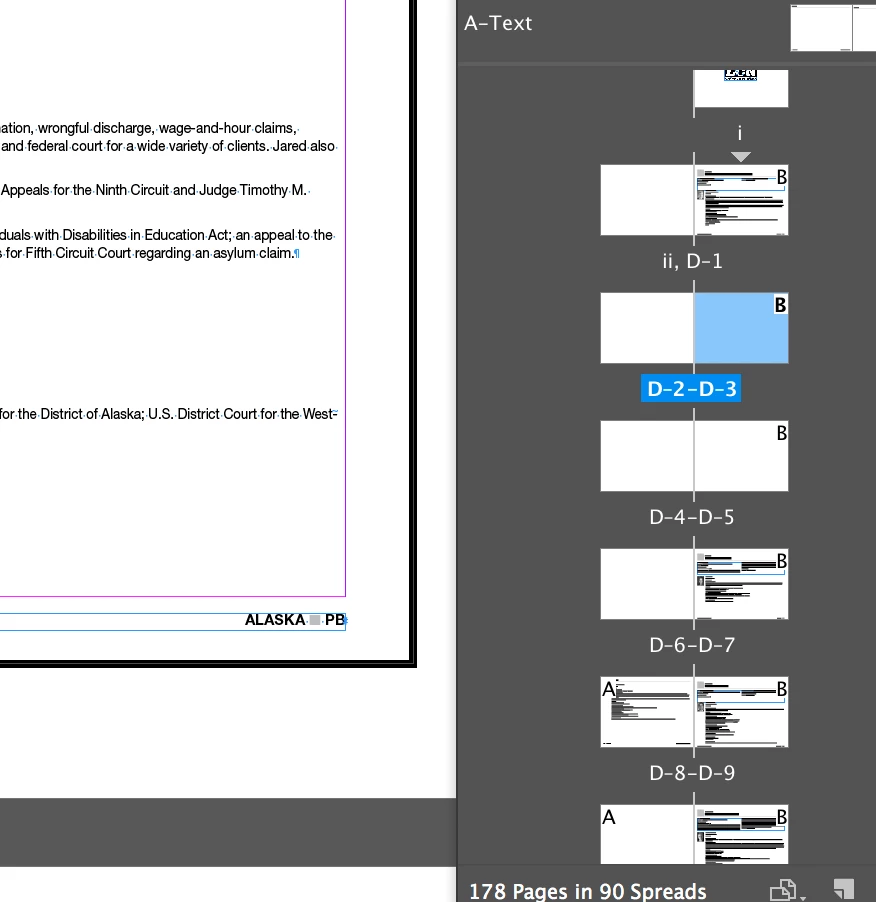
This topic has been closed for replies.
Correct answer Anders Slaga37441870qop1

I just ran into this same issue.

Solved it by copying the affected page spread to a new document then deleted the pages in the original document and copied them back from the new document

3 replies

Participant
May 16, 2024

I just ran into this same issue.

Solved it by copying the affected page spread to a new document then deleted the pages in the original document and copied them back from the new document

Participant
March 15, 2021

This same thing happened to me without warning and thank goodness I came to the forum. I exported my file as IDML, then reopened it and it is fine now. The only thing that was amiss is that some of the fonts did not export correctly and that was an easy fix. Thank you for the help everyone! I'm in the middle of a very tedious instruction manual and it would have been quite a loss.


Participant
July 25, 2022

same thing happened to me and that seems to help

Community Expert
January 12, 2019

It looks like your pages think they are actually on the pasteboard - which speaks of some sort of weird corruption (not a bad thing, just bad code in the file probably built up over time).

To fix, try moving the frame from the page to the pasteboard, to the middle of the page, and back to the original location.

Or if that's not working - then roundtrip to File>Export and choose IDML - then open that file - save it as a new indesign file - and hopefully that fixes it.

Colin Flashman
Community Expert
Community Expert
January 13, 2019

Agree with Eugene, sounds like a corruption, and would export a copy to IDML, then open the IDML and see if it resolves the issue.

Other posters with similar issues had luck with that on this thread: Links are in the file, it says on PB, but are not accessible... what to do?!

Otherwise, there is a bug report on the indesign.uservoice.com with a similar issue and an invitation for an engineer to inspect: double layout page has become a PB spread. some pictures missing – Adobe InDesign Feedback

If the answer wasn't in my post, perhaps it might be on my blog at colecandoo!
Participant
November 13, 2019

I have the same problem. Exported to IMDL and re-opened. Did see some changes, but I still have a lot of missing  images. Looks like some frames are working like a mask or something. Most other images in a frame are on the right bottom corner of the frame (so you can't see them). Also, transparancy and feather effects on pictures are not visable after exporting to IMDL. 


Conclusion: exporting to IMDL isn't working for me. Need another option. Are there more fixes possible?  Never had any problems and suddendly it occured. (when reopening the file).


EDIT: I just noticed that creating a package isn't possible. Exporting the PDF doesn't work anymore. Pictures that seem on 'PB' in the links panel, are on the correct page but show as small dot. Relinking the picture doesn't work. On one page the whole page dissapears when in 'preview-mode' (W).