
Cannot Replace Type 1 Fonts?
I have an InDesign Document that I created about a year ago (I update it annually for a client). It uses several Franklin Gothic font variations. When I first opened this document yesterday, I saw the common warning from Adobe that Type 1 fonts are being deprecated, and that document contains quite a few as can be seen here...
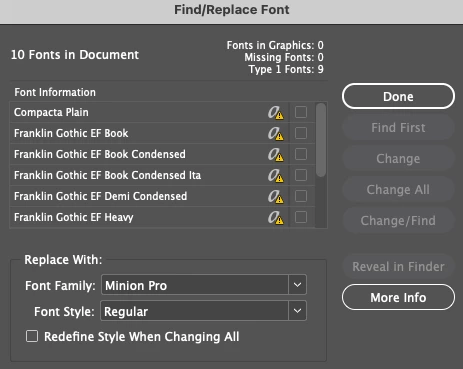
I have gone through this before where I select the OTF replacements that I have with the same names and hit "Change All" and this has always worked on other documents until now.
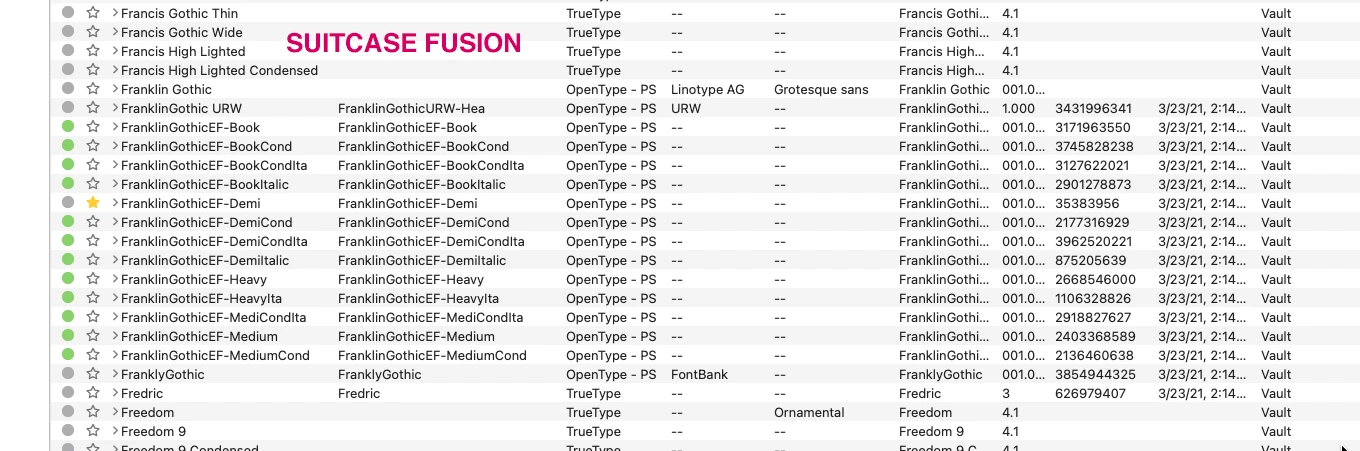
I am on Mac Pro 2019, latest version of InDesign and Big Sur latest version. I also use Suitcase Fusion to activate and auto-activate fonts (as always in the past). This shows the OTF replacements for some of the fonts in question in this document...
When I try to replace the Type 1 fonts with the OTF activated versions I get this garbled result...
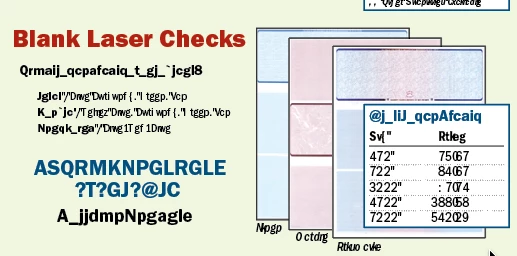
I have tried everything I can think of - restarting everything including computer, saving as IDML and opening that - always the same result? I can make changes to text inside the document without replacing fonts, but I have no idea where it is getting that Type 1 font info from as I have removed all of them on my system? The problem so far has only shown up in this one document and I no longer get the Adobe font warning when opening it?
If I open a NEW InDesign Document and choose ANY of the same OTF fonts used in the problem document they work perfectly. If I got to Find/Replace fonts in the new document it looks perfect - no Type 1 fonts.
If I make text changes to the problem document (without trying to update the Type 1 fonts) I can successfully save a print PDF - I just cannot update the fonts to fix it for the future.
I have several other multi-page documents for this client using the same older fonts and now I am scared to even open them.
Any Idea how to fix this?
 AdChoices