
Known Participant
May 16, 2011
Answered

Capitalise words via paragraph styles?

  • May 16, 2011
  • 5 replies
  • 38220 views

Hello.

I create a lot menus which require Each Word To Begin With A Capital.

Now I can see to do that in type>case

However in pragraph styles, I only see options for small caps or all caps. Is there not a way to make this part of a pragraph style so I don't have to go through the menus for the hundreds of food items I will have?

Cheers
    Correct answer b_pashley

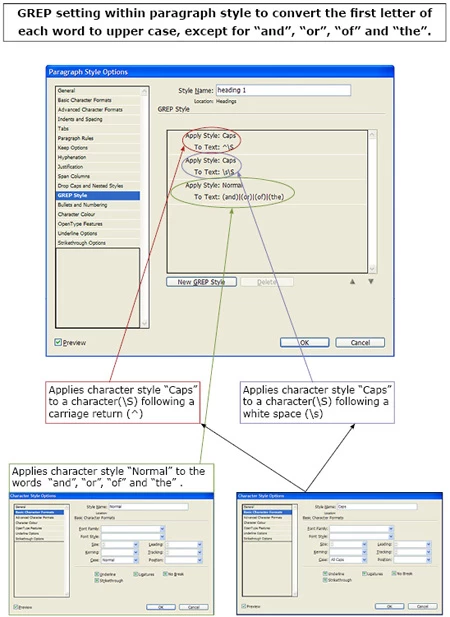
    You've probably solved your problem by now but incase you haven't here is a crib sheet I made for myself on this specific use of GREPs when faced with a similar problem.  If it's not clear then let me know and I will send you a better quality version

    5 replies

    Participant
    March 15, 2012

    Jongware,

    Your solution "'([sdt]|ve)\b" works perfectly. Thank you very much!

    I'm so happy to have found this forum. This will save me so much time!

    Jongware
    Community Expert
    Community Expert
    March 15, 2012

    Dude, see my belated follow-up above if your typesetting up to specs (i.e., using your curly quotes correctly).

    Participant
    March 15, 2012

    I'm not sure I know what you mean by using curly quotes correctly in my typesetting.

    Participant
    March 15, 2012

    Jongware, This is what I used.

    Jongware
    Community Expert
    Community Expert
    March 15, 2012

    Hmmm ... apparently the apostrophe is picked up by the top expression as a "word break" character.

    Short solution: add another GREP "'s\b" (that's Apostrophe S, followed by yet another word break) and apply the style "Normal" for this as well. It needs a word break after the "s" so the esses in "'seven' 'silly' 'strumpets'" will still be capitalized.

    If you'd want to include (= EXclude) other contractions as well (don't, I'd, I've -- any more?) you can add them one at a time, as above, or all at once:

    '([sdt]|ve)\b

    Jongware
    Community Expert
    Community Expert
    March 15, 2012

    Oh scratch that. I was finally going to make dinner, but let me add this:

    If you are conscious about using your Curly Quotes, it ought to be enough to re-Normalize the lower case character right after a single curly close quote:

    ~]\l

    Participant
    March 15, 2012

    OK, so I followed the directions above and got my faux Title Case in my Paragraph Style. Works very well, so thanks to you all for the GREP info.

    One hiccup so far - when using a title with a possessive noun "Library's Computer", it capitalizes the S after the apostrophe so it's instead "Library'S Computer".

    Is there any way to remedy that?

    Jongware
    Community Expert
    Community Expert
    March 15, 2012

    Which of the (extremely varied) methods/script/GREP queries did you use?

    b_pashleyCorrect answer
    Participant
    May 17, 2011

    You've probably solved your problem by now but incase you haven't here is a crib sheet I made for myself on this specific use of GREPs when faced with a similar problem.  If it's not clear then let me know and I will send you a better quality version

    GarethiAuthor
    Known Participant
    May 17, 2011

    Wow thanks for this guys, so not only is it possible but I can ignore 'and' 'the' etc which was something I assumed could not be done.

    Now just to learn how to use grep!

    What does it mean Grep?

    Jongware
    Community Expert
    Community Expert
    May 17, 2011

    You don't have to learn it right now, the posts above are ready-to-go.

    It's usually explained mean "Generalized Regular Expression Parser", but you don't have to memorize that, as everyone who knows it just calls it "grep".

    Steve Werner
    Community Expert
    Community Expert
    May 16, 2011

    Not in paragraph styles.

    Sounds like time for GREP or a script. Does anyone have one?

    Harbs.
    Legend
    May 16, 2011

    http://in-tools.com/products/plugins/style-utilities/