
Andreas Jansson
Inspiring
December 15, 2015
Answered

CC2015/Mac: CXSEvent does not have a constructor – Warning from newly installed CEP extension on MACOSX
  • December 15, 2015
  • 2 replies
  • 4755 views

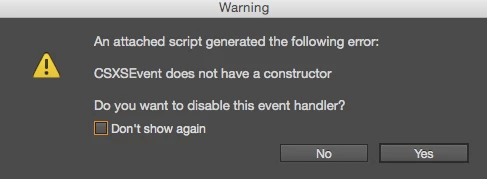
Some MacOSX users get this error:

"An attached script generated the following error:

CSXSEvent does not have a constructor

Do you want to disable this event handler"

...when running our CEP Extension ( HTML5 / JS / JSX ).

The user who reports it is running CC 2015.2. The message is showing for almost everything she does in the user interface, but most actions (perhaps all) are working despite the annoying message.

For the first user (it might have been CC 2014 then) with this problem, the error was suddenly gone. He had not checked the "Don't show again" checkbox.

It seems this error is only on Mac. Users running Windows, including myself don't have the issue.

(There is also an initial "I/O error" for the user, when starting the application, but that might not have anything to do with the CSXSEvent.)

This topic has been closed for replies.
Correct answer Trevor:

I found a few threads about I/O errors and ExternalObject:

https://forums.adobe.com/thread/1444959?tstart=0 reads: " it turned out to be OSX Deployment Target setting under Build Settings > Deployment of the target.  I had to switch to OS X 10.8 for it to work."

https://forums.adobe.com/thread/1445754?tstart=0 reads: "I got it, the framework is for 32 bit not 64 bit"

https://forums.adobe.com/thread/1245938?start=0&tstart=0 reads: "In Windows 64, if your application is compiled 64bit then you can only access InDesign 64bit and its object library. However if your app is 32 bit then you can only access InDesign 32bit and its object library."

But could 32/64 bit differences be an issue using HTML5/JS/CEP?


With CEP6 the plugplug library is included so doesn't need to load it from a external file. One can just use the method that Loic showed

var mylib = new ExternalObject( "lib:PlugPlugExternalObject" );

Did you try that before doing what you described in #12?

If not, try it and see if it works

2 replies

Andreas Jansson
Inspiring
December 18, 2015

In my initial question I wrote that the first one of our users who experienced this error "had not checked the "Don't show again" checkbox" when the error went away.

It turns out that this was not necessarily true, since I found another mail where it seems he did uncheck that very checkbox, but I'm not quite sure whether that was an earlier installation.

Loic.Aigon
Legend
December 15, 2015

Hi Andreas,

You need to load the PlugPlug library in order to instantiate CSXSEvent objects at the ExtendScript level.

var externalObjectName = "PlugPlugExternalObject";
var mylib = new ExternalObject( "lib:" + externalObjectName );

then you can instantiate CSXSEvents

var eventObj = new CSXSEvent();
eventObj.type="documentCreated";
eventObj.data="blahblah";

eventObj.dispatch();

Hope that helps

Loic

www.ozalto.com

Andreas Jansson
Inspiring
December 15, 2015

I am loading the PlugPlug library, and so far I've never seen these errors on Windows, but users on Mac are reporting them.

Looking through the resource files for the code, I should probably update my CSInterface.js file, from this link, since my version is 5.2, and there are versions >6 now.

https://github.com/Adobe-CEP/CEP-Resources/tree/master/CEP_6.x

There seem to be no new versions of PlugPlugExternalObject since 2014: https://github.com/Adobe-CEP/CEP-Resources/releases/tag/1

Loic.Aigon
Legend
December 15, 2015

Hi Andreas,

At the very least, you could try to investigate if within the CSInterface library, you can find the following code

/**

* @class CSEvent

* A standard JavaScript event, the base class for CEP events.

*

* @param type The name of the event type.

* @param scope The scope of event, can be "GLOBAL" or "APPLICATION".

* @param appId The unique identifier of the application that generated the event.

* @param extensionId The unique identifier of the extension that generated the event.

*

* @return A new \c CSEvent object

*/

function CSEvent(type, scope, appId, extensionId)

{

this.type = type;

this.scope = scope;

this.appId = appId;

this.extensionId = extensionId;

};

There is no reasons why you wouldn't find it but just in case. Try updating the library if needed.

Let us know how that goes.

Loic