Exit
  • Global community
    • Language:
      • Deutsch
      • English
      • Español
      • Français
      • Português
  • 日本語コミュニティ
  • 한국 커뮤니티
0

CC2021: Where is "Redefine Scaling as 100%" in the latest version if InDesign?

Community Beginner ,
May 05, 2021 May 05, 2021

I scalled some test and now have type that was scaled, and now the size is shown with another number next to it is parentheses. In previous versions there was the command to "Redefine Scaling as 100%," but I can no longer find it. How do I get rid of the parentheses?

TOPICS
Print
3.4K
Translate
Report
Community guidelines
Be kind and respectful, give credit to the original source of content, and search for duplicates before posting. Learn more
community guidelines

correct answers 1 Correct answer

Community Expert , May 05, 2021 May 05, 2021

Hi Jake,

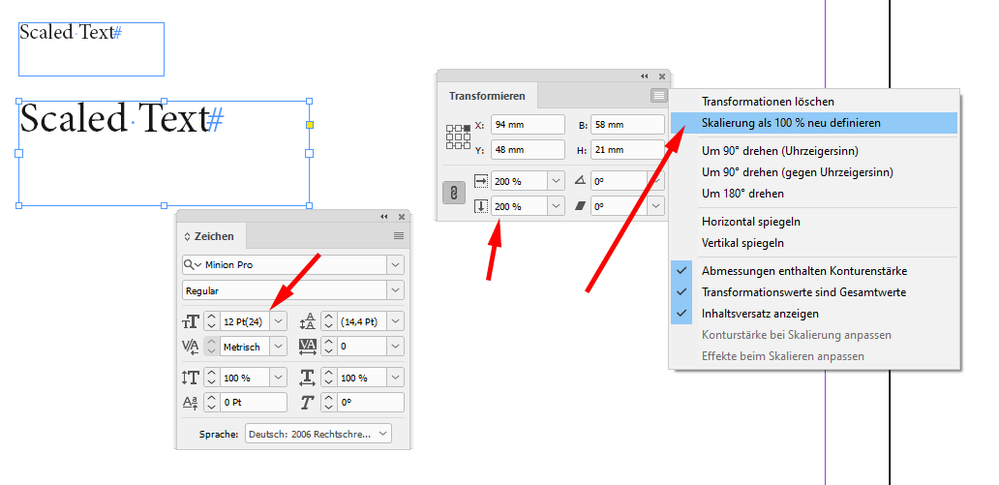
"Redefine Scaling as 100%" is still there where it was in previous versions:

Object & Layout > Transform


From my German InDesign 2021 on Windows 10


RedefineScalingTo-100-Percent.png


Regards,
Uwe Laubender

( ACP )

Translate
Community Expert ,
May 05, 2021 May 05, 2021
LATEST

Hi Jake,

"Redefine Scaling as 100%" is still there where it was in previous versions:

Object & Layout > Transform


From my German InDesign 2021 on Windows 10


RedefineScalingTo-100-Percent.png


Regards,
Uwe Laubender

( ACP )

Translate
Report
Community guidelines
Be kind and respectful, give credit to the original source of content, and search for duplicates before posting. Learn more
community guidelines