
Participant
March 3, 2020
Answered

Cell Range Not Showing - InDesign 2020

  • March 3, 2020
  • 13 replies
  • 3053 views

Hi,


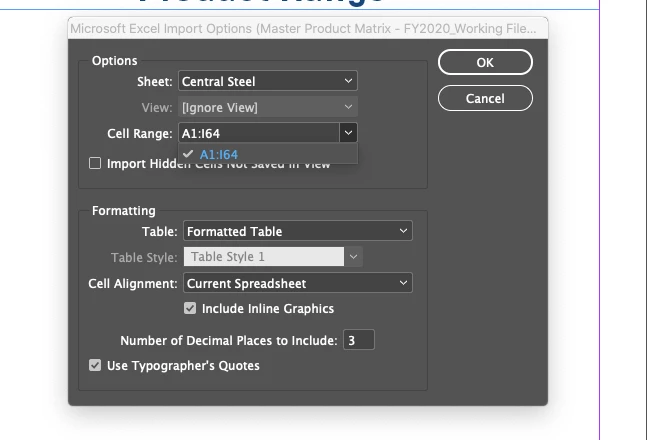
I'm a long term user of InDesign, and since the change to 2020, when I'm importing excel files to InDesign, when I try to import information, from a sheet with a named cell range, it doesn't bring it up. 


Has there been some change? When I use an older version it works? Can this be fixed at all? I do a lot of work, importing price files into InDesign from Excel.


Thanks for your help, below is an image to show you what I mean, in the 'cell range' it should say 'Cent2020' not just the numbers.

Thank you! 
your 

This topic has been closed for replies.
Correct answer Ahenn

Know this is an old thread but after about an hour of Googling around and being incredibly frustrated when the "remove spaces" fix above didn't work for me, I figured out what my issue was (using 2024 19.0.1) - numbers in my sheet names. I'm working in rather large files and so I kept my named ranges separated by corresponding page in the document - my Excel file had corresponding pages number in my sheet names.


Originally I had my sheets titled 1 - Cats Dogs etc. Read this thread and replaced spaces with underscores so that it showed 1_Cats_Dogs,. Still no luck. Changed it to just say CatsDogs and then FINALLY my named ranges showed up in the Import Options drop down.


It's worth noting that my range names also excluded spaces and numbers (that wasn't on purpose, but I'd also try removing them there if you have this issue and the problem persists). 

13 replies

AhennCorrect answer
Participant
April 19, 2024

Know this is an old thread but after about an hour of Googling around and being incredibly frustrated when the "remove spaces" fix above didn't work for me, I figured out what my issue was (using 2024 19.0.1) - numbers in my sheet names. I'm working in rather large files and so I kept my named ranges separated by corresponding page in the document - my Excel file had corresponding pages number in my sheet names.


Originally I had my sheets titled 1 - Cats Dogs etc. Read this thread and replaced spaces with underscores so that it showed 1_Cats_Dogs,. Still no luck. Changed it to just say CatsDogs and then FINALLY my named ranges showed up in the Import Options drop down.


It's worth noting that my range names also excluded spaces and numbers (that wasn't on purpose, but I'd also try removing them there if you have this issue and the problem persists). 

Rishabh_Tiwari
Community Manager
Community Manager
April 19, 2024

Hi,


Thank you for reaching out and sharing the solution that worked for you. I am sure it will help other community members. If anyone else is experiencing a similar issue, you can also refer to this discussion.


Thanks

Rishabh

Participant
August 3, 2021

I was running into the same issue. I had defined all of the cell range names in my spreadsheet, but none of them would appear when I went to import into InDesign. One commenter mentioned changing the sheet name to remove any spaces. I did this and replaced all of the spaces with underscores. That seemed to fix the issue. Now all of my defined cell ranges are appearing. I hope this helps someone!

kaichilver
Participant
August 20, 2021

This is still an issue in 16.3.2 
I tried removing any spaces from the sheet name with no luck.

Participant
July 21, 2022

I had been having this same issue. I tried removing all spaces, underscores, and hyphens from worksheet name and range name. Seems to be working. At least for now.

Participant
May 30, 2021

Same problem here . my excel Sheet contains 14 names ranges but on Indesign it show only 12 named ranges

.

Known Participant
May 12, 2021

This is still not working (16.1) and I don't think the Adobe person knows what we are talking about. Their example shows the standard choices, not custom cell ranges. This is a HUGE problem.

jacquio57852915
Participant
March 14, 2021

Still not working. Surely they can get their acts together aand fix this.


Participant
March 3, 2021

Had the same issue, solved it by replacing all spaces with underscores in all sheet names. Then it worked like expected.

Known Participant
March 3, 2021

Since the 2021 version came out, it has worked as it had before for me.

Participant
November 26, 2020

Same here....need to import the Defined Names but nothing shows up in the list. I thought it was me going mad but clearly the latest version is broken.

Participant
October 29, 2020

I'm running 16.0 and can confirm that this still is not working.

Ashutosh_Mishra
Inspiring
August 29, 2020

Hi All,


Sorry to hear about your experience. This is really unusual. I'd request updating your InDesign to the latest version(v15.1.2) and see if it helps.


Regards,

Ashutosh


ealesius
Participant
October 22, 2020

Did anyone find a solution to this issue? I have updated my InDesign and I am still not seeing my named cell range

Known Participant
August 20, 2020

I am also having this issue since updating to InDesign2020, 15.03. I can import the named ranges from an .xls file, though.