Participant
October 3, 2017
Answered

Center indication

  • October 3, 2017
  • 4 replies
  • 417 views

My texts and images no longer indicate when they are centered in relation to the page...

    This topic has been closed for replies.
    Correct answer Barb Binder

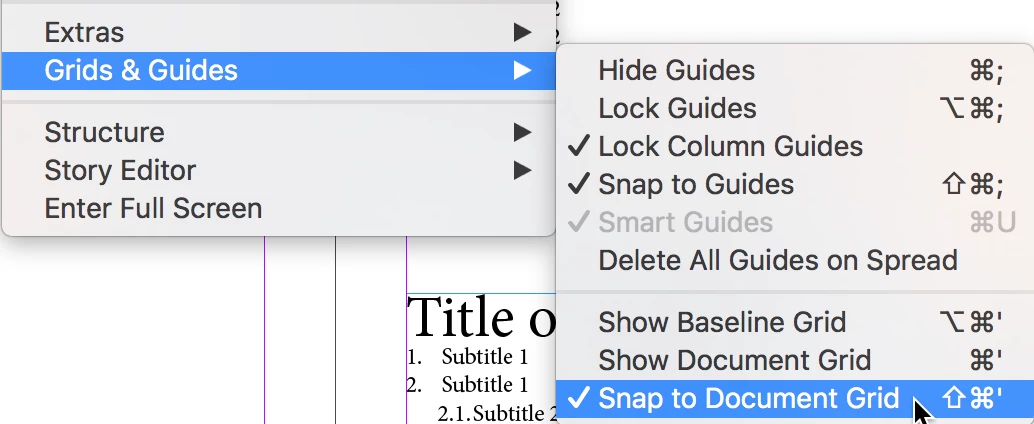
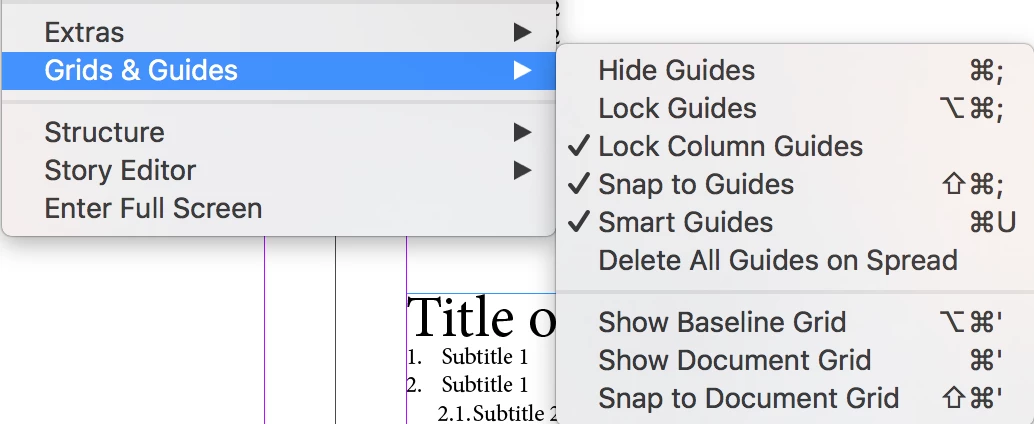
    Did you disable Snap to Document Grid?
    4 replies

    Barb Binder
    Community Expert
    Barb BinderCommunity ExpertCorrect answer
    Community Expert
    October 3, 2017

    Did you disable Snap to Document Grid?
    ~Barb at Rocky Mountain Training
    Participant
    October 3, 2017

    THANK YOU BARBBINDER !

    Barb Binder
    Community Expert
    Community Expert
    October 3, 2017

    You are very welcome. Another one of those InDesign idiosyncrasies!

    ~Barb at Rocky Mountain Training
    Jongware
    Community Expert
    Community Expert
    October 3, 2017
    vinny38
    Legend
    October 3, 2017

    In addition to Derek's answer, check Preferences > Guides & Pasteboard and make sure Align To Object Center and/or Align To Object Edge are selected.

    Derek Cross
    Community Expert
    Community Expert
    October 3, 2017

    Show guides: View > Grids & Guides > Smart Guides  (Cmd/Ctrl + U)

    Participant
    October 3, 2017

    Dereck : I can't do anything with Ctrl+U ...