


- Home
- InDesign
- Discussions
- Re: Change color values for existing spot color in...
- Re: Change color values for existing spot color in...
Change color values for existing spot color in indesign, javascript

Copy link to clipboard
Copied
Hi,
I need temporary change color values for existing spot color in indesign CS6, javascript. I have it created, not sure how to change it:
try{
myColor = myDoc.colors.item("red");
myName1 = myColor.name;
}
catch (myError){
myColor = myDoc.colors.add({name:"red", model:ColorModel.spot,
colorValue:[0, 100, 80, 0]});
}
Thank you.
Yulia


 6
Replies
6
6
Replies
6



Copy link to clipboard
Copied
Hi Yuila,
I hope this will be helpful to you.
Re: Specific Colour changing Script from RGB to CMYK
Thanks,
Prabu G
Prabu
Design smarter, faster, and bolder with InDesign scripting.
Copy link to clipboard
Copied
Hi,
Try this!..
var myDoc = app.activeDocument;
var myColor = myDoc.colors.itemByName("red");
try{
if(myColor.space ==ColorSpace.CMYK){
if(myColor.name=="red")
{
myColor.model=ColorModel.SPOT;
var myCV = myColor.colorValue=[0,100,80,0];
myColor.name = "red";
}
}
}
catch(e)
{alert(e)}
Thanks,
Prabu G
Prabu
Design smarter, faster, and bolder with InDesign scripting.


Copy link to clipboard
Copied
Hi Yulia,
how did you define your spot color that you want to change?
What I see from your code: The name of your color is "red".
What are all other properties?
BTW: What do you like to prevent with your try/catch ?
I think, that's not needed. You could always test if the color is there with isValid.
// That line cannot throw an error except there is no document open:
var myColor = app.documents[0].colors.itemByName("red");
// Is it really there?
if( myColor.isValid )
{
myColor.properties =
{
model : ColorModel.SPOT ,
space : ColorSpace.CMYK ,
colorValue : [0,100,80,0]
}
}
However, it is possible that you cannot change your spot color because it has a special flag that is not scriptable.
You also said, that you need to change that temporarily.
So I think it's better to do a new spot color with your temp values and map the new one to the old one using the ink object:
( function()
{
if( app.documents.length == 0 ){ return };
var doc = app.documents[0];
var tempSpotColorName = "tempRed" ;
var nameOfSpotToMap = "red" ;
// If the temp color is already there we remove it and add it anew:
var tempSpotColor = doc.colors.itemByName( tempSpotColorName );
if( tempSpotColor.isValid ){ tempSpotColor.remove() };
tempSpotColor = app.documents[0].colors.add
(
{
name : tempSpotColorName ,
model : ColorModel.SPOT ,
space : ColorSpace.CMYK ,
colorValue : [ 0,100,80,0 ]
}
);
// The old spot color is mapped to the new one:
doc.inks.itemByName( nameOfSpotToMap ).aliasInkName = tempSpotColorName ;
// To show this with objects using the color you have to turn on Overprint Preview:
doc.layoutWindows[0].overprintPreview = true ;
}() )
Regards,
Uwe
Copy link to clipboard
Copied
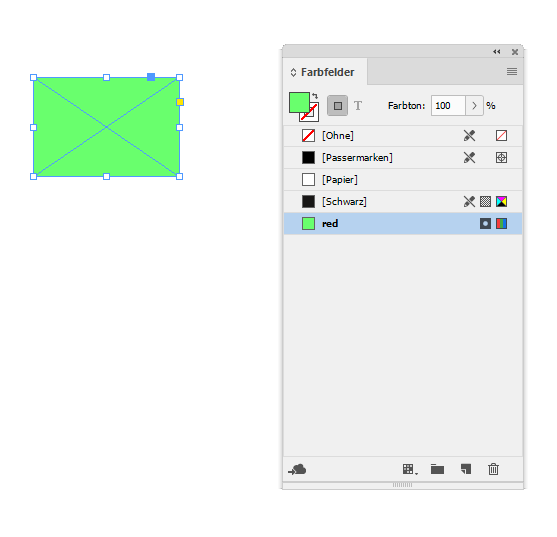
Below two screenshots that showing what will happen when using my second code snippet.
Before. Just spot color "red" in the document. I gave it a "green" look so that one can see the difference better when that has changed:
After running the snippet. Spot color "red" is mapped to the temp spot color. You will see the difference only if you turn on "Overprint Preview":

In this scenario you can easily remove spot color "tempRed" without problems.
Regards,
Uwe
Copy link to clipboard
Copied
Sorry, everybody, I was not very clear about what I need. And 'red' was not good name for the sample ether.
Let's say myColor is 'Foil' and it's 100 magenta only. I need it to keep the same name, but to change to new color values, let's say 100 black only, so that all the objects assigned to the color export as black, but then go back to original 100 magenta, with same spot color name 'Foil'.
Thank you.
Yulia
Copy link to clipboard
Copied
Hi Yulia,
just see into the code everyone posted and adapt it to your needs.
It's there. Everything you need to use your "Foil" spot color.
Regards,
Uwe


Get ready! An upgraded Adobe Community experience is coming in January.
Learn more
 AdChoices