Answered
Change Colour Profile
I need to change the colour settings within InDesign so I can us my company's custom colours.
The colours work within Photoshop but not within InDesign.
#061ca8 is the colour I need.
Thank you
Will

I need to change the colour settings within InDesign so I can us my company's custom colours.
The colours work within Photoshop but not within InDesign.
#061ca8 is the colour I need.
Thank you
Will
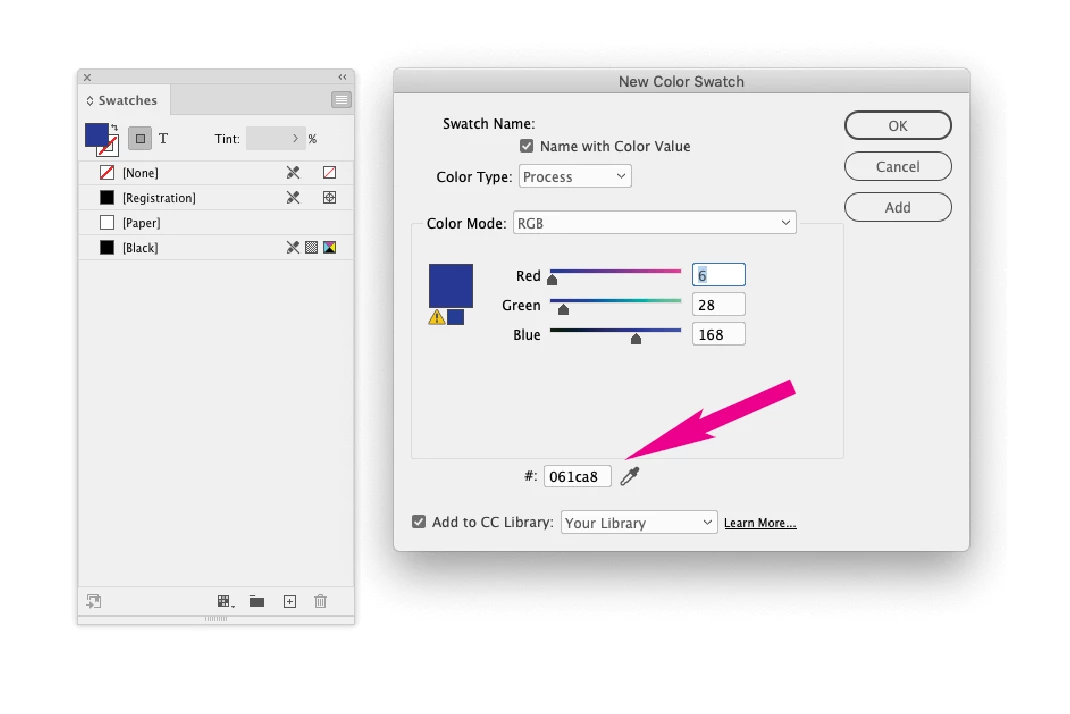
That is a hexadecimal color value. To add this color to InDesign, go to Swatches> Add new swatch> Color mode> RGB> (insert the hex value at the bottom of the New Color Value panel). Note the yellow triangle is warning you that the color is out of the RGB color gamut. You can change the swatch to CMYK if needed.
If you are looking for a spot color (Pantone) equivalent for #061ca8, you could look for an on-line converter, although there might not be an exact match. Pantone Blue 072C might be close, although your company might already have a specific Pantone color in use.
Already have an account? Login
Enter your E-mail address. We'll send you an e-mail with instructions to reset your password.
 AdChoices