

Kelli Jae Baeli
Inspiring
August 11, 2018
Answered

change display performance on all pasted images simultaneously

  • August 11, 2018
  • 3 replies
  • 2278 views

I often have to paste in documents of text that have images and i need to be able to globally change the display performance on ALL the images at once. Is this possible? It is tedious to go through a large document and do them one at a time.
This topic has been closed for replies.
Correct answer mjbelt

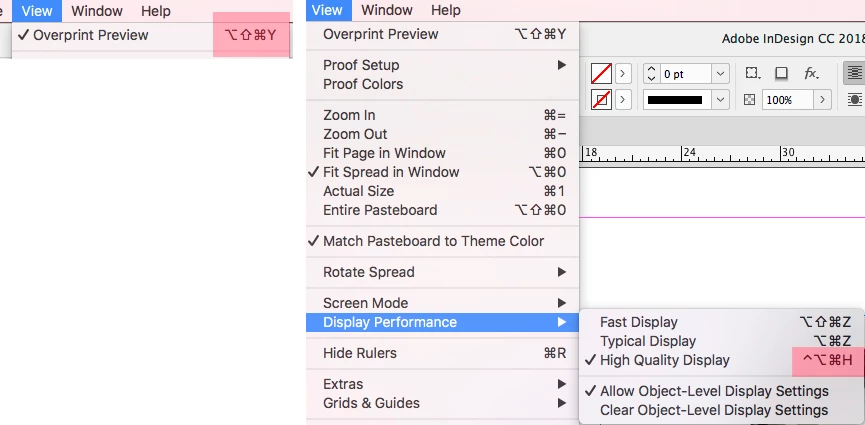
Try these two shortcuts highlighted in red:

3 replies

mjbeltCorrect answer
Participating Frequently
August 12, 2018

Try these two shortcuts highlighted in red:

rob day
Community Expert
Community Expert
August 12, 2018

Right, shouldn't need the script. Choose Clear Object-Level Display Settings.

barbara_a7746676
Community Expert
Community Expert
August 12, 2018

If I'm understanding correctly, sounds like this would do it --

To change the quality of the display for the entire current document, make sure nothing is selected, then choose Display Performance from the View menu.

manal shanableh
Legend
August 12, 2018

I agree with you, to change the display Performance for all images in the document, from View> Display Performance.

Scott Falkner
Community Expert
Community Expert
August 11, 2018

Why not change the display performance of the document?

Also, you should not be pasting images into InDesign. Find a way to save them as files and place them.

Kelli Jae Baeli
Inspiring
August 11, 2018

This is a manuscript, and when, for instance, doing the interior file for a box set of manuscripts already formatted, the entire thing must be pasted in. That will include all the chapter start graphics and the text-divider graphics. My question concerns how time-consuming and tedious it is to go through a 600 or 800 page manuscript and apply the settings to each graphic one at a time. I was hoping there was a way to globally change all graphics to high quality.

Also, I have the default set to high quality in all documents, but when they are pasted in, they don't follow that rule.

Scott Falkner
Community Expert
Community Expert
August 11, 2018

Regardless of the number of images, it is poor form to paste images into InDesign. Get the source images and place them. Is this time consuming? Yup. Is this the right way to do it? Also yup. Perhaps pasted images don’t honour the document display preferences. I wouldn’t know and I’m not interested in finding out.

You might try changing the preferences for display quality. You can tell InDesign to use high resolution for vectors, rasters, and effects for any or all three display options in InDesign > Preferences > Display Performance.

Edit: One more question. What is the effective resolution for the images, or maybe just one? You can check that in the Info pane at the bottom of the Link panel when you select one image.