
Participant
November 25, 2019
Answered

Change .INDD file association from Acrobat to InDesign
  • November 25, 2019
  • 3 replies
  • 3064 views

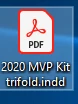
I can not double click on any InDesign files in folders as they show up as PDF icons. I have to go and open everything through InDesign. Why are my files showing up as PDF file and not .indd files like they were saved? How do I fix this?


{Renamed by MOD}

This topic has been closed for replies.
Correct answer Ashutosh_Mishra

Hi Shelly,


Bob is absolutely correct.

Looks like you are using Windows OS. In order to help you out, I have created a GIF:


You may also click on the link below to know how you can change the file association:

https://www.lifewire.com/how-to-change-file-associations-in-windows-2624477


Just in case you are using macOS, you may check the steps given on:

https://www.groovypost.com/howto/change-default-file-types-os-x/


Hope it helps.


Regards,

Ashutosh


3 replies

Inspiring
February 3, 2024

Having same issue. Sadly this looks like it has been an issue for quite awhile. Any ideas? I've already tried the good suggestions given here. Thank you! Debbie

Ashutosh_Mishra
Ashutosh_MishraCorrect answer
Inspiring
November 25, 2019

Hi Shelly,


Bob is absolutely correct.

Looks like you are using Windows OS. In order to help you out, I have created a GIF:


You may also click on the link below to know how you can change the file association:

https://www.lifewire.com/how-to-change-file-associations-in-windows-2624477


Just in case you are using macOS, you may check the steps given on:

https://www.groovypost.com/howto/change-default-file-types-os-x/


Hope it helps.


Regards,

Ashutosh


Participant
November 25, 2019

YOU ROCK! I will go give this a try and let you know if I was successful!


thank you!

Shelly Copland
Graphic Design / Marketing
Hours: Monday - Friday (9:30 a.m. - 2:30 p.m.)


{Personal Information removed by MOD}

BobLevine
Community Expert
Community Expert
November 25, 2019

That's an operating system level issue. Change the file association for INDD back to InDesign.

Participant
November 25, 2019

Can you give me some help with what steps to take to do that?

thank you
Shelly Copland
Graphic Design / Marketing
Hours: Monday - Friday (9:30 a.m. - 2:30 p.m.)


{Personal Information removed by MOD}