
Inspiring
June 26, 2025
Answered

Change Indesign Control Panel

  • June 26, 2025
  • 2 replies
  • 1217 views

Hi there,

My Indesign's Control Panel used to show paragraph border and paragraph shading in the topright. Which was very convenient for fast access.
Since last week i lost these options?


Anyone know how i can get these back up there?


I know these options differ a bit when you use different screen sizes, but these are unchanged. 


Regards, Ed'
Correct answer defaults2aq0czkx4gl

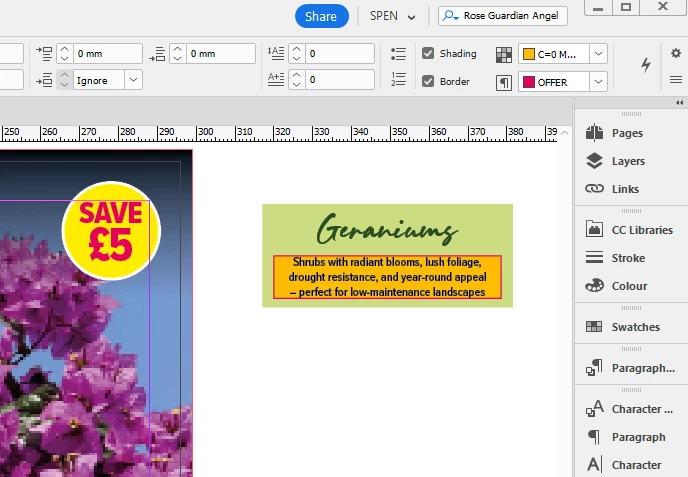
I have it in my control panel, but only if I drag out the width of the screen to the max. I suspect another menu has appeared in yours that has pushed it further along the panel.

Usually I have all my menus down the right in a custom workspace (in this case Type & Tables> Paragraph).


2 replies

Community Expert
June 30, 2025

There's 3 lines on the bottom right - that's the sub menu panel - when you open htis you can choose Customise - then can you select the option from there?

Inspiring
June 30, 2025

Hi Eugene,


From the hamburger menu topright, all options are ticked. The paragraph shadow and border do show when i merely select 'T' (text).
But when i select a snippet of text it doesn't show anymore - and that's when you would in fact want to use it.

I've compared the 2 control panels for the above. The difference is that color and border color are added in the latter. So i guess it is in fact a fitting issue. For now i threw the 'character style' out of the control panel - as i don't use that through the control panel - et voila, then it fit's!

Don't know whether that changed during an update of late, but i guess/hope this works ok. Cheers, Ed'

Community Expert
June 30, 2025

Indeed - it can only fit so much - so you do need to trim away anything you don't need or use often. 


defaults2aq0czkx4glCorrect answer
Inspiring
June 26, 2025

I have it in my control panel, but only if I drag out the width of the screen to the max. I suspect another menu has appeared in yours that has pushed it further along the panel.

Usually I have all my menus down the right in a custom workspace (in this case Type & Tables> Paragraph).


Inspiring
June 26, 2025

Yup that's what i mean, and what i used to see.


I know size matters (no pun), as i sometimes switch from monitor to laptop only. but i didn't change a thing 🤷‍
Add: lol, i just rechecked and they are back? No idea why, didn't change a thing #jinx

Add 2: And now it's gone again..still think it has to do smt with screensize but who know's...

Anyway, i hope it gets back someday soon..

Inspiring
June 26, 2025

Perhaps an update has seen something else added to your control panel as default? You could run down the customise control panel options (hamburger top right) and see if something is selected that wasn't before.