Known Participant
February 2, 2021
Answered

Change line spacing in a bullet list?

  • February 2, 2021
  • 5 replies
  • 4628 views

How do I make the lines that wrap closer together? Right now when they go to the next line they look like they are another line item where a bullet was forgotten instead of looking like it belongs with the line above. It looks strange to have all the lines evenly spaced.

This topic has been closed for replies.
Correct answer Barb Binder

Hi @jeljohnssp:


If a 1 pt change makes that much of a difference, then those paragraphs are definitely on a baseline grid, as per @vladan saveljic. If you aren't using paragraph styles—hopefully you are, so his two answers will solve this for you—you can also take those paragraphs off the grid in the Type > Paragraphs. 
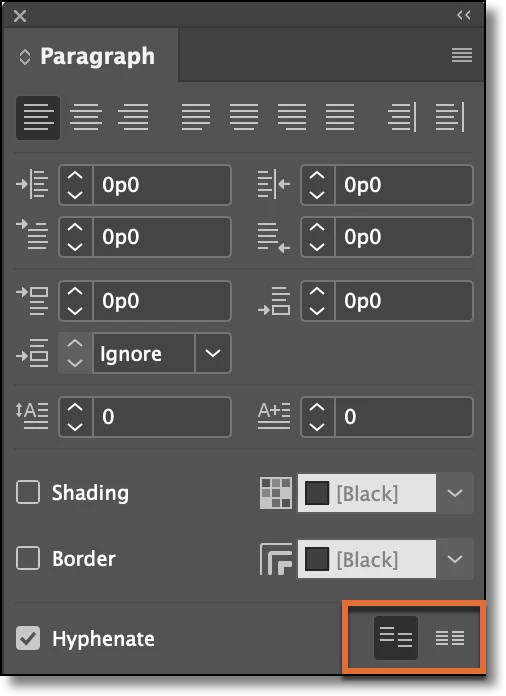


~Barb 

5 replies

Barb Binder
Barb BinderCorrect answer
Community Expert
February 2, 2021

Hi @jeljohnssp:


If a 1 pt change makes that much of a difference, then those paragraphs are definitely on a baseline grid, as per @vladan saveljic. If you aren't using paragraph styles—hopefully you are, so his two answers will solve this for you—you can also take those paragraphs off the grid in the Type > Paragraphs. 


~Barb 

~Barb at Rocky Mountain Training
vladan saveljic
Inspiring
February 2, 2021

You could do it in the paragraph style or locally you could select paragraphs and click on the icon "Don't Align To Baseline Grid" as in my screenshot

vladan saveljic
Inspiring
February 2, 2021

Try to unchek "Align paragraphs to the baseline grid".

New Participant
December 7, 2023

Hi!


I dont have the checkbox anywhere... I can't find it under paragraph or paragraph styles. Do you know were it lives in the latest version of the software?

Thank you!

Barb Binder
Community Expert
December 7, 2023

Hi @Nica332899296k2i:


This is the InDesign forum. Illustrator does not have a baseline grid option.


~Barb

~Barb at Rocky Mountain Training
Barb Binder
Community Expert
February 2, 2021

You will need to decrease the leading (line-spacing) value. 

~Barb

~Barb at Rocky Mountain Training
Known Participant
February 2, 2021

This is what happens if I decrease the leading even 1 pt.

Community Expert
February 2, 2021

You will need two different pallets to get the result you want. 

Space between paragraphs in the paragraph pallet and leading in the character pallet

Brainiac
February 2, 2021

Hi jeljohnssp,

highlight\select the bottom line that wraps and decrease the leading.

Regards,

Mike
