Participant
September 9, 2020
Answered

Change multiple text colours

  • September 9, 2020
  • 2 replies
  • 16142 views

Hi, if i have type in 2 different colours in one text box is there a way to quickly change both colours like recolour artwork in illustrator?

Correct answer Barb Binder

Hi Matthew:


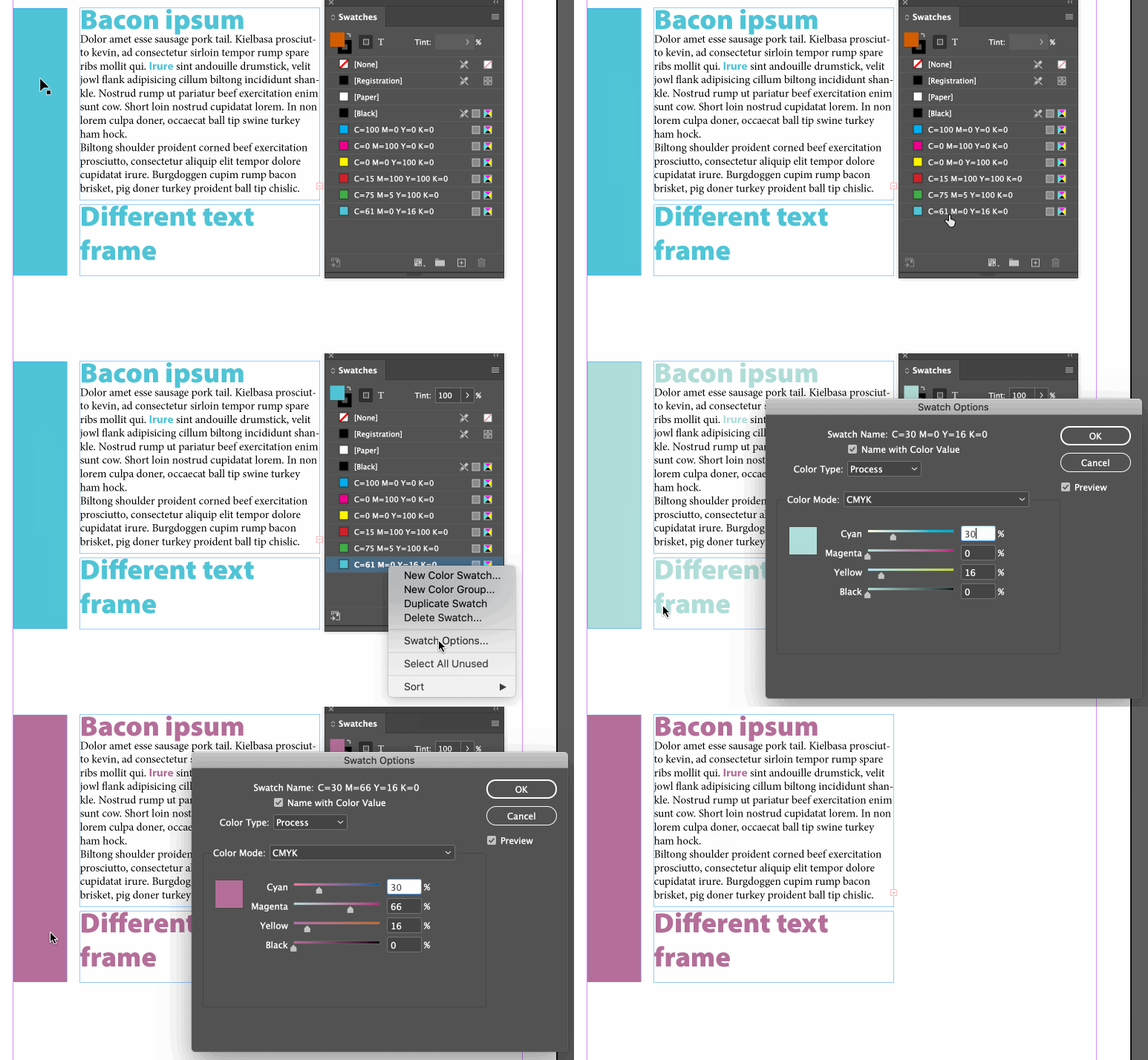
A third option is to redefine the colors (like Illustrator's global colors), but this will redefine all occurrences of the swatch in the document—not just those in the selected text frame.


~Barb
2 replies

Barb Binder
Community Expert
Barb BinderCommunity ExpertCorrect answer
Community Expert
September 9, 2020

Hi Matthew:


A third option is to redefine the colors (like Illustrator's global colors), but this will redefine all occurrences of the swatch in the document—not just those in the selected text frame.


~Barb

~Barb at Rocky Mountain Training
Participant
July 26, 2022

This was extremely helpful for recoloring text on the entire indesign file. Thank you!

Legend
September 9, 2020

InDesign does not have the equivelent of re-color artwork. If those colors are not used elsewhere in the document, you could create the new colors in the Swatch pallet, delete the old color and chose the new one as its replacement. 

Another option would be to set up character styles that contain only the color, then edit the styles to change the color. InDesign does not have a way to change them all at once.