
Community Expert
June 10, 2021
Answered

Changegrep behaviour different via scripting vs UI w.r.t applied character formatting

  • June 10, 2021
  • 3 replies
  • 337 views

Hello All,

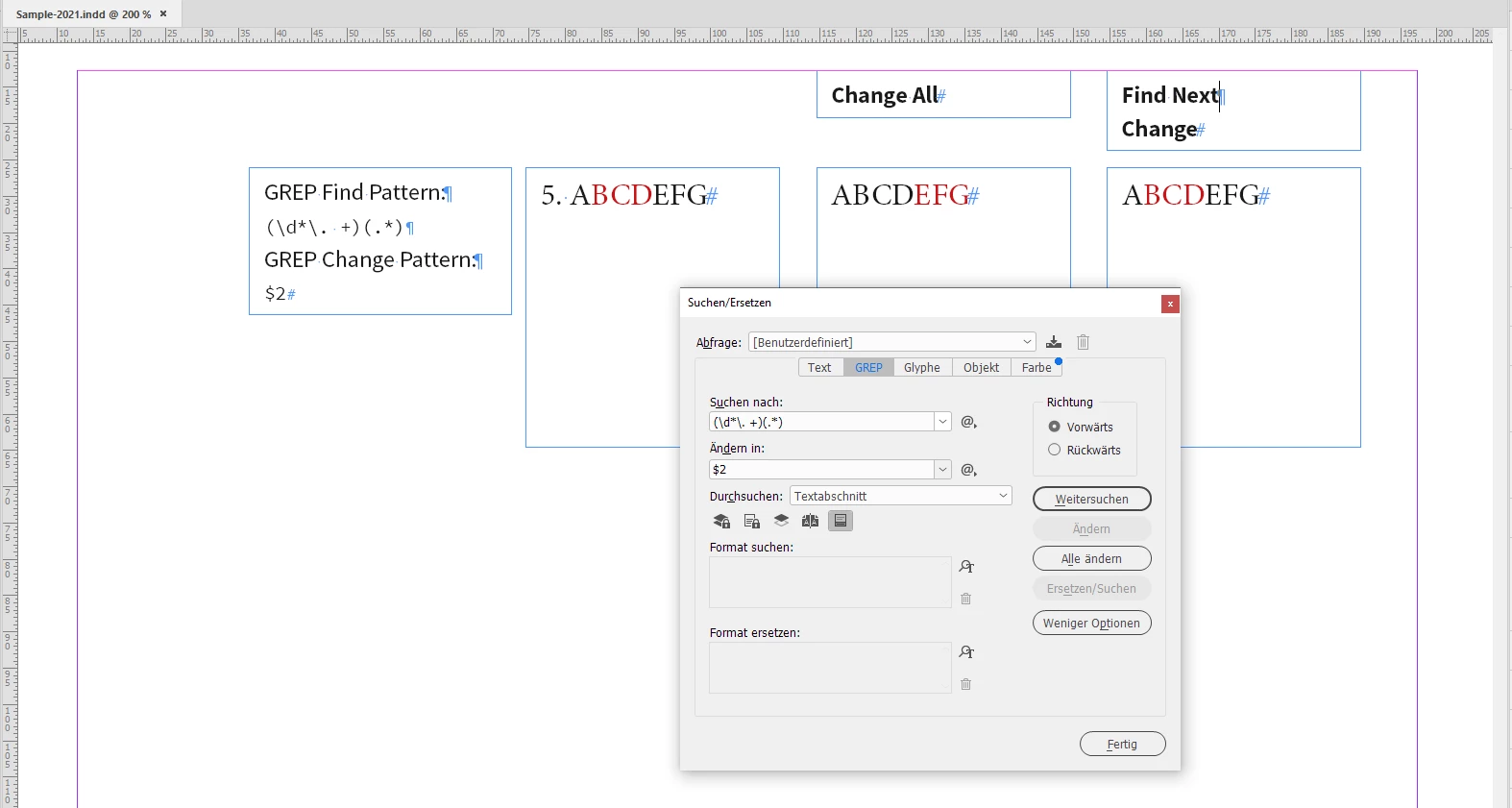
I noticed that when we use change grep via scripting the changed texts character formatting are adjusted based on the number of characters removed or added. However, this does not happen when the same is done using the InDesign UI. Let me explain with an example

If the Indesign test is as follows, notice BCD are underlined

5. ABCDEFG

Now if use changegrep to remove 3 characters before A. The results are different with scripting vs UI

With scripting, the result is as follows

ABCDEFG

The underline is shifted to the right 3 places to adjust the removal of 3 characters

With UI this does not happen and the underline stays under BCD. Is this a bug or am I missing something? For more details see the screengrab via the link given below

https://www.dropbox.com/s/xbhqijx798d4706/screen%20recording%202021-06-10%20at%201.11.57%20pm.mov?dl=0

app.findGrepPreferences = app.changeGrepPreferences = null
app.findGrepPreferences.findWhat= "(\\d*\\.\\s+)(.*)"
app.changeGrepPreferences.changeTo = "$2"
app.documents[0].changeGrep()
app.findGrepPreferences = app.changeGrepPreferences = null

-Manan
 

This topic has been closed for replies.
Correct answer Laubender

So it's not scripting vs GUI here. It's more:


GREP

Change All vs Find Next > Change


Regards,
Uwe Laubender

( ACP )

3 replies

Community Expert
June 10, 2021

Thanks, Uwe. I get your point now. So in order to simulate, I needed to handle the find and change separately. So what I tried is first use find, then again run find on the results of find to locate the portion to remove and then set it to a blank string, the portion that remains of the first find result now is the string of my interest.

-Manan

-Manan
LaubenderCommunity ExpertCorrect answer
Community Expert
June 10, 2021

So it's not scripting vs GUI here. It's more:


GREP

Change All vs Find Next > Change


Regards,
Uwe Laubender

( ACP )

Community Expert
June 10, 2021

Hi Manan,

there is no difference. The underline will shift in both cases to "EFG".

Just tested that with InDesign 16.2.1.102 on Windows 10.


Why? You have to compare pressing "Change All" in the GUI with changeGrep() without doing an extra step in the GUI first. A single "Change" in the GUI will not shift the underline to "EFG".


Regards,
Uwe Laubender

( ACP )