
Exit
  • Global community
    • Language:
      • Deutsch
      • English
      • Español
      • Français
      • Português
  • 日本語コミュニティ
  • 한국 커뮤니티
0

Changing text box size for complete document

Enthusiast ,
Jul 14, 2024 Jul 14, 2024

I am editing a book and it is almost complete with textboxes exactly matching the page margins. I have set page numbers and headers in the parent page and that is fine. However I now see that the top of the text frame is a bit too close to the page number/headers. So I want to lower the top of the frame a bit. But it is a 200 page book and I don't want to have to do this on every page. Is there a way of selecting all the text frames so I can do this for the entire document? I have spent some time researching Google/YouTube but I have yet to find a solution.
TOPICS
EPUB , How to , Print , Publish online
699
Translate
Report
Community guidelines
Be kind and respectful, give credit to the original source of content, and search for duplicates before posting. Learn more
community guidelines

correct answers 1 Correct answer

Community Expert , Jul 14, 2024 Jul 14, 2024
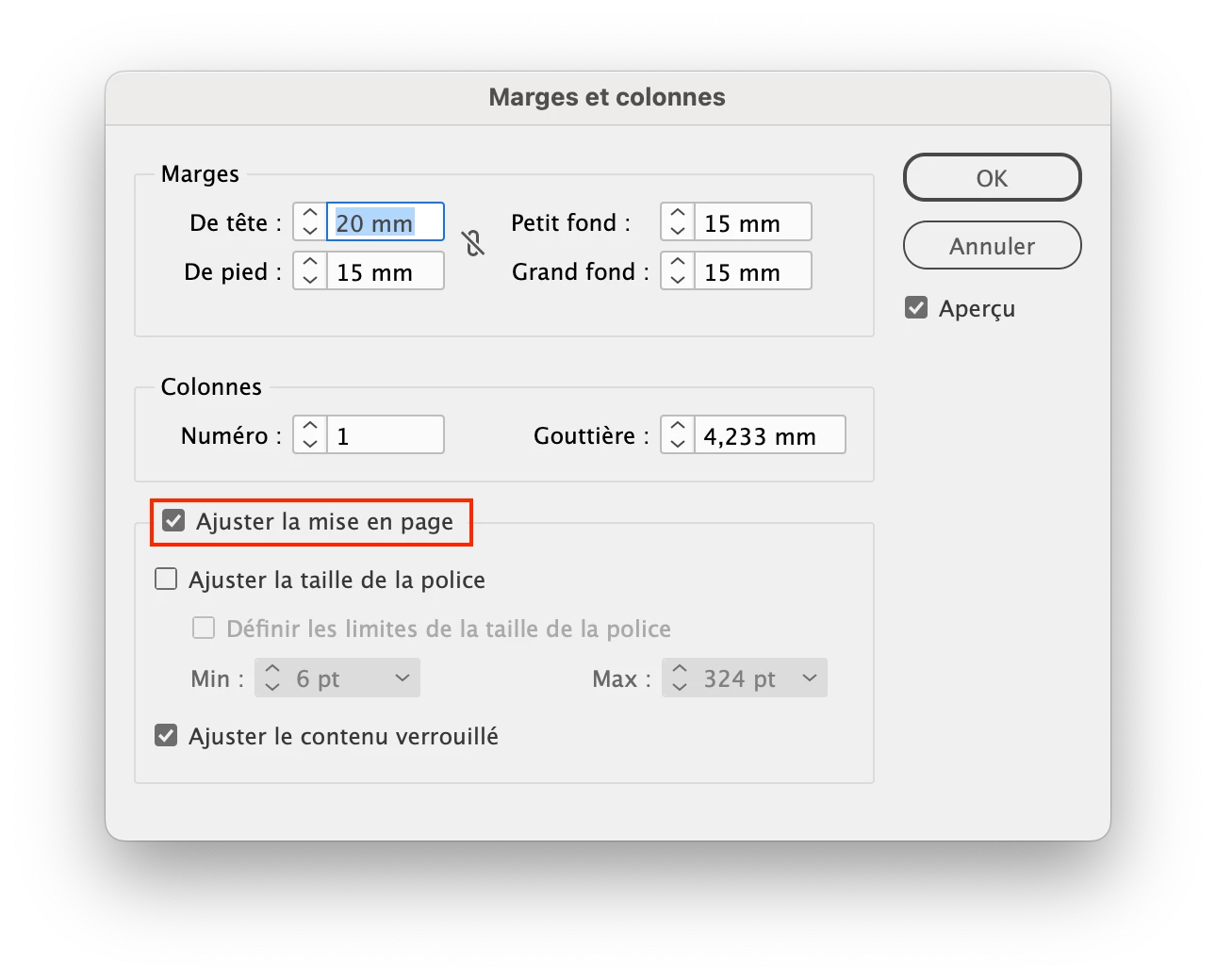
  1. Select parent pages,
  2. Go to the Page menu (NOT the page panel) > margins and columns
  3.  Modify the margins as you wisk
  4. Tick the “Adjust layout” checkbox

Capture d’écran 2024-07-14 à 15.12.29.png

Translate
Community Expert ,
Jul 14, 2024 Jul 14, 2024
  1. Select parent pages,
  2. Go to the Page menu (NOT the page panel) > margins and columns
  3.  Modify the margins as you wisk
  4. Tick the “Adjust layout” checkbox

Capture d’écran 2024-07-14 à 15.12.29.png

Translate
Report
Community guidelines
Be kind and respectful, give credit to the original source of content, and search for duplicates before posting. Learn more
community guidelines
Enthusiast ,
Jul 14, 2024 Jul 14, 2024

Thanks for your response. I cannot however find the margins and columns panel. Here is a screenshot of what I am looking at in the Parent menu but that clearly is not right. Ah sorry, I found it in the Layout menu - and that all worked so many many thanks!

Translate
Report
Community guidelines
Be kind and respectful, give credit to the original source of content, and search for duplicates before posting. Learn more
community guidelines
Community Expert ,
Jul 14, 2024 Jul 14, 2024

My mistake: in the French version, the Layout menu is called "Page".

Translate
Report
Community guidelines
Be kind and respectful, give credit to the original source of content, and search for duplicates before posting. Learn more
community guidelines
Enthusiast ,
Jul 14, 2024 Jul 14, 2024
LATEST

No prob and again many thanks!

Translate
Report
Community guidelines
Be kind and respectful, give credit to the original source of content, and search for duplicates before posting. Learn more
community guidelines