AsmaaElmongi
Participant
June 4, 2020
解決済み

Changing Text Direction to (Right to Left) in InDesign

  • June 4, 2020
  • 返信数 2.
  • 8887 ビュー

I have changed paragraph options to Adobe World-Ready Paragraph Composer, and it writes in Arabic, but I have no options to change text direction to be from right to left. What should I do in this case?

このトピックへの返信は締め切られました。
解決に役立った回答 Zaid Al Hilali

I used to have a number of posts on Adobe forums in Arabic where I explained all you need to do for RTL control.  The whole Arabic forum was removed along with its content… unfortunately, I could have shared the links with you.

Having said that, by default, when you choose Adobe World Ready in the Paragraph Panel, InDesign will switch to default" character direction that you can select from the Character Panel fly-out menu as illustrated below…
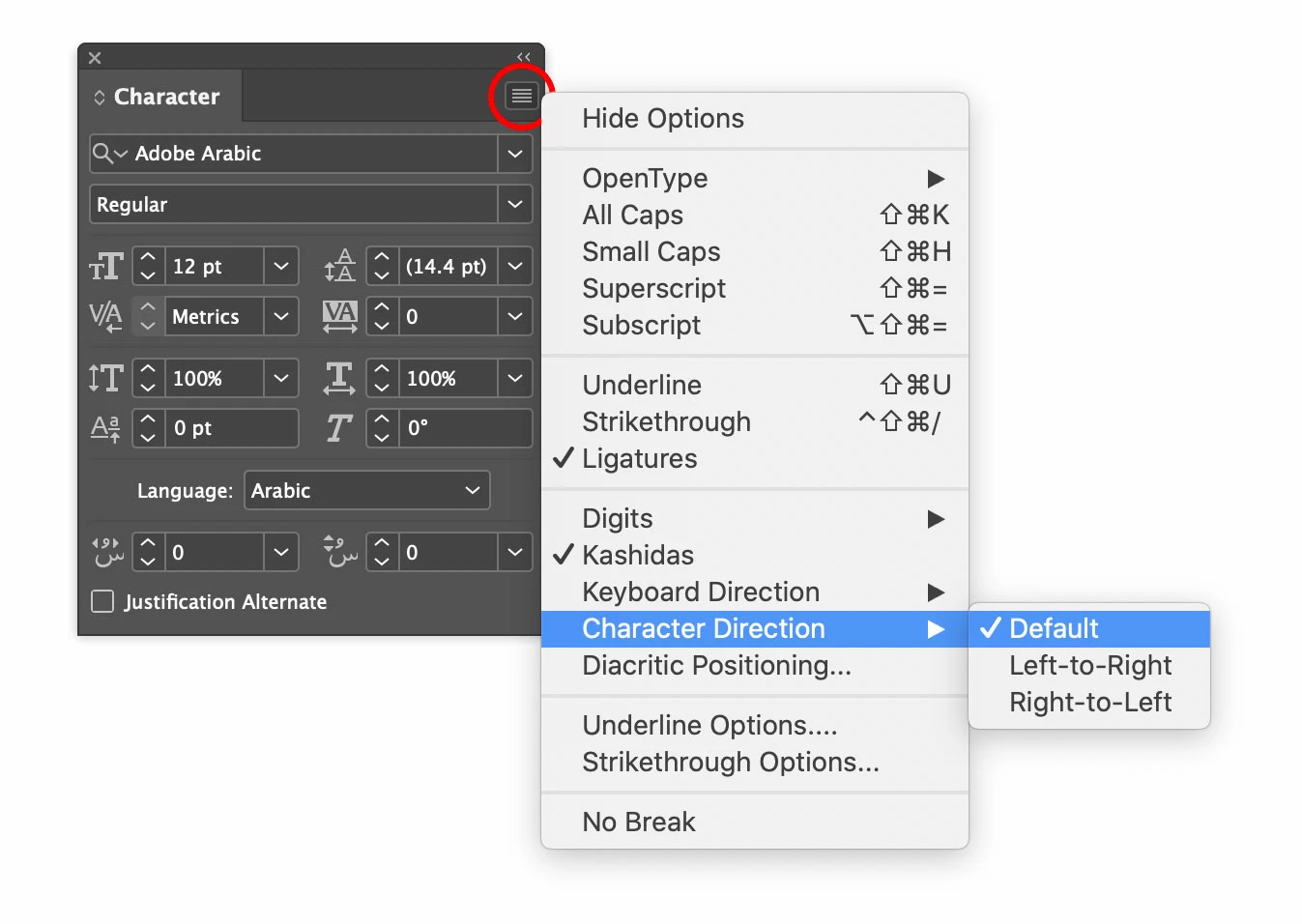
If you're mixing Arabic/English languages together, I would strongly recommend keeping the direction on "Default" as InDesign is smart enough to switch right and left when needed.


返信数 2

Zaid Al Hilali
Community Expert
Community Expert
June 9, 2020

I used to have a number of posts on Adobe forums in Arabic where I explained all you need to do for RTL control.  The whole Arabic forum was removed along with its content… unfortunately, I could have shared the links with you.

Having said that, by default, when you choose Adobe World Ready in the Paragraph Panel, InDesign will switch to default" character direction that you can select from the Character Panel fly-out menu as illustrated below…

If you're mixing Arabic/English languages together, I would strongly recommend keeping the direction on "Default" as InDesign is smart enough to switch right and left when needed.

Osmosis
Participant
October 19, 2022

This is the correct answer for those who don't do RTL often. I did not want to install a whole new product just for one line of hebrew. Thank you Zaid.

Community Expert
June 4, 2020

For that option you will need to install the middle eastern version of InDesign. See the following link

https://helpx.adobe.com/indesign/using/arabic-hebrew.html

https://helpx.adobe.com/indesign/kb/access-install-hebrew-arabic-indesign-illustrator-CC.html


-Manan

-Manan
AsmaaElmongi
AsmaaElmongi作成者
Participant
June 4, 2020

Thanks a lot Manan.

Actually, I tried the options in the link you posted, but it doesn't work.

I tried the options in the following link:
https://helpx.adobe.com/indesign/kb/access-install-hebrew-arabic-indesign-illustrator-CC.html

Then, I re-installed InDesign from the Creative Cloud app, and it worked properly.
I hope this would be helpful for others who have the same issue with their InDesign version.


Thanks so much for your help and your time!

Community Expert
June 4, 2020

Glad that it worked, i shared the same link that you have pasted on your response. In a nutshell these options are available in the MENA version of InDesign and that needs to be installed as per the instructions in the link


-Manan

-Manan