
Participant
June 20, 2023
Answered

character/paragraph formatting controls icon issue

  • June 20, 2023
  • 3 replies
  • 501 views

Hi!


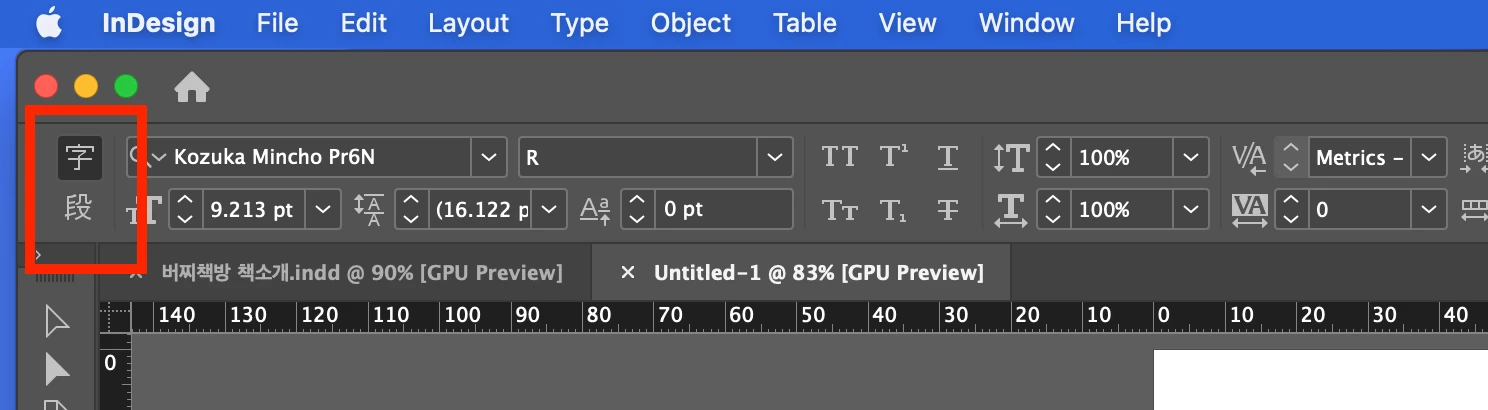
I've installed indesign in English and weirdly, character/paragraph formatting controls button seems to be in chinese.

(I don't speak chinese, and none of my desktop setting's in chinese)


I'm attaching a screenshot. Does anyone know how to fix this issue?

Thanks in advance!
This topic has been closed for replies.
Correct answer Rene Andritsch

The first thing I would try is to uninstall InDesign, delete all Preferences (when asked) and reinstall it to see if this happens again. Let us know how it goes. Edit: *I was writing my comment at the same time as Willi*

3 replies

Joel Cherney
Community Expert
Community Expert
June 20, 2023

Well, you're clearly working on a Korean document there, right? Do you want East Asian CJK toolset with an English interface? Or are you asking how to remove that obviously CJK toolset and replace it with a plain vanilla Latin-script toolset and English interface?

Participant
June 21, 2023

I work both in Korean and English. The reason why I'm trying to set this in English is because localisation is not great. For example the same function is translated differently in Indesign, Photoshop and Illustrator. I just wanted my interface to be clear and consistent. And lastly I do not like chinese characters so that's why 🤷🏻‍♂

Rene Andritsch
Community Expert
Rene AndritschCommunity ExpertCorrect answer
Community Expert
June 20, 2023

The first thing I would try is to uninstall InDesign, delete all Preferences (when asked) and reinstall it to see if this happens again. Let us know how it goes. Edit: *I was writing my comment at the same time as Willi*

Participant
June 21, 2023

Deleting preferences was the key! Thank you for the help 🙂 

Willi Adelberger
Community Expert
Community Expert
June 20, 2023
  1. Uninstall InDesign
  2. Creative Cloud Desktop Application > Preferences > Applications, scroll down
  3. If not English is the AppLanguage, change it.
  4. Install InDesign again.
Participant
June 21, 2023

Thank you very much 🙂