
Participating Frequently
January 4, 2023
Answered

Character Style is removed when copying and pasting text with hyperlink

  • January 4, 2023
  • 3 replies
  • 829 views

Did anybody experienced this?

I copy or cut a text that has a hyperlink with a Character style applied to it, but after I paste it in another text frame (or even simply dragging a copy of that text frame), the Character style is removed.

The hyperlink is still there, the Paragraph style is applied too, but the Character style misteriously disappears. 
Copying or dragging a copy of the text with a Character style but without a hyperlink doesn't have thsi problem. If the text frame has a Character style applied to text with and wihout hyperlink, it only removes the Character style from the hyperlinked text, but the other one is fine. 
Please help. Thank you. 
Alex
This topic has been closed for replies.
Correct answer Barb Binder

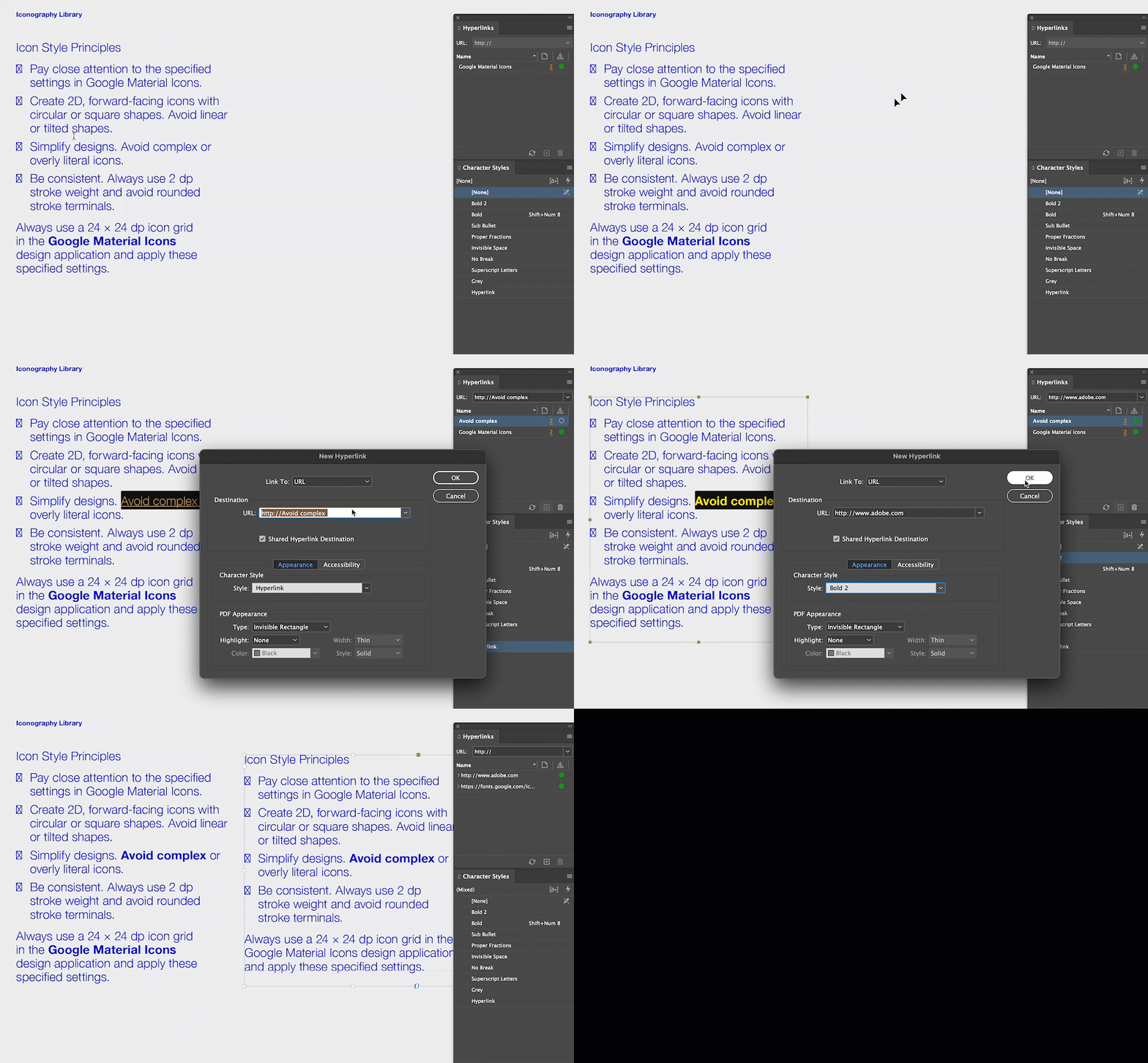
I see what's going on. You aren't using the default Hyperlinks character style, but a manually-applied style called Bold2. Enter that in the hyperlinks panel and the issue will stop happening.


~Barb


3 replies

Barb Binder
Community Expert
Community Expert
January 5, 2023

Hi Alex:


You don't need to actually assign the character style to hyperlink. It does it automatically. And if you already have a character style assigned to the text that you were adding a hyperlink to, it's going to replace the character style at that location. I'm still playing with the variations that you're describing and I still can't make it happen. Are you comfortable sharing a file, or a page of the file? You can replace sensitive info with placeholder text. 


~Barb

(MacBook Pro, Monterey 12.6, InDesign 18.1)


~Barb at Rocky Mountain Training
Participating Frequently
January 5, 2023

I attached InDesign file. Replaced the font with Helvetica Neue. 

Barb Binder
Community Expert
Barb BinderCommunity ExpertCorrect answer
Community Expert
January 5, 2023

I see what's going on. You aren't using the default Hyperlinks character style, but a manually-applied style called Bold2. Enter that in the hyperlinks panel and the issue will stop happening.


~Barb


~Barb at Rocky Mountain Training
Barb Binder
Community Expert
Community Expert
January 5, 2023

Hi Alex:


Actually, I can't replicate that behavior. What version of InDesign and what OS?


~Barb


~Barb at Rocky Mountain Training
Participating Frequently
January 5, 2023

Hi Barb, thank you for your answer. I do suspect that that's what probably happening, but I didn't have this behavior in any other version of the InDesign before. Usually that would happen if I had a Character style applied to the text, and then added a hyperlink on top of that Character style. Then it might reset it to the default Hyperlink style. But in this case I applied custom Character style after I had hyperlink added. 
InDesign version is 18.1.
macOS Ventura Version 13.1.
iMac Pro 2017.

Participating Frequently
January 5, 2023

Sorry, I meant, thank you James for the explanation.  

James Gifford—NitroPress
Legend
January 4, 2023

Hyperlinks are sort of 'hyper managed' by InDesign. It likes to apply its own Character Style, called (oddly enough) Hyperlink, and it can be difficult to consistently override or change this application.


What I suspect is happening is that ID is "fixing" the style on paste or placement.


I am not sure there's any solution for this, other than re-applying your preferred style after doing the repositioning.