triadcom
Known Participant
December 5, 2017
Answered

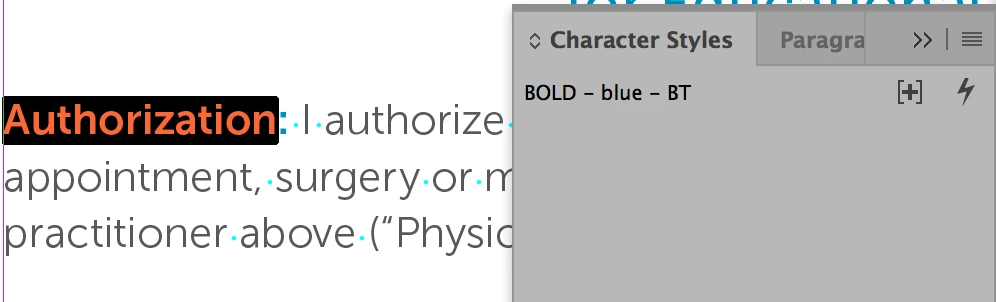
Character styles not shown in panel

  • December 5, 2017
  • 3 replies
  • 1804 views

Indesign CC  2018 is not showing my character styles. I have several created, but none show in the panel.
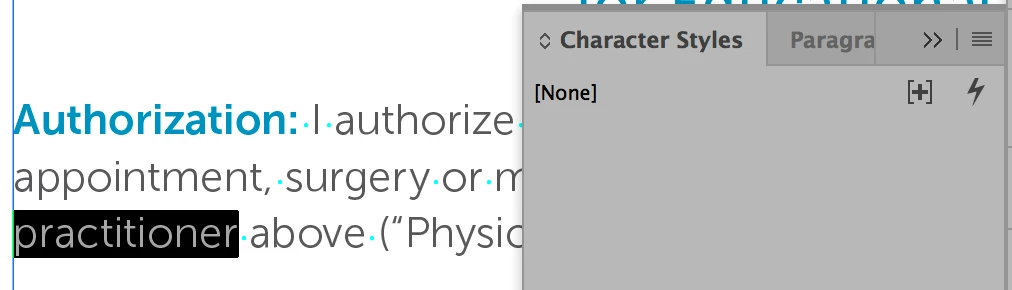
The character styles appear in my CC Library panel, but I would like them back where they are supposed to be.

Any ideas?

thanks!

    This topic has been closed for replies.
    Correct answer Steve Werner

    Try restoring your InDesign preferences:

    Trash, Replace, Reset, or Restore the application Preferences

    3 replies

    DKTR Jeroen
    Known Participant
    December 5, 2017

    Same problem here. Definately a bug. Hope they fix long standing bug panels not opening at startup too!

    triadcom
    triadcomAuthor
    Known Participant
    December 5, 2017

    Of course, you are right. I'm just tired of replacing my preferences. I have to do that every day or two. If it's not the character styles not showing, it's the side panels not working. I have to stop, delete and restore the preferences. Just annoying.

    Thanks for the reminder.

    TᴀW
    Legend
    December 5, 2017

    Sometimes resetting your workspace can fix problems like this without resorting to resetting preferences.... Worth a try.

    Ariel

    id-extras.com | InDesign tools & scripts for typesetters, form designers, and translators
    Steve Werner
    Community Expert
    Steve WernerCommunity ExpertCorrect answer
    Community Expert
    December 5, 2017