Participant
April 8, 2022
Answered

Chartwell Pies not working in InDesign?

  • April 8, 2022
  • 2 replies
  • 679 views

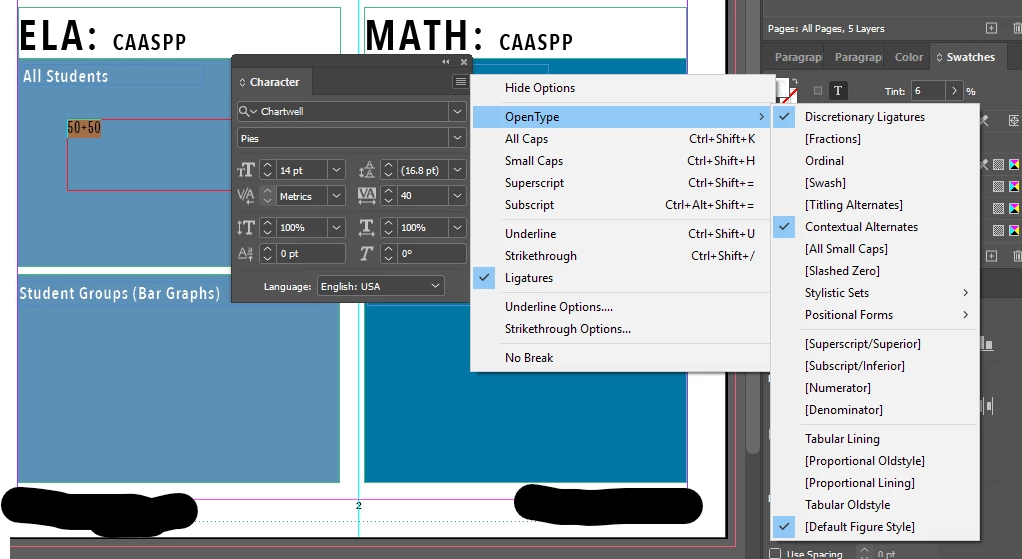
I've followed the directions for Chartwell Pies and I still cannot get the ligatures to function. Any suggestions?

This topic has been closed for replies.
Correct answer Brad @ Roaring Mouse

You have tracking applied (40). It needs to be zero.

2 replies

Brad @ Roaring Mouse
Community Expert
Brad @ Roaring MouseCommunity ExpertCorrect answer
Community Expert
April 10, 2022

You have tracking applied (40). It needs to be zero.

Community Expert
April 10, 2022

WOW - great spot!

Community Expert
April 9, 2022

What version of InDesign and OS?

--------------


If a document is not behaving well then try 

File>Export 

Choose IDML

Open the IDML in InDesign
Save the file as a new InDesign file with a new name
See if the issue persists.


-----------


Try resetting your preferences:
The easiest way to reset everything is to delete the InDesign preferences: as soon as InDesign starts to boot hold down Shift, Alt, Ctrl (and Apple/Cmd if working on a Macintosh). A dialog will appear asking to delete the InDesign Preferences, select 'Yes' on this dialog.
Further info and instructions here if needed:
https://helpx.adobe.com/in/indesign/kb/indesign-preferences-support-file-locations.html


----

Reinstalling rarely fixes everything - you can do a complete reinstall using the
Creative Cloud Cleaner Tool https://helpx.adobe.com/creative-cloud/kb/cc-cleaner-tool-installation-problems.html


----


Rollback to a previous InDeisgn version

https://helpx.adobe.com/download-install/using/install-previous-version.html#:~:text=Open%20the%20Creative%20Cloud%20desktop,down%20list%2C%20select%20Other%20Versions.