Answered
Chinese characters not being supported in QR generator
Paste some Chinese characters into to QR code editor and try and scan it. The characters are messed up. Tested in 19.3 and 19.4 (pre-release)
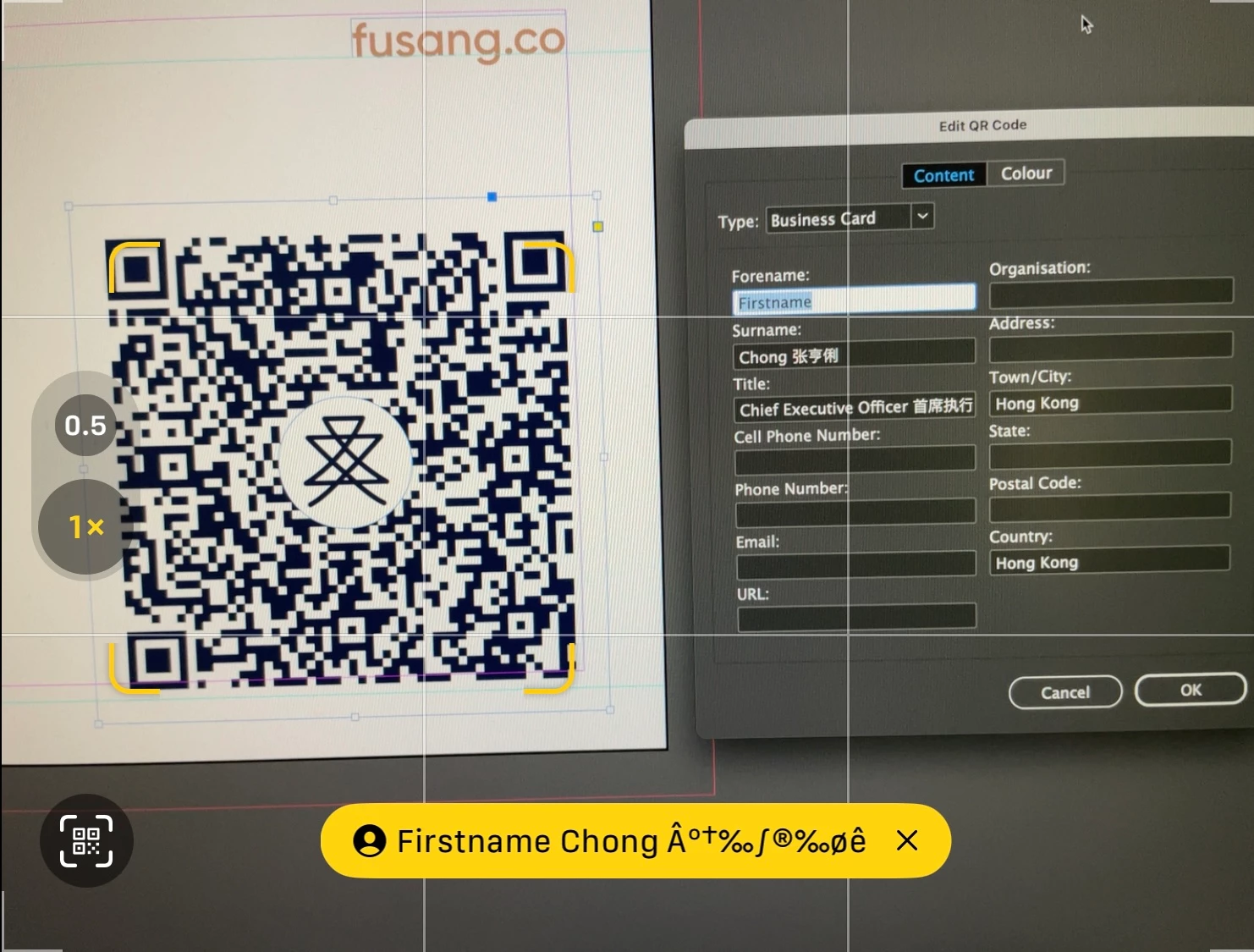

Paste some Chinese characters into to QR code editor and try and scan it. The characters are messed up. Tested in 19.3 and 19.4 (pre-release)
Simple LOL. ChattyG insn't doing a great job at it either. Tried a vCard 4.0 but that didn't encode the Chinese characters. And then MeCard, which doesn't seem to have the ability seperate names... Still working on the problem.
Yeah, Chaggy is just great if you have the expertise to sort out its mistakes. 😛
If you have examples of QR codes with Chinese characters that work, you can 'disassemble' them at:
https://zxing.org/w/decode.jspx
That will give you the raw encoding, not the parsed result. But again keep in mind that there are four or five steps to success here, starting with a valid encode; a valid read and decode; a valid parsing of the data; and an app that will accept the data. Any of those can be a failure point, so make sure you're comparing apples to apples.
I also don't know what Chinese characters are valid. My vague understanding is that only the alphabetic Japanese characters are valid; it may be that only a simplified Chinese glyph set is recognized by the apps.
Already have an account? Login
Enter your E-mail address. We'll send you an e-mail with instructions to reset your password.
 AdChoices