
Participating Frequently
July 12, 2018
Answered

Chinese text baseline shifts away

  • July 12, 2018
  • 1 reply
  • 1578 views

I have two fonts:
English - Poppins (taken from Google fonts)
Chinese - DengXian (available from system)

now I used GREP to match them together in one text box, but DengXian goes off the baseline when there's no English text present (which making the text going above the normal text bounds). Making them co-exist will fix the problem, but no way I would put a letter before every line of Chinese text.

Any ideas to let DengXian stays where it's supposed to be?
    This topic has been closed for replies.
    Correct answer Laubender

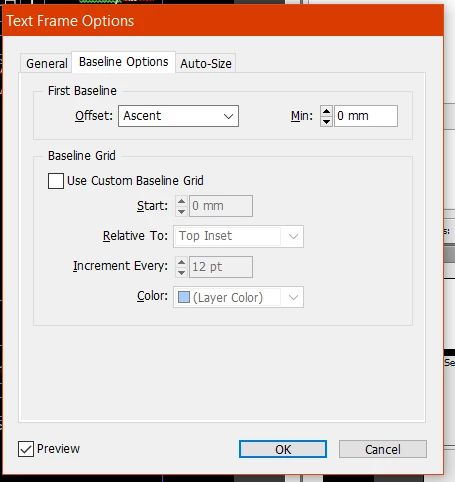
    which one does the job?


    I'd say you are good to go with Offset: Fixed Height or perhaps Leading.

    Fine tune the value for Minimum when doing Fixed Height and do an object style for the text frame.

    Regards,
    Uwe

    1 reply

    Abambo
    Community Expert
    Community Expert
    July 12, 2018

    What OS? (I'm asking because on my Windows 7 system I do not have the Chinese font you mention).

    Is the DengXian-font behaving the same for Latin characters?

    Could you post a screen shot of what you experience?

    (You could also check if a different Chinese/English font solves the issue. Noto Sans CJK SC is a free Asian font from Google. The same font, different Name is also available from Adobe. It's a good testing font for this).

    ABAMBO | Hard- and Software Engineer | Photographer
    BShenAuthor
    Participating Frequently
    July 13, 2018

    Windows 10.

    Above is CH characters without English characters.

    Below is CH with EN.

    LaubenderCommunity ExpertCorrect answer
    Community Expert
    July 13, 2018

    which one does the job?


    I'd say you are good to go with Offset: Fixed Height or perhaps Leading.

    Fine tune the value for Minimum when doing Fixed Height and do an object style for the text frame.

    Regards,
    Uwe