
Obi-wan Kenobi
Legend
December 21, 2016
Question

Code to be evaluated! [012] Extract the Table Title! …

  • December 21, 2016
  • 5 replies
  • 785 views

Hi Scripters,

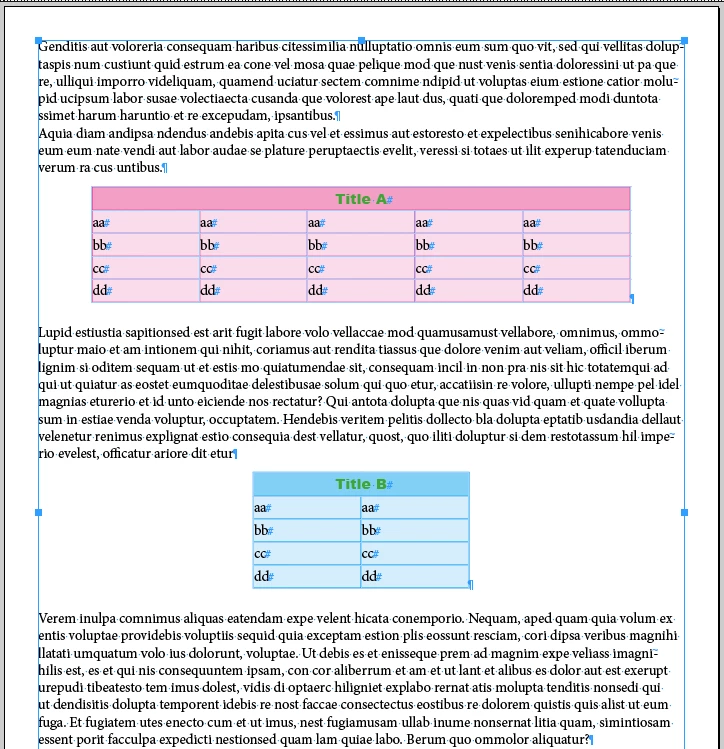
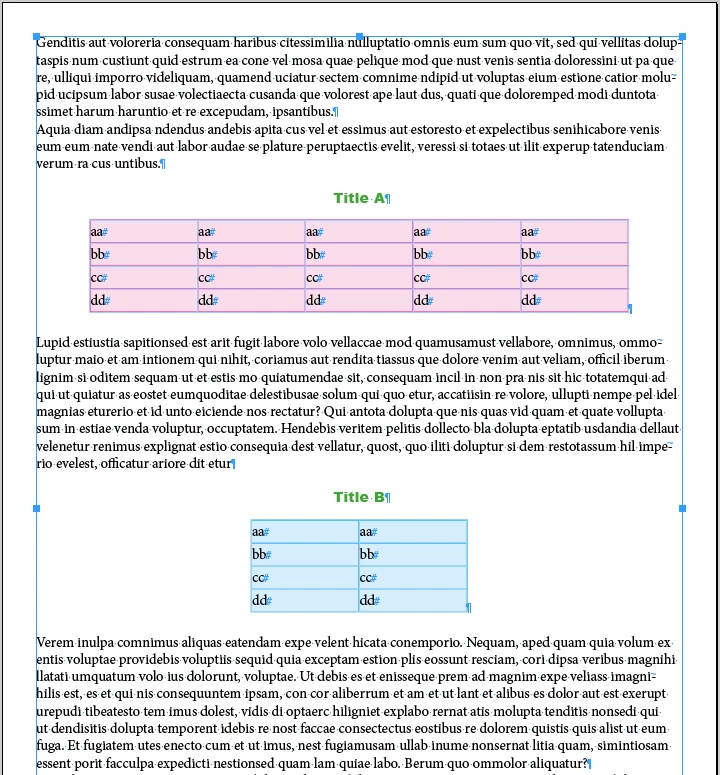
Table Titles are included in the first row of each table and I want to "extract" them before the table using a para style "Title" applied to them!

Before:
After:
I've written the code below. Even if it totally works well, I'm not sure [as usual!] it's the more beautiful code we can read!

Thanks for your comments! 

app.doScript("main()", ScriptLanguage.javascript, undefined, UndoModes.ENTIRE_SCRIPT, "Extract Title! …");

function main()    

{

    var 

    myDoc = app.activeDocument,   

    myTables = myDoc.stories.everyItem().tables.everyItem().getElements();   


    for ( var T = 0 ; T < myTables.length; T++ )   

        {   

            myTables.storyOffset.paragraphs[0].duplicate(LocationOptions.after, myTables.storyOffset.paragraphs[0]);

            var myRows = myTables.rows;

            var R = myRows.length;

            while ( R -- )  if (R != 0)  myRows.remove();

            var myTitle = myTables.convertToText("\t", "\r");

            myTitle.appliedParagraphStyle = "Title";

        }


    myTables = myDoc.stories.everyItem().tables.everyItem().getElements();

    var T = myTables.length;

    while ( T-- )  myTables.rows[0].remove();


}

(^/)

This topic has been closed for replies.

5 replies

Loic.Aigon
Legend
December 22, 2016

Vamitul

It actually makes a lot of difference and it can significantly speed up the script.

That's a good one and I will certainly make mine from now on

Happy holidays !

Loic

Loic.Aigon
Legend
December 22, 2016

var a  = new Array(10000);

var t = (new Date() ).getTime();

var i = 0;

var n = a.length;

for ( i = 0; i<a.length; i++ ) {

  a = new Date();

}

(new Date() ).getTime()-t;

> ~120

var a  = new Array(10000);

var t = (new Date() ).getTime();

var i = 0;

var n = a.length;

for ( i = 0; i<n; i++ ) {

  a = new Date();

}

(new Date() ).getTime()-t;

> ~75

Obi-wan Kenobi
Legend
December 22, 2016

… So, a double good practice is to:

• convert a collection to an array, using "everyItem().getElements()"

• define ~.length as a variable before using it n a loop

Right?

(^/)

Loic.Aigon
Legend
December 22, 2016

Because the script engine won't reach a property of an object (the length property of the array ) every loop. It will only read a value stored in memory. It might not be obvious for a small loop but with huge loops the difference can be sensitive.

Besides why would you want to force convert the collection into an array with

  1. var tables = doc.stories.everyItem().tables.everyItem().getElements(); 

A collection is an array like object so it does have a length property too and you can loop through the same way. Once again, unless you want to sue some specific arrays methods, it's useless to to so.

FWIW

Loic

Vamitul
Legend
December 22, 2016

About converting collections to arrays:

It actually makes a lot of difference and it can significantly speed up the script.

Iterating through a collection will make a request to the DOM for each member of the collection, in order to resolve the specifier.

Using the everyItem().getElements() to convert to an array will only touch the DOM once, and return an array of actual honest indesign objects, not specifiers, which results in a huge speed increase.

To illustrate, use the following code:

(function(){

var d=app.documents.add();

for (var i=0; i<100; i++){

  d.pages.add();

}

$.hiresTimer;

var p=d.pages;

for (var i=0; i<p.length;i++){

  $.write(p.name);

}

$.writeln('\r'+$.hiresTimer);

var p=d.pages.everyItem().getElements();

for (var i=0; i<p.length;i++){

  $.write(p.name);

}

$.writeln('\r'+$.hiresTimer);

}());

Vamitul
Legend
December 22, 2016

Uwe was faster.
Also, Obi, try your code on a document that has no tables!

Loic.Aigon
Legend
December 22, 2016

Obi,

Think I already advised you this but this simple line will save you efforts and energy:

if ( !app.documents.length) return;

myDoc = app.activeDocument

or you will have execution error at the very first moment your code will be run.

Also, in a loop, don't look at the length property but reference it before

var n = tables.length;

for ( i=0; i<n; i++ )…

If you want to acquire good practices.

Obi-wan Kenobi
Legend
December 22, 2016

Hi Loic,

About the second point, why is it a better practice? …

(^/)

Community Expert
December 22, 2016

Hi Obi-wan,

if you are sure that every table in your document has a title and you want to move it out of the table why don't you move just the text of cell one to an insertion point?

Example:

/*

    Preconditions:

    1. There are tables in the document

    2. All cells in the first row are merged to one cell

    3. The first row contains text

    4. The last character of that text is no paragraph sign

    5. There is a paragraph style named "Title"

*/

var doc = app.documents[0];

var tables = doc.stories.everyItem().tables.everyItem().getElements();

for(var n=tables.length-1;n>=0;n--)

{

    var index = tables.storyOffset.index;

    var story = tables.storyOffset.parentStory;


    tables.cells[0].insertionPoints[-1].contents = "\r";

    tables.cells[0].texts[0].move(LocationOptions.AT_BEGINNING , story.insertionPoints[index]);

    tables.rows[0].remove();


    story.insertionPoints[index].paragraphs[0].appliedParagraphStyle = "Title";

}

Regards,
Uwe

Obi-wan Kenobi
Legend
December 22, 2016

Uwe, Vlad and Loic,

Thanks for your interest! …

Uwe's code is obviously more interesting and more relevant (and more written too! )! Thanks for it!

I'm going to insert "if" statements in it to take in account these 2 points:

1/ if open doc and if no table.

2/ if the contents of the first row (merger or not [1-column table) is a table title (para style applied) - a necessary filter!

Imho, no need to verify if "Title" para style exists and if the last is not a para sign! It seems logical for me even if not always for users!

Do I need to use a try … catch for the first point?

(^/)